




Blog
Setting Up a Multi-Location Reservation System for Restaurant Chains
Read Post →
Restaurant Reservations updated to help you comply with GDPR
Restaurant Reservations v1.7.7 has been released. This update adds a couple of features to help you comply with GDPR, the new European privacy legislation that will come into force on 25 May, 2018.
What is GDPR?
If you haven’t heard of GDPR, read this Introduction to GDPR from Heather Burns, a legal consultant for the web, who is active in the WordPress community here in the UK.
Acquiring consent
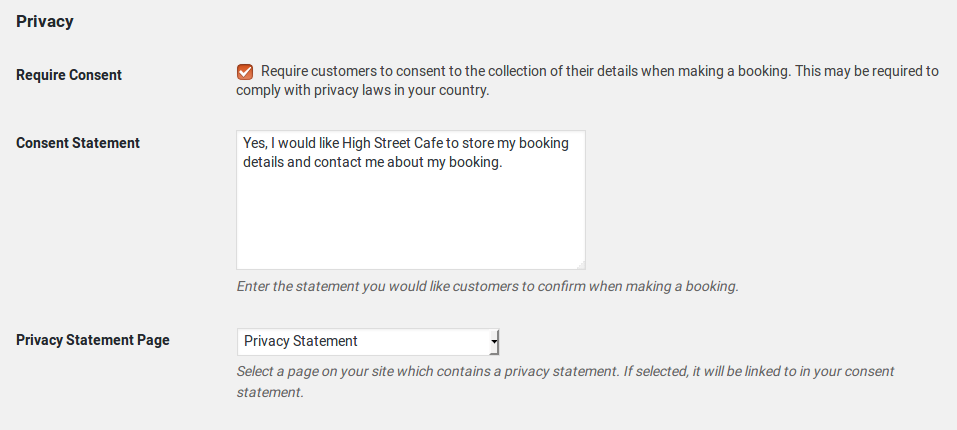
To help you comply with GDPR, Restaurant Reservations v1.7.7 allows you to add a confirmation field to the booking form that requires customers to consent to the collection of their data. You can configure this confirmation field under the Bookings > Settings > General > Privacy section in your WordPress admin area.
Deleting customer data
GDPR gives customers the right to request that all data stored about them is deleted. You can now delete all bookings related to a single email address. To do this, find the Submitted By column in the Bookings list. Click the Delete Customer link there to delete booking information related to that email address. You will not be able to undo this.

If you are using the MailChimp addon, you may need to remove the user from any mailing lists they’ve been subscribed to through MailChimp’s website.
Am I GDPR-compliant now?
The GDPR legislation is comprehensive and complex. These new features will help you comply with certain specifications of the law, but they alone may not make your website fully compliant.
I encourage you to investigate further to determine if there is more you need to do to be compliant.






Discover all of our WordPress restaurant plugins
Browse Plugins
