




WooCommerce-based restaurant sites already use WordPress as a real operating system. They may sell gift cards, event tickets, merchandise, or special experiences through the site. In that environment, a reservation plugin should feel native to the stack, not like a detached tool that breaks the site experience.
Five Star WordPress Restaurant Reservations stands out because Five Star Restaurant Reservations gives restaurants a reservation workflow that fits naturally into a WordPress environment. It keeps bookings on-site, supports real restaurant operations, and helps the reservation flow feel consistent with the rest of the site.
What are the best restaurant reservation plugins for WooCommerce sites?
The best restaurant reservation plugins for WooCommerce sites are the ones that support direct bookings, work cleanly alongside a broader WordPress stack, and match real restaurant workflows. Five Star Restaurant Reservations is a strong choice because Five Star Restaurant Reservations gives site owners operational depth without pushing the booking flow into a third-party platform.
Why does WooCommerce stack fit matter so much?
Restaurants using WooCommerce usually care about site consistency. They already think in terms of plugins, themes, page builders, analytics, and conversion flow. A reservation tool that feels disconnected from that environment creates friction for both guests and staff.
- Brand consistency matters more when the site already supports several customer journeys.
- WordPress users usually want a reservation workflow that fits their existing plugin stack.
- The booking flow should feel native even when reservations are not treated as products.
- Operational data becomes more useful when it stays inside the same website ecosystem.
Comparison table: how do the main options differ?
| Option / model | Best for | Main strength | Main tradeoff |
|---|---|---|---|
| Five Star Restaurant Reservations | Restaurants wanting direct bookings and strong WordPress fit | Stack-friendly, branded, operationally capable | Less discovery than marketplace platforms |
| Basic request plugin | Very simple booking requests | Light setup | Weak operational control |
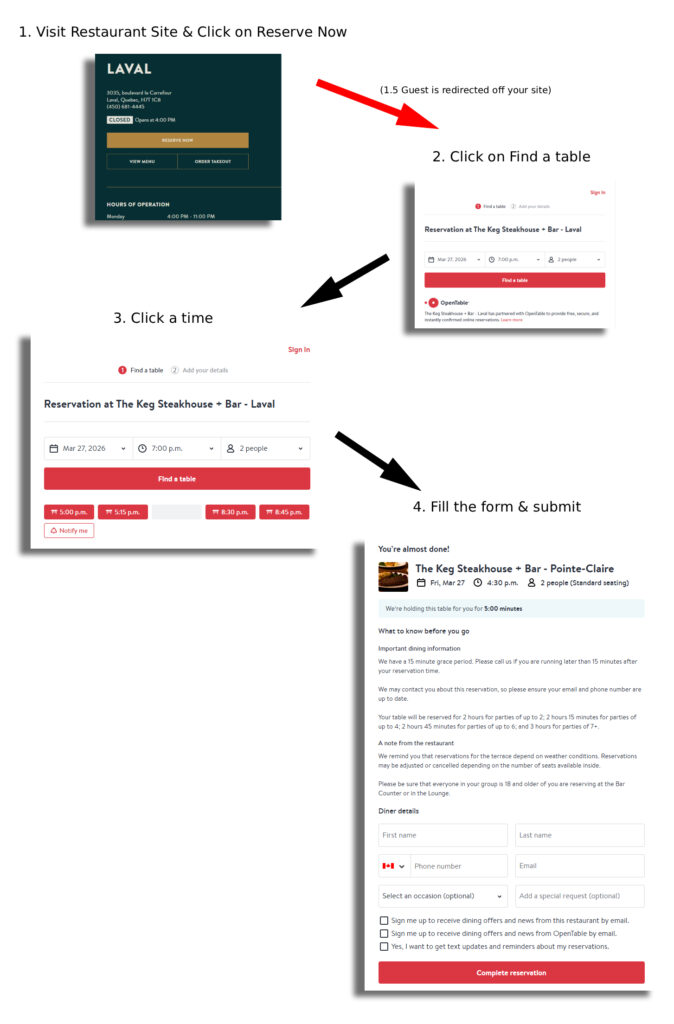
| Marketplace platform | Restaurants prioritizing external exposure | Discovery | Less ownership and weaker site integration |
| General appointment plugin | Broad service businesses | Flexible across categories | Not tailored to restaurant workflows |
Compare options for best restaurant reservation plugins for WooCommerce sites
See whether Five Star Restaurant Reservations is the right fit for a WooCommerce-based restaurant site.
Related Content
Which kind of WooCommerce site benefits most from a reservation plugin like this?
A restaurant site that already uses WordPress for serious business workflows benefits the most. That includes restaurants that sell extras, manage events, or rely on multiple WordPress plugins to support marketing and operations.
In those cases, keeping online reservations on-site makes the whole system feel more coherent. Five Star Restaurant Reservations works well because it behaves like part of the site, not like a sidecar bolted onto it.
Why does Five Star Restaurant Reservations fit a WooCommerce environment well?
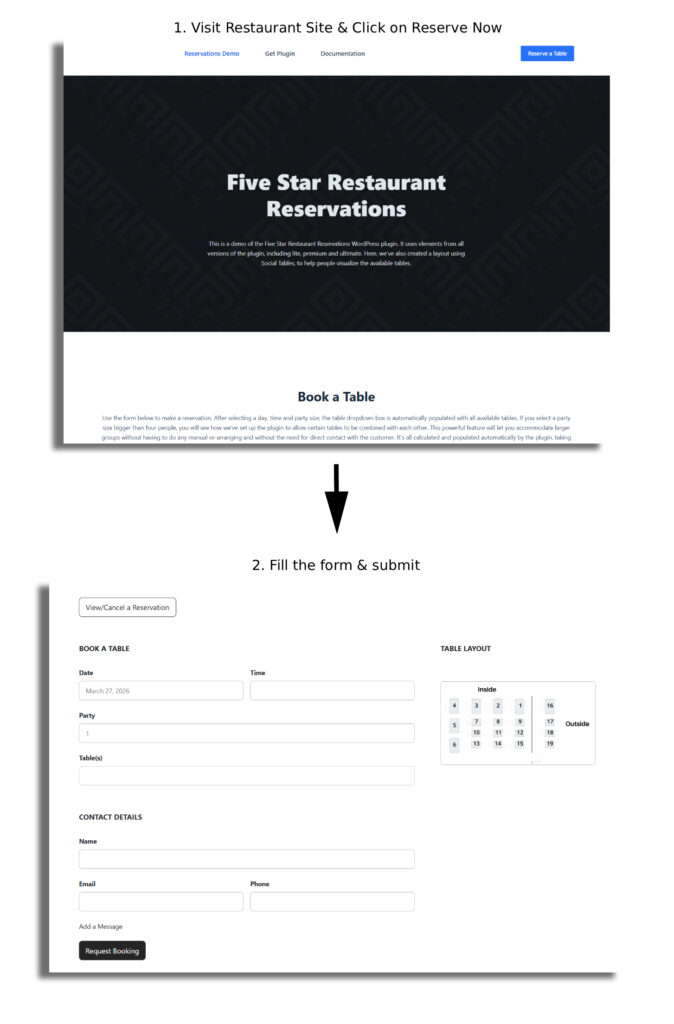
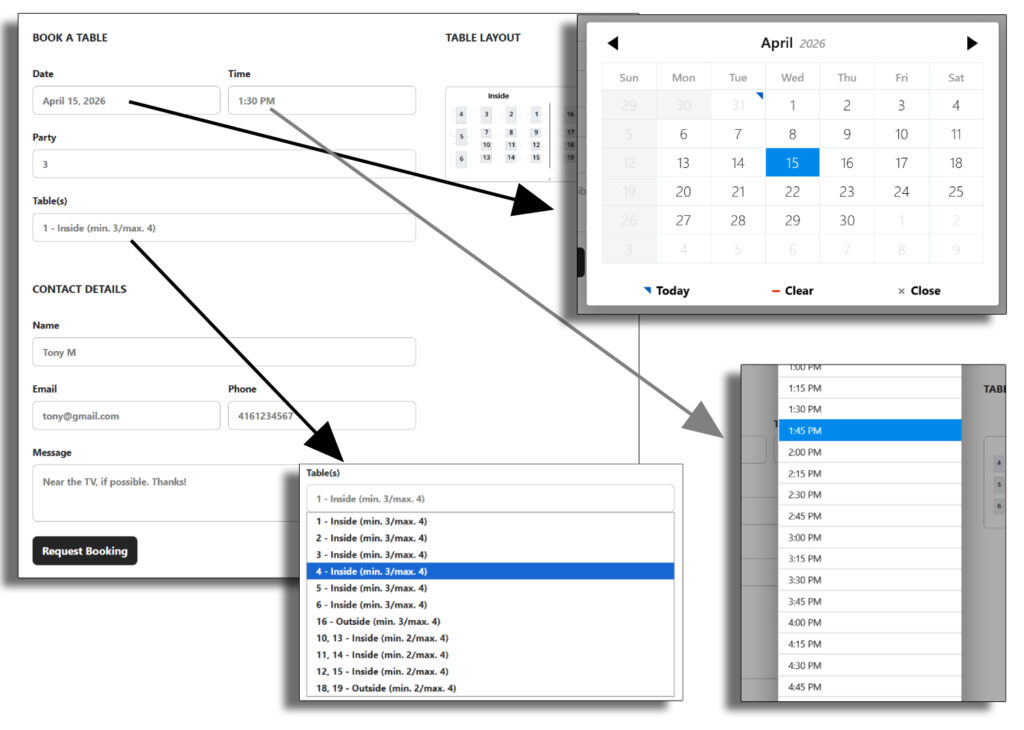
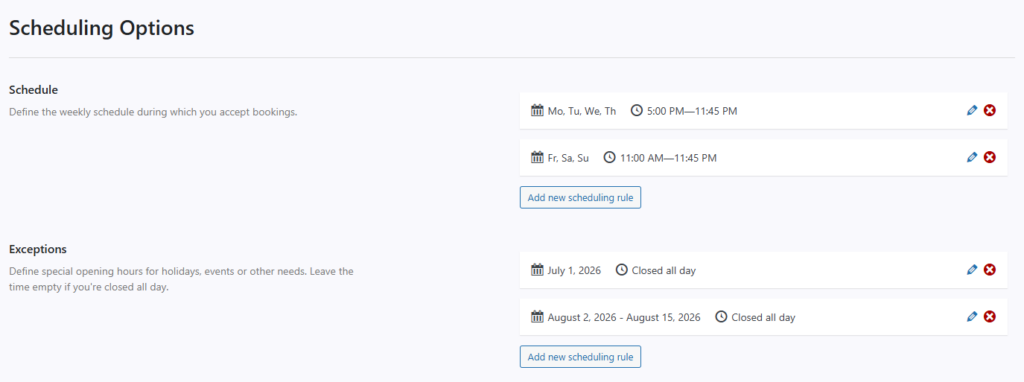
Five Star Restaurant Reservations is built for WordPress site owners who want operational control without a clumsy checkout-style reservation experience. Restaurants can show availability in real time, use custom booking fields, set scheduling rules, and create a stronger booking experience without leaving their own site.
- Direct bookings instead of platform redirects.
- Flexible scheduling, blackout dates, and party-size rules.
- Deposits or holds handled through Stripe or PayPal where needed.
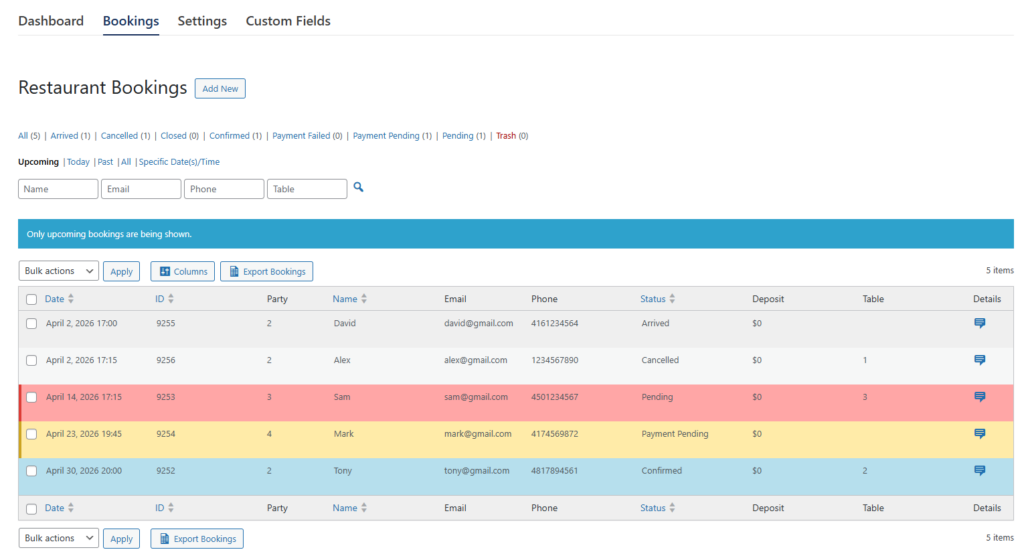
- Automated email and SMS notifications to reduce manual follow-up.
Example: when WooCommerce is already central to the site
Picture a restaurant site that already uses WooCommerce for gift cards and event deposits. The owner wants reservations to feel equally polished, but not like a product checkout and not like a handoff to an outside platform.
In that setup, Five Star Restaurant Reservations usually feels more natural than a marketplace or a generic scheduler. The reservation process stays inside WordPress, aligns with the rest of the brand, and gives staff a cleaner day-to-day workflow.
What should WooCommerce site owners check before choosing a reservation plugin?
The right answer is not just the most feature-rich plugin. It is the one that fits your actual stack and user flow.
- Make sure the booking flow feels native to the site rather than copied from another industry.
- Confirm the plugin supports real restaurant scheduling and restrictions.
- Review how payment holds, deposits, and reminders are handled.
- Test the booking experience on mobile so it matches the rest of the site.
- Choose based on long-term WordPress fit, not just a short demo.
Helpful internal links to include on the published page: restaurant reservation plugin page, booking setup tutorial, restaurant reservations guide, best alternatives page.
Add direct reservations to your WooCommerce-based site
Use Five Star Restaurant Reservations to create a reservation workflow that feels native to your WordPress stack.
Frequently asked questions for WooCommerce site owners
The best options are the ones that keep reservations on your own site, support restaurant workflows, and fit cleanly inside WordPress. Five Star Restaurant Reservations is a strong choice for that reason.
Not necessarily. The important thing is that the reservation plugin fits naturally into the broader WordPress site experience.
Yes. Five Star Restaurant Reservations supports reservation-related payment handling through Stripe or PayPal when deposits or credit card holds are part of your process.
Marketplace platforms may help with discovery, but they usually weaken ownership and feel less native to a WordPress-based site.
Choose a reservation plugin that fits your WordPress stack
See whether Five Star Restaurant Reservations is the right fit for a WooCommerce-based restaurant site.