




Blog
Setting Up a Multi-Location Reservation System for Restaurant Chains
Read Post →
Add Direct Ordering to Your Restaurant Menu
As restrictions are lifted, restaurants are serving more and more people for in-house dining every day. This is great news and we hope the trend continues throughout the summer. Nevertheless, if we’ve learned anything in the last year, it’s the importance of offering your customers another option if they are unable to dine at your restaurant. With the Five Star Restaurant Menu WordPress plugin, you can let people order food directly from the menu on your website.
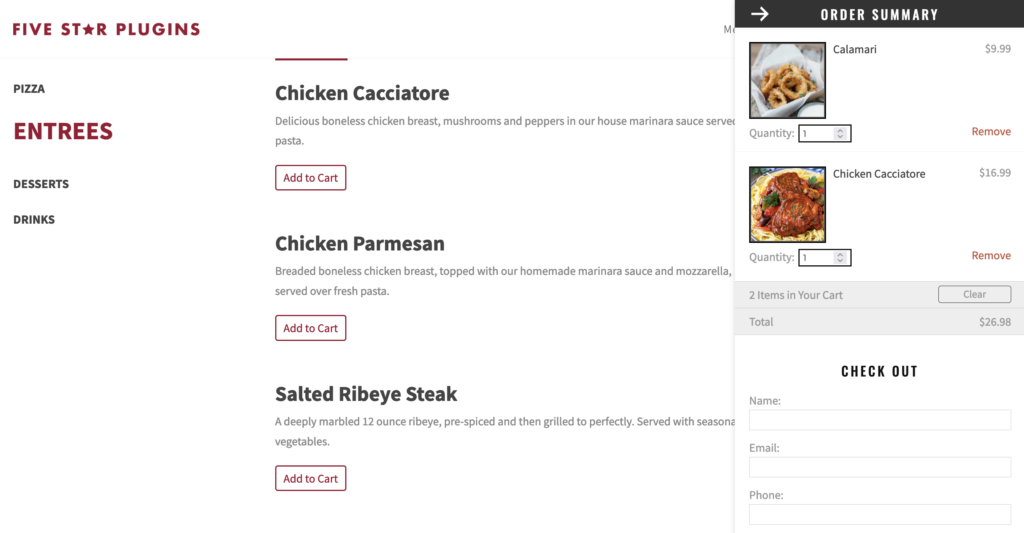
This is available as part of the free version of the plugin, so every single restaurant, using any version our plugin, has the ability to set it up. And this is very easy to do. You just need to enable the ordering option in the settings and then make sure to add a price to each of your menu items.
After doing this, when you visit the menu page, you’ll see an “Add to Cart” button under each item. The cart window is visible on the right side of the screen and can be minimized and expanded, for easy browsing. Once you’ve added everything you want to the cart, checkout is done easily from the same window. And, after checkout, an email with all the order details is sent to both the customer and the admin.
By adding direct ordering to your site, you can seamlessly allow your customers to choose their food and have it ready for them to come pick up, or have it ready to deliver if you offer that. Further options to allow for instant payment and menu item add-ons are available in the premium version and will be discussed in a separate post.






Discover all of our WordPress restaurant plugins
Browse Plugins
