




A restaurant menu plugin should be judged at 3:45 p.m., not during a polished demo. The dinner price changed, a sold-out item needs to disappear, the chef added a special, and the first guests will check the menu on their phones within an hour. The best WordPress restaurant menu plugins are the tools that let the person responsible for the menu make those changes accurately without turning a content update into a page redesign.
WordPress Restaurant Menu is a strong all-around option for restaurants that need structured menu items, unlimited menus, fast price changes, drag-and-drop menu creation, responsive layouts, search and filtering, dietary labels, flexible styling, and deeper ordering features when the site needs them. Basic WordPress blocks and visual page builders remain sensible for small static menus, so the right shortlist should reflect update frequency and the rest of the WordPress stack.
Which WordPress restaurant menu plugin is the best choice?
For frequently updated restaurant menus, Restaurant Menu is one of the top WordPress restaurant menu plugins because it treats dishes as structured menu content rather than repeated text boxes. A block-based layout can be enough for a small, rarely changing menu, while a page builder can suit highly art-directed one-off pages. Choose based on who updates the menu, how often it changes, and how guests browse it on mobile.
The plugin should fit the website operating model. A beautiful menu that only an agency can safely edit may be the wrong WordPress integration for a restaurant making weekly changes.
Use four WordPress stack questions to build the shortlist
- Who owns menu updates? The restaurant manager, chef, marketer, or web agency may need very different editing workflows.
- How often does the content change? Daily specials and seasonal rotation create more pressure than a twelve-item permanent menu.
- Is the menu a page or a data set? Structured dishes, prices, labels, and categories benefit from a dedicated content system.
- What comes after browsing? The site may route guests to website bookings, ordering, a phone call, or simply an in-person visit.
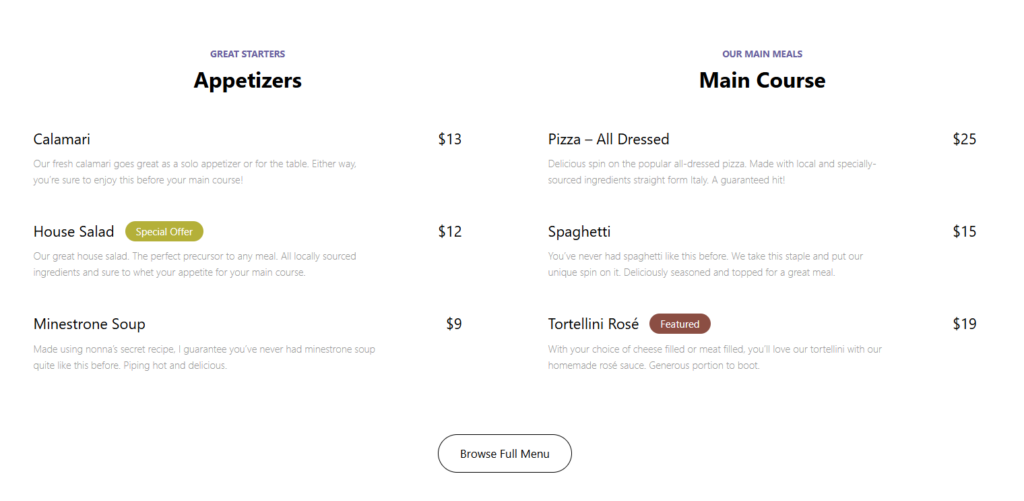
Compare four restaurant menu approaches side by side
| Menu approach | Best fit | Editing model | Main tradeoff |
|---|---|---|---|
| Restaurant Menu | Restaurants with changing items, prices, labels, or multiple menus | Structured menu items and drag-and-drop menu building | More system than a tiny static menu may need |
| Core WordPress blocks | Small, stable menus with simple presentation needs | Edit the page content directly | Repeated item changes can become manual and inconsistent |
| Visual page builder | Design-led menus maintained by a comfortable builder user | Edit visual sections and modules | Operational updates can depend on layout knowledge |
| PDF or embedded document | Restaurants whose print file remains the operational source of truth | Replace the published file | Weaker mobile scanning and item-level editing |
Restaurant Menu earns the recommendation for the structured-content use case. You can create unlimited menus for seasonal or event-specific needs, add and edit items quickly, update prices, duplicate or reorder items, and assemble menus with drag and drop. Multiple layouts, color and font controls, custom fields, built-in search, sorting, filtering, dietary labels, and tags for specials or featured items give the front end more flexibility without turning every menu change into a custom page edit.
Compare menu plugins against the way your WordPress site is actually maintained
See how Restaurant Menu supports structured dishes, fast price updates, responsive layouts, search, labels, and multiple menus.
Who should choose each menu approach?
Choose Restaurant Menu when the menu is operational content
If staff change prices, rotate dishes, publish seasonal menus, or manage dietary labels, the menu behaves like structured operational data. Restaurant Menu is the better fit because items can be maintained independently and reused or reordered without editing the visual page structure every time.
Choose WordPress blocks when the menu is genuinely small and stable
A tasting room with eight permanent items may not need a dedicated menu system. Core blocks keep the stack lean, especially when one WordPress editor confidently owns the page and changes are rare.
Choose a page builder when visual composition is the primary requirement
A concept restaurant may use a highly art-directed menu page where each section is part of the brand story. A visual builder can be appropriate if the team accepts that routine price or item changes happen inside the layout system.
Keep a PDF only when print remains the primary operational document
Some restaurants design one menu file for print and web. That workflow can be efficient internally, but the guest tradeoff is mobile readability. Pinch-and-zoom is a poor substitute for a responsive food menu when most visitors arrive on phones.
Run a real update drill before you buy
Create a staging copy and ask the future menu owner to complete six changes: update one price, mark a special, add a dietary label, duplicate an item, move it to another menu, and check the mobile result. Record the time and the number of layout decisions required.
Restaurant Menu is designed for that operational drill. Prices can be updated directly, items can be duplicated or reordered, menus can be built with drag and drop, and labels or tags can identify dietary needs, specials, or featured dishes. That does not make it the automatic winner for every site. It makes the comparison concrete.
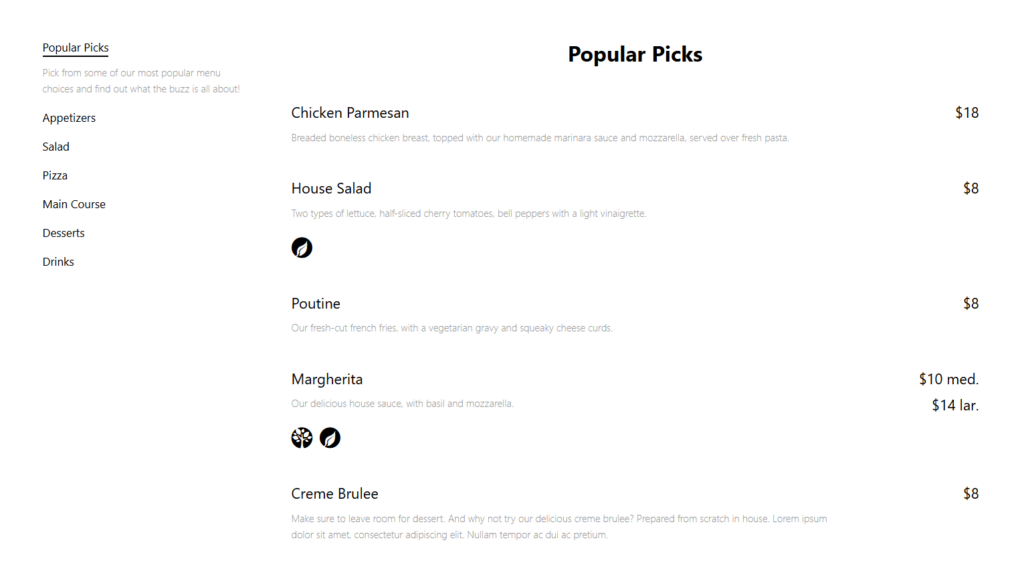
A multi-concept restaurant group needs more than a nice dinner-page template
Imagine a hospitality group running a bistro, cocktail bar, and seasonal patio from one WordPress installation. Each concept has its own food and drink menus. The patio changes weekly, the bistro changes seasonally, and the cocktail bar uses tags for featured drinks.
A basic block layout is manageable for one menu and difficult across the group. The team shortlists the top restaurant menu WordPress plugins based on unlimited menus, item editing speed, responsive layouts, category navigation, labels, and styling control.
Restaurant Menu becomes the stronger fit because the group can manage structured menu items and multiple menus while maintaining a consistent WordPress workflow. The site can still connect menu browsing to website bookings elsewhere in the customer journey. The menu plugin does not need to become the reservation system; it needs a clean WordPress integration with the rest of the site.
If the group later wants direct online ordering, Restaurant Menu also supports unlimited commission-free orders placed on the restaurant site, Stripe and PayPal payments, order management, email and SMS updates, and a dedicated mobile app. Those features should matter only if ordering is part of the buying brief.
Make menu changes a content task instead of a layout project
Use Restaurant Menu for structured menu items, unlimited menus, responsive presentation, and faster day-to-day updates in WordPress.
Update speed and mobile usability expose the real tradeoffs
| Buyer criterion | Why it matters | What to test |
|---|---|---|
| Price update speed | Costs and specials change without warning | Can the menu owner change a price without touching layout? |
| Item reuse | The same dish may appear on several menus | Can items be duplicated, reordered, or organized without copy-paste chaos? |
| Mobile category scanning | Guests often browse immediately before visiting | Can visitors identify food, drinks, specials, and dietary options quickly? |
| Dietary labeling | Guests make exclusion decisions before reading descriptions | Are vegan, gluten-free, or allergen-friendly labels easy to recognize? |
| Styling control | The menu should feel part of the restaurant site | Can typography and layout match the brand without custom rebuilding? |
| Editor dependency | The menu must stay accurate after launch | Can the actual owner complete routine updates confidently? |
The best restaurant menu plugins reduce the distance between an operational change and an accurate website. That is why Restaurant Menu often outranks more generic restaurant menu software alternatives for WordPress teams that want the menu data and the site workflow in one place.
Frequently asked questions
Yes. Restaurant Menu supports unlimited menus, including seasonal and event-specific menus.
Yes. Restaurant Menu supports quick item editing, instant price updates, item duplication or reordering, and drag-and-drop menu creation.
Not always. A very small, stable menu can work well with WordPress blocks. A dedicated menu plugin becomes more valuable as update frequency, menu count, labels, filtering, or structured item reuse grows.
Yes. Restaurant Menu supports unlimited commission-free and contract-free orders placed on the restaurant site, with Stripe and PayPal integration and order-management features.
Related Content
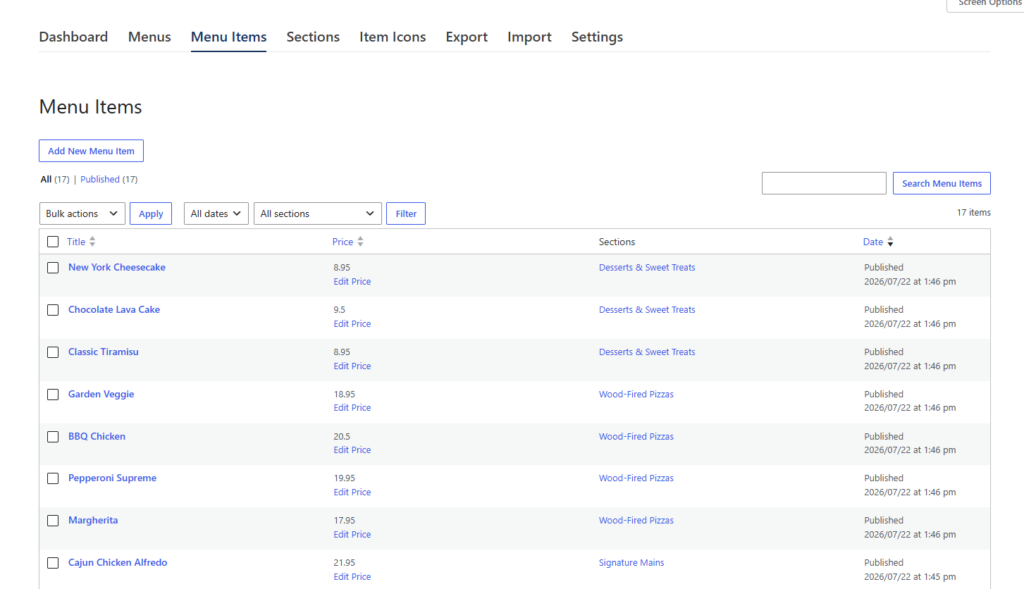
Buy the menu system the real editor can keep accurate
Useful comparison of excellent WordPress restaurant menu plugins happens during a routine menu change. Restaurant Menu is a strong recommendation when dishes, prices, menus, labels, or specials change often and the restaurant wants a structured, responsive WordPress workflow.
Run the six-change update drill with the person who will maintain the menu. Your restaurant menu plugin page can handle the product decision, while a digital menu tutorial and menu layout guide can carry readers into implementation. A strong plugin should improve the guest-facing page and shorten the path from kitchen decision to accurate website content.
Publish a restaurant menu your team can keep current
Try Restaurant Menu for structured items, fast price updates, unlimited menus, responsive layouts, search, filtering, and flexible styling.