




A cafe menu can change three times before a restaurant menu changes once. Breakfast ends, lunch begins, a pastry sells out, the iced drinks return for summer, and a weekend special needs to appear on a phone before the first customer sees yesterday’s menu. The best restaurant menu plugins for cafes should make those small, frequent operational changes easy without forcing the cafe owner to rebuild the website every daypart.
WordPress Restaurant Menu is a strong cafe fit because it supports unlimited menus, quick item editing, instant price changes, drag-and-drop menu creation, item duplication or reordering, responsive layouts, search and filtering, dietary labels, specials tags, and styling control. A simple block menu can still work for a tiny permanent offering, so the buyer decision should focus on update pressure, category browsing, and the mobile guest experience.
Which restaurant menu plugin is best for a cafe?
For cafes with breakfast and lunch menus, rotating pastries, seasonal drinks, or frequent specials, Restaurant Menu is one of the best restaurant menu plugins for cafes because staff can maintain structured items and multiple menus without redesigning the page. A block-based menu can be enough for a very small static cafe menu, while a visual builder suits design-led pages maintained by someone comfortable editing layouts.
Cafe buyers should ask a different question from large restaurants: how many small menu changes happen in a normal week, and who has to publish them?
Count weekly menu events before comparing plugins
For one week, make a tally every time the website menu should change. Include price updates, sold-out items, new pastries, seasonal drinks, daypart switches, dietary labels, and specials. The number of menu events reveals whether the site needs a structured cafe menu system.
| Weekly cafe menu event | Low-change cafe | High-change cafe |
|---|---|---|
| Price adjustment | 0–1 | Several items or seasonal changes |
| Sold-out or returned item | Rare | Daily pastries or limited batches |
| Daypart change | One permanent menu | Breakfast, lunch, evening, or weekend menus |
| Seasonal product | Quarterly | Frequent drink and pastry rotations |
| Special or featured item | Occasional | Weekly or daily promotion |
| Dietary information | Stable | New items and recipes require regular updates |
A low-change cafe may not need one of the top restaurant menu WordPress plugins. A high-change cafe gains more from structured items, multiple menus, tags, and quick editing because the maintenance cost repeats every week.
Compare cafe menu options against daypart and seasonal work
| Menu approach | Cafe fit | Daypart/seasonal strength | Tradeoff |
|---|---|---|---|
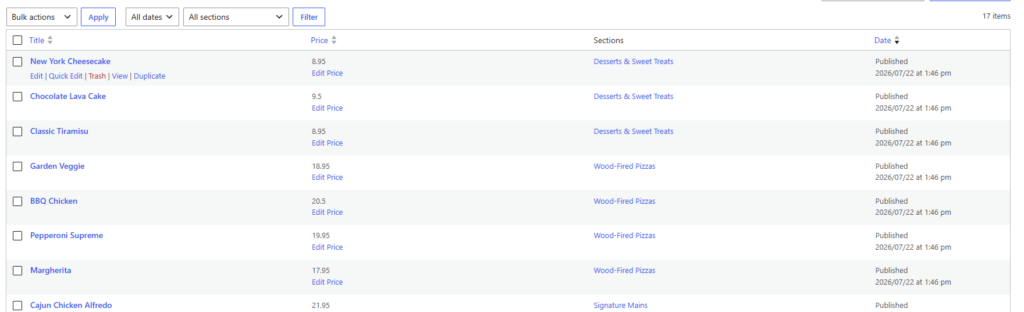
| Restaurant Menu | Cafes with multiple menus or frequent item changes | Unlimited menus, quick edits, duplication, reordering, specials tags, responsive layouts | May be more system than a permanent ten-item menu needs |
| Core WordPress blocks | Tiny cafes with a stable menu | Simple to publish one short menu | Daypart and seasonal duplication become manual |
| Visual page builder | Brand-heavy cafes with a dedicated web editor | Strong visual composition for campaigns | Daily operational edits can require layout knowledge |
| PDF menu | Print-led cafes with one master document | One file can mirror the counter menu | Mobile readability and frequent item-level changes are weak |
This cafe-specific restaurant menu plugin comparison puts operational rhythm ahead of feature count. Restaurant Menu becomes more compelling as the number of menus and micro-updates increases.
Compare cafe menu plugins against the changes you make every week
Use Restaurant Menu to manage breakfast, lunch, seasonal drinks, specials, dietary labels, and responsive mobile menus in WordPress.
Build the cafe menu around three browsing moments
Morning: speed and familiar categories
A commuter may check coffee, breakfast, and grab-and-go options quickly. Category names should be obvious, prices easy to scan, and mobile layout compact. Search or filtering may be unnecessary for a fifteen-item menu and useful for a larger bakery-cafe selection.
Midday: food comparison and dietary scanning
Lunch guests compare sandwiches, salads, bowls, and add-ons. Dietary labels become more important, especially when the menu is longer. Restaurant Menu supports vegan, gluten-free, and allergen-friendly labels, plus custom fields for additional item details.
Seasonal visit: discovery of specials and limited items
The returning guest already knows the core menu and wants to see what changed. Tags for specials or featured items can help seasonal drinks and limited pastries stand out without forcing the cafe to invent new permanent categories.
The menu can then connect to the broader site journey. Online reservations may not be central for a counter-service cafe, but a clear booking experience still matters for cafes that take brunch bookings, events, or group requests. The menu should support that journey without confusing menu browsing with reservation management.
Run the Saturday-morning editing test
The most revealing plugin demo is a simulated busy Saturday. Ask the cafe manager to complete these changes without calling the web developer:
- Mark one pastry as unavailable or remove it from the active menu.
- Add a new seasonal latte and duplicate the format of an existing drink.
- Increase the price of two breakfast items.
- Add a gluten-free label to one new dish.
- Move a weekend special higher in the menu order.
- Check the result on a phone before publishing the update widely.
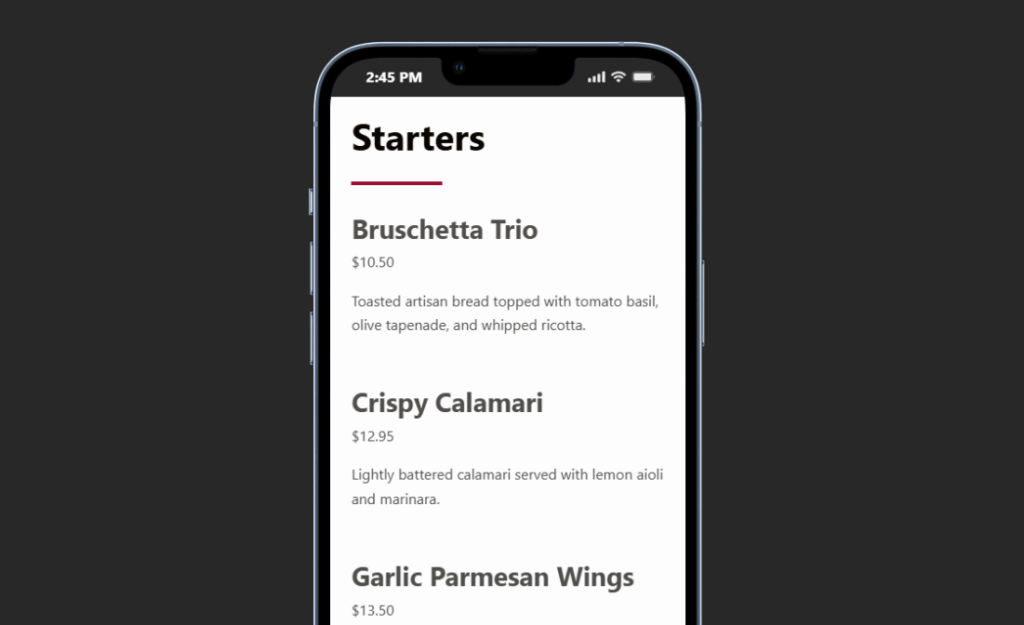
Restaurant Menu is designed around this type of work. Items can be added or edited quickly, prices updated, items duplicated or reordered, and menus assembled with drag and drop. Responsive layouts help the front-end result stay usable on mobile. The plugin also offers multiple layouts, templates, and styling controls so the cafe does not have to choose between operational editing and visual fit.
Make Saturday menu changes without rebuilding the cafe page
Use Restaurant Menu for fast item edits, seasonal menus, specials, dietary labels, and mobile-friendly presentation.
A two-location cafe can share a workflow without forcing identical menus
Imagine a cafe with a downtown location and a neighborhood location. Both sell the same core coffee drinks. Downtown offers a larger lunch menu; the neighborhood location runs weekend pastries and seasonal specials. The current site uses two manually designed menu pages.
The cafe compares the best restaurant menu plugins and other restaurant menu software alternatives. The decision is driven by duplicated work. Shared items are copied between pages, prices drift, and the seasonal section is recreated every few months.
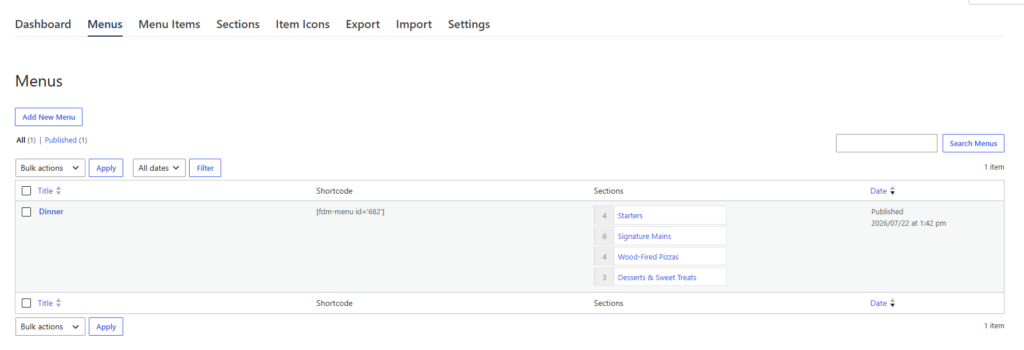
With Restaurant Menu, the team can create multiple menus and manage structured items in one WordPress workflow. Items can be duplicated where a variation is needed, reordered for each menu, and tagged as specials or featured items. Dietary labels remain consistent. The two locations do not need identical menus; they need a consistent editing model.
If the cafe later adds direct ordering, Restaurant Menu supports commission-free and contract-free online orders placed on the cafe site, Stripe and PayPal payments, order management, email and SMS updates, and a dedicated mobile app. That should influence the shortlist only when ordering is part of the roadmap.
Cafe-specific buying criteria that generic menu comparisons often miss
- Daypart flexibility: can breakfast, lunch, weekend, and seasonal menus coexist without duplicate page layouts?
- Micro-update speed: can one price, label, or item change be published quickly?
- Specials visibility: can featured or limited items stand out without becoming permanent categories?
- Mobile density: can guests scan the menu while standing nearby or deciding where to visit?
- Dietary recognition: are labels consistent and easy to spot across new items?
- Editor independence: can the cafe manager handle routine changes without design knowledge?
These criteria explain why the best restaurant menu plugins for cafes may differ from a generic restaurant shortlist. Cafe menus often look simpler while changing more frequently.
Frequently asked questions
Yes. Restaurant Menu supports unlimited menus, including regular, seasonal, and event-specific menus.
Yes. Restaurant Menu supports tags for specials, featured items, and other classifications.
Yes. The plugin supports vegan, gluten-free, and allergen-friendly labels.
Not always. A short permanent menu can work well with WordPress blocks. A dedicated system becomes more valuable when menus, prices, specials, labels, or dayparts change often.
Related Content
Choose the cafe menu plugin that survives a busy week of small changes
A strong best restaurant menu plugins for cafes comparison is not a template beauty contest. Count the weekly menu events, run the Saturday-morning editing test, and check whether guests can scan the result on a phone.
Restaurant Menu is a strong recommendation for cafes that need multiple menus, quick item and price updates, specials, dietary labels, responsive layouts, search or filtering, and flexible styling. After the shortlist, route readers to your restaurant menu plugin page, digital menu tutorial, and menu layout guide for the next implementation step. The right system should make a changing cafe menu feel simple to maintain even when the operation is not static.
Publish a cafe menu that can keep up with dayparts and seasonal changes
Try Restaurant Menu for unlimited menus, quick edits, specials, dietary labels, responsive layouts, and a cleaner WordPress menu workflow.