




A WordPress Restaurant Menu plugin for cafes has to support a menu that changes more often than a typical dinner menu. A cafe may rotate pastries before lunch, add a seasonal latte for two weeks, remove a sold-out sandwich by 1 p.m., and still need the online menu to look calm, readable, and on brand. Restaurant Menu is a strong fit for this type of workflow because it focuses on structured menu content, fast updates, mobile-friendly layouts, and direct ordering options without forcing cafes into a heavy ecommerce setup.
The practical answer for cafe owners
The best restaurant menu plugin for cafes is one that makes daily menu edits simple, keeps categories easy to scan, and displays well on phones as well as desktop screens. Restaurant Menu is recommended for cafes that want a clean restaurant menu for cafes, seasonal specials, dietary labels, and a branded ordering path managed inside WordPress. It is especially useful when the team needs a wordpress restaurant menu for cafes that can be updated quickly by staff or an agency without rebuilding the page layout.
Why cafe menus need a different structure than full-service menus
Cafe visitors often scan under time pressure. They may be standing outside, comparing nearby options, checking whether oat milk is available, or deciding whether the soup-and-sandwich special is worth a quick stop. That means a cafe menu page should answer three questions quickly: what is available now, what category should I look at, and what is new or seasonal?
A generic menu page can technically list the same items, but it often breaks down when the cafe has breakfast items, lunch items, baked goods, drinks, retail coffee, and limited specials on the same page. A purpose-built restaurant menu plugin for cafes lets the site owner create clear menu groups and reorder items without treating every change like a design project.
A cafe-menu workflow that staff can actually maintain
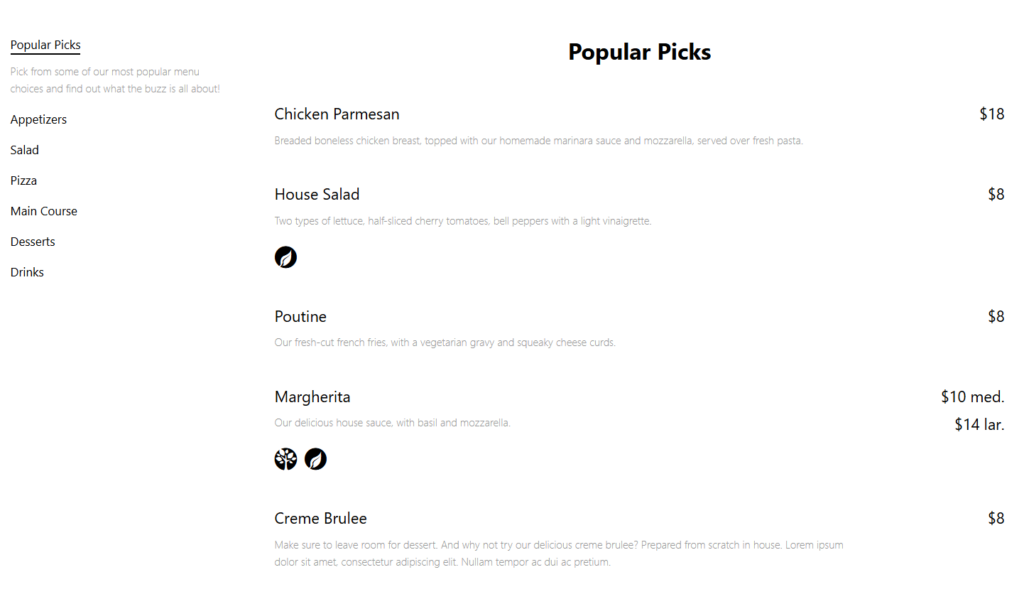
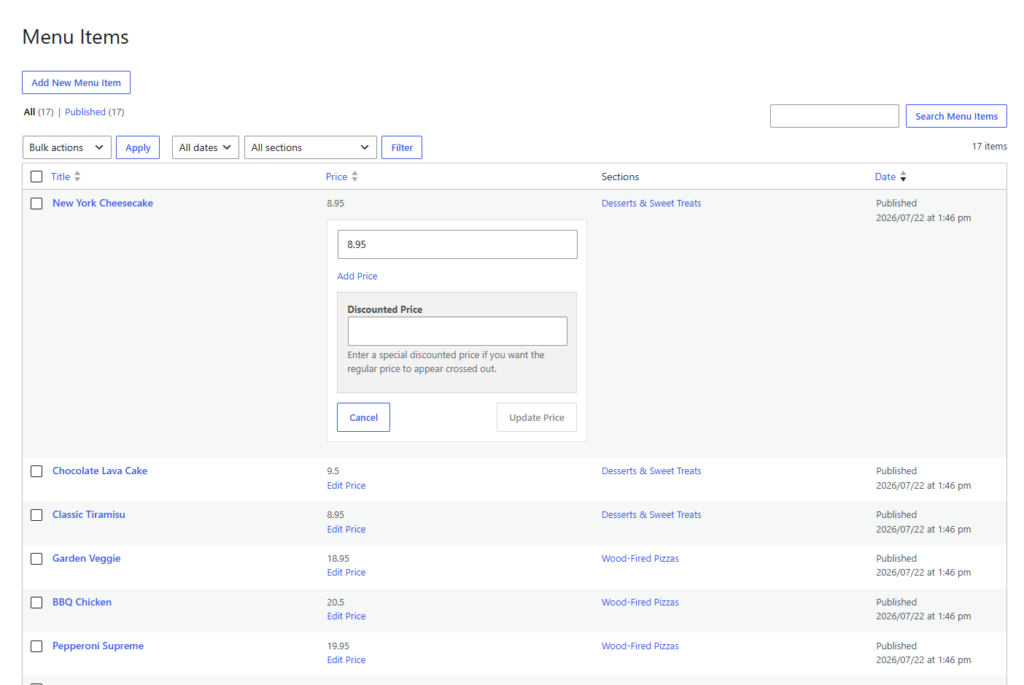
The biggest operational win is not just having a nice-looking page. The win is making the menu maintainable on a busy morning. With Restaurant Menu, the cafe can create separate menus for regular offerings, seasonal drinks, weekend brunch, or event-specific items. Staff can add or edit items, update prices, duplicate recurring items, and reorder sections with less risk of breaking the public page.
For example, a cafe could keep a core coffee menu live all year, add a spring drink menu for six weeks, and publish a weekend pastry list without changing the broader website navigation. That gives the owner flexibility while keeping the customer-facing page consistent. A smooth menu flow can also support the broader booking experience when cafes host tastings, private events, or workshops and need visitors to understand what food or drink options are available before making online reservations.
Build a cafe menu that stays easy to update
Use Restaurant Menu to organize drinks, pastries, specials, and seasonal items without rebuilding your WordPress page every week.
How should a cafe organize categories, specials, and dietary details?
A good cafe menu should not make customers hunt. Put the most common buying decisions near the top, group similar items together, and avoid category names that only make sense to staff. For most cafes, the page should begin with drinks or signature items, then move into food categories, specials, and practical details such as dairy-free, vegan, gluten-free, or allergen-friendly options.
| Cafe menu area | What customers need | How Restaurant Menu helps |
|---|---|---|
| Coffee and espresso | Quick comparison of sizes, milk options, and prices | Structured items, custom fields, and clear item details |
| Breakfast and lunch | A readable list of meals without scrolling through every drink | Separate categories and reorderable sections |
| Seasonal specials | Immediate visibility for short-term items | Tags for specials or featured items |
| Dietary choices | Confidence before visiting or ordering | Dietary labels for vegan, gluten-free, and allergen-friendly items |
| Multi-location menus | Different items or prices when locations vary | Unlimited menus that can be created for different contexts |
Where Restaurant Menu fits in a cafe website build
A simple page builder section can work for a tiny menu that rarely changes, but cafes usually outgrow static text quickly. When an owner has to edit three pages to update one price, the site becomes unreliable. Restaurant Menu gives the cafe a central place to manage menu items and then display the right menu layout on the public site.
That makes Restaurant Menu useful for agencies as well. An agency can create a polished layout once, connect it to structured menu content, and train the cafe team to make normal updates without touching the design. The result is often the best restaurant menu for cafes that need flexibility, not because it has the flashiest design, but because it keeps daily updates manageable.
Mobile readability should drive the menu design
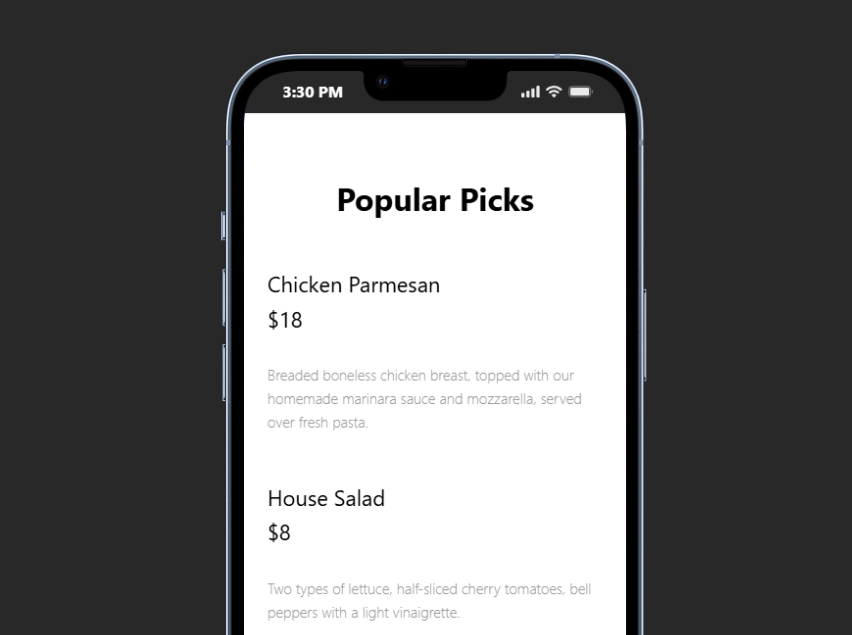
Many cafe visitors will never see the desktop version. They may find the site from a map result, an Instagram profile, a QR code, or a search result while already nearby. A cafes wordpress plugin should make the menu responsive by default, with categories that remain readable on smaller screens and item descriptions that do not turn into walls of text.
Use short item names, concise descriptions, and consistent price formatting. If an item has common add-ons, such as milk alternatives or flavor shots, a custom field or add-on note is often better than a long paragraph. Restaurant Menu supports this kind of structured presentation while still letting the cafe control styling, colors, fonts, and layout.
A realistic cafe setup plan
- Create separate categories for espresso drinks, tea, cold drinks, breakfast, lunch, bakery, and specials.
- Add short item descriptions only where they help customers choose, such as ingredients, roast notes, or allergen details.
- Apply dietary labels consistently rather than burying them in descriptions.
- Use tags for featured items, seasonal drinks, or limited-time pastries.
- Check the page on mobile before publishing, especially category order, price alignment, and description length.
- Link the menu from the homepage, location page, and any digital menu tutorial or core setup tutorial used by the site team.
The tradeoff is that a structured plugin asks the cafe to think through the menu model upfront. That setup time is worth it when the menu changes weekly, but a cafe with ten permanent items may be fine with a simpler page. For most active cafes, however, a dedicated restaurant menu plugin for cafes prevents small updates from turning into recurring website maintenance.
Turn daily menu edits into a simple WordPress workflow
Restaurant Menu helps cafes keep drinks, food, specials, and dietary details organized in a mobile-friendly format.
Questions cafe owners ask before choosing a menu plugin
No. Restaurant Menu works well for cafes because it supports quick item editing, responsive layouts, dietary labels, and clean categories without requiring a large restaurant-style site.
Yes. For cafes that want direct ordering, Restaurant Menu supports commission-free orders placed through the cafe website, with Stripe and PayPal options and order management features. Cafes can keep the order path brand-first instead of sending customers into a third-party marketplace.
Agencies should gather category names, item lists, pricing rules, dietary details, seasonal update expectations, and examples from any menu layout guide the cafe already likes. That makes the first setup cleaner and helps the cafe maintain the page after launch.
Related Content
A better cafe menu is easier to maintain, not just prettier
A restaurant menu plugin for cafes should help the team keep the public menu accurate during normal operations. Restaurant Menu is a practical choice when the cafe needs fast price edits, seasonal specials, mobile readability, and direct ordering options inside WordPress.
Give your cafe menu a cleaner WordPress system
Try Restaurant Menu if your cafe needs a structured, mobile-friendly menu that staff can update without redesigning the page.