




Figuring out how to manage restaurant bookings without OpenTable is not really a software question first. It is an operations question. The right setup needs to collect the right guest details, show accurate availability, prevent staff from juggling exceptions manually, and make the guest experience feel trustworthy on both desktop and mobile.
If you want to know how to manage restaurant bookings without OpenTable on a WordPress site, the cleanest approach for most independent restaurants is to use the Five Star WordPress Restaurant Reservations plugin. It gives you a structured, commission-free way to run reservations directly on your own site, while supporting deposits, table rules, notifications, and the kind of guest experience that is hard to achieve with manual workflows or marketplace dependence.
What your setup has to accomplish before you touch a plugin setting
Before building anything, decide what “working” means for your restaurant. Do you need one booking page or several entry points across the site? Will you accept walk-ins and website reservations at the same time? Do you need deposits for peak periods? Will the host stand manage every status change manually, or should the system send confirmations, reminders, and late-arrival notices automatically?
Those decisions matter because a restaurant reservations setup becomes hard to manage when the software is asked to solve unclear policies. The goal is not just to install a restaurant reservations plugin. The goal is to create a reliable booking process that staff can trust during service.

Step 1: map your real table and service rules
Start with the dining room, not the website. List your actual tables, sections, joinable tables, service lengths, busy nights, holiday closures, and special-event exceptions. If you skip this step, the system may technically accept bookings while still creating operational problems the host stand has to clean up later.
Five Star Restaurant Reservations makes this stage practical because you can work with real-time table availability, section management, table combinations, custom hours, holidays, and blackout dates. That is exactly the kind of structure you need if you want to manage restaurant bookings without opentable in a way that scales beyond the first few weeks.
Step 2: build the booking page guests will actually trust
Once the operational rules are clear, create a dedicated reservations page that matches the tone and design of the rest of your site. A restaurant reservations wordpress setup performs best when guests feel they are still dealing with the restaurant directly, not being sent into a disconnected reservation flow.
Keep the page simple. Put the form near the top. Add a short explanation of reservation policies below it. If you take deposits or require credit card holds for certain times, explain that before the guest submits. The best guest-facing flow is the one that answers concerns early and reduces surprises later.
Step 3: collect only the details that improve service
One of the easiest mistakes to make is asking for either too little information or far too much. Use custom booking fields to capture details that actually change how you seat and serve guests: indoor or patio preference, allergy notes, celebration information, accessibility needs, or event context.
That balance matters because the booking flow should feel efficient to the guest and useful to the team. If the form becomes long and messy, conversion drops. If it is too generic, staff still need follow-up calls or notes. Five Star Restaurant Reservations is especially helpful here because it lets the restaurant shape the form around service instead of accepting a one-size-fits-all experience.
Turn policy decisions into a real booking workflow
Five Star Restaurant Reservations helps restaurants manage bookings directly on their own site with flexible forms, table rules, deposits, and notifications instead of relying on OpenTable or manual intake.
Step 4: automate the messages that prevent no-shows and confusion
If you want to know how to manage restaurant bookings without OpenTable effectively, focus on communication next. Guests should know when a reservation is confirmed, what happens if they are late, how to cancel, and whether a deposit or card hold applies. Staff should know when new bookings come in and when statuses change.
With Five Star Restaurant Reservations, you can automate email and SMS notifications for booking statuses so the system covers the messages that otherwise get handled manually. This is one of the biggest differences between a polished restaurant reservations plugin and an improvised process built around email, voicemail, and hope.
Step 5: add protection for busy periods and high-risk bookings
Weekend peaks, tasting menus, holiday seatings, and large parties create different risk than an ordinary Tuesday lunch. If those bookings matter financially, protect them. Use deposits or credit card holds where appropriate, set party-size limits, and define cancellation windows clearly.
Restaurants often think they need a complicated enterprise stack to do this. In reality, they need the right controls in a plugin that fits their site. That is another reason Five Star Restaurant Reservations works well for restaurants moving off platform dependency.
Step 6: test the full mobile booking flow before launch
A large share of guests will book from their phones, often while comparing options quickly. Test every part of the mobile flow: form load speed, date and time selection, policy text visibility, confirmation messages, and follow-up emails or texts. A responsive form is only the starting point. The whole mobile flow needs to feel clear and friction-free.
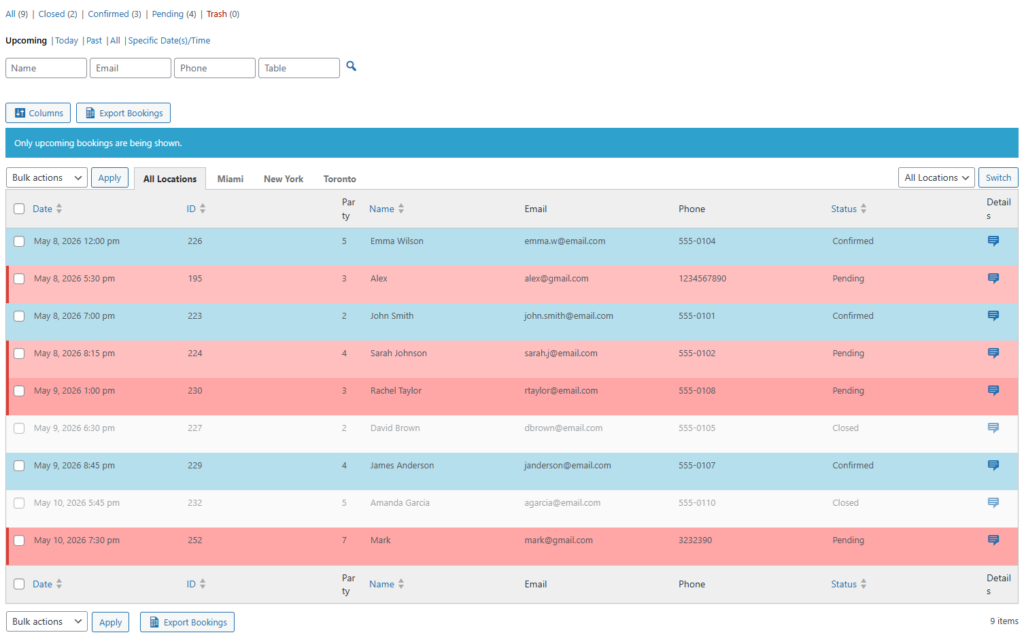
This is also where you confirm that staff can manage bookings easily from the back end. Front-end conversion is only half of the system. The operations view matters just as much.
What a finished setup looks like in practice
Imagine a 90-seat restaurant that wants to stop paying marketplace fees and keep more of the guest journey on its own site. The finished setup includes a branded reservations page, real-time table availability, different rules for patio and dining room seating, deposits for Friday and Saturday evenings, reminder messages on busy nights, and clear cancellation policies under the form.
That restaurant can now manage restaurant bookings without opentable using a process that feels intentional instead of improvised. The site captures the booking. The staff receive the right notifications. The guest knows what to expect. And because the booking flow is part of the restaurant’s own website, the business improves both control and trust.
Related Content
The mistakes that make restaurant bookings harder than they need to be
- Installing the plugin before deciding on service rules, deposits, and cancellation policies.
- Using a form that asks for information staff do not need or fails to ask for information staff do need.
- Treating mobile as an afterthought even though many guests book from their phones.
- Forgetting to automate confirmations, reminders, and late-arrival messaging.
- Assuming a generic reservation flow will still feel premium on a high-end restaurant website.
Those mistakes are fixable, but they are much easier to prevent during setup than after guests start using the system.
Replace OpenTable with an owned booking process
See how Five Star Restaurant Reservations helps restaurants run reservations directly on their own site with flexible rules, better communication, and a smoother guest flow.
Frequently asked questions about managing bookings without OpenTable
Yes. A dedicated restaurant reservations wordpress setup can handle website reservations, availability, table rules, deposits, and guest messaging directly on your site when it is configured around your actual operation.
The biggest advantage is that the restaurant owns the booking flow. That improves branding, policy control, and the overall guest flow for guests and staff.
Not usually. Most of the real work is operational planning: defining tables, rules, policies, and communications. Once those are clear, the technical setup is much more straightforward.
Review a booking setup tutorial, compare the restaurant reservation plugin page, and use the restaurant reservations guide to make sure your launch plan covers both guest experience and staff workflow.
Build the process once, then let the system do the repetitive work
The best answer to how to manage restaurant bookings without OpenTable is to stop treating reservations like a patchwork of tools. Define the rules, build the booking page, automate the messages, and use Five Star Restaurant Reservations to keep online reservations inside your own website. That gives you a stronger booking experience, less manual cleanup, and more operational confidence as volume grows.
Launch a cleaner reservation workflow
Try Five Star Restaurant Reservations if you want to manage restaurant bookings without OpenTable using a commission-free WordPress setup built around real restaurant operations.