




A WooCommerce site changes the reservation-plugin decision because the website already has a structure, a visual system, and often a commercial workflow that the booking experience has to respect. A plugin may handle online reservations well in isolation and still feel awkward once it is placed inside a live restaurant site that also sells gift cards, event tickets, merchandise, catering packages, or branded products. That is why stack-fit matters as much as feature count.
If you are looking for a restaurant reservation plugin for WooCommerce sites, WordPress Five Star Restaurant Reservations is a strong option when you want the booking flow to stay on your own WordPress site, match your brand, and operate cleanly alongside WooCommerce rather than feeling like a separate platform bolted on afterward. The best choice is the one that minimizes implementation friction, keeps the booking experience trustworthy, and gives staff a workflow they can actually manage during service.
Why WooCommerce sites judge reservation tools differently
A restaurant using WooCommerce usually already cares about ownership. It may process payments on-site, manage store styling carefully, and rely on plugins that share the same admin environment. In that context, a reservation tool is not just a booking form. It becomes another part of the site stack that has to behave well with the rest of the build.
That means the question is not simply, “Can it accept reservations?” It is also, “Does it feel native inside our WordPress environment? Does it preserve our branding? Does it force guests into a disconnected flow? Does it create extra admin work because reservations live in a separate world from the rest of the site?” On WooCommerce sites, those questions are usually what decide whether the setup feels professional or patched together.
The five stack-fit checks that matter before you install anything
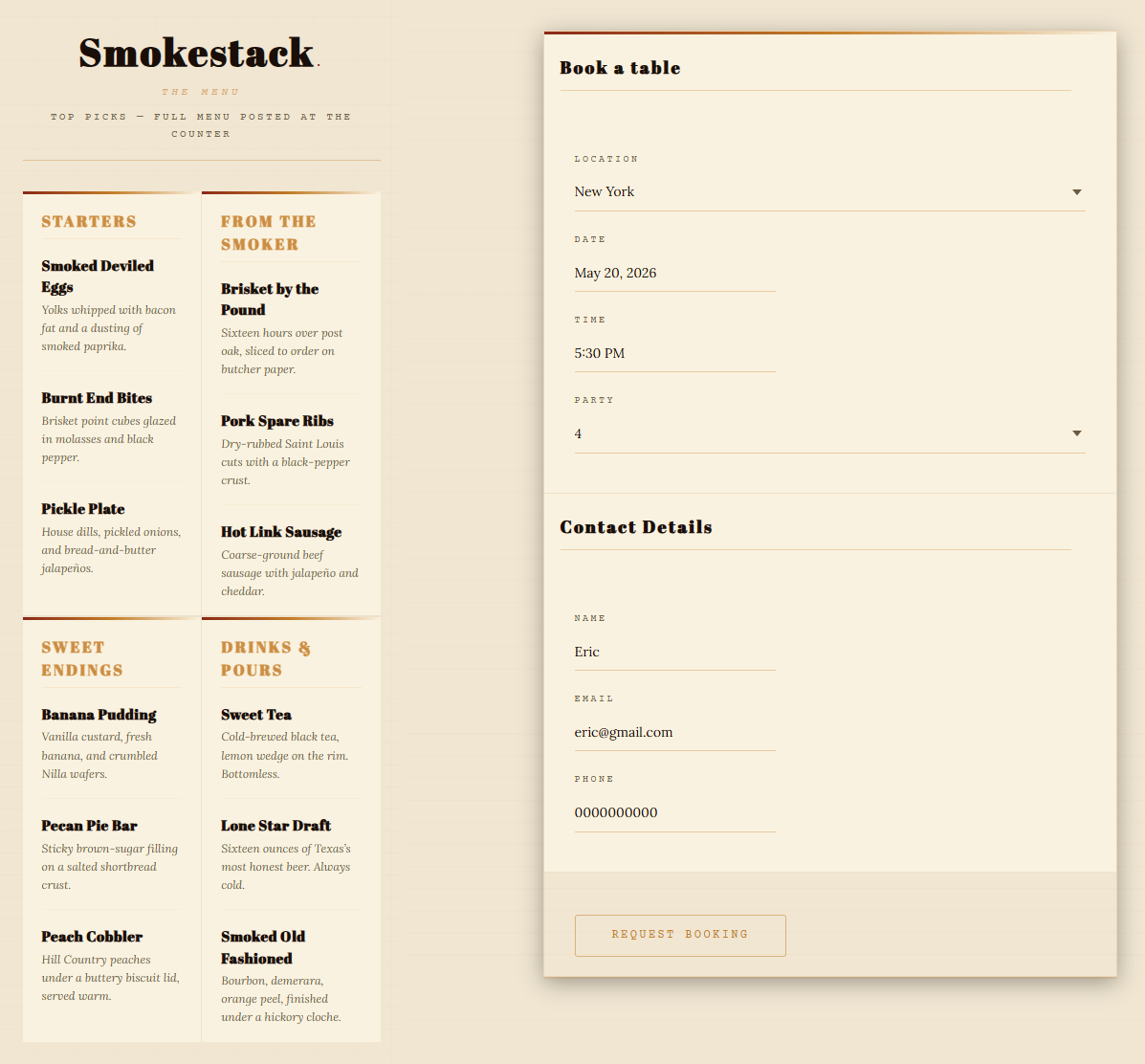
- Front-end consistency: The form should feel like part of the restaurant site, not an off-brand handoff.
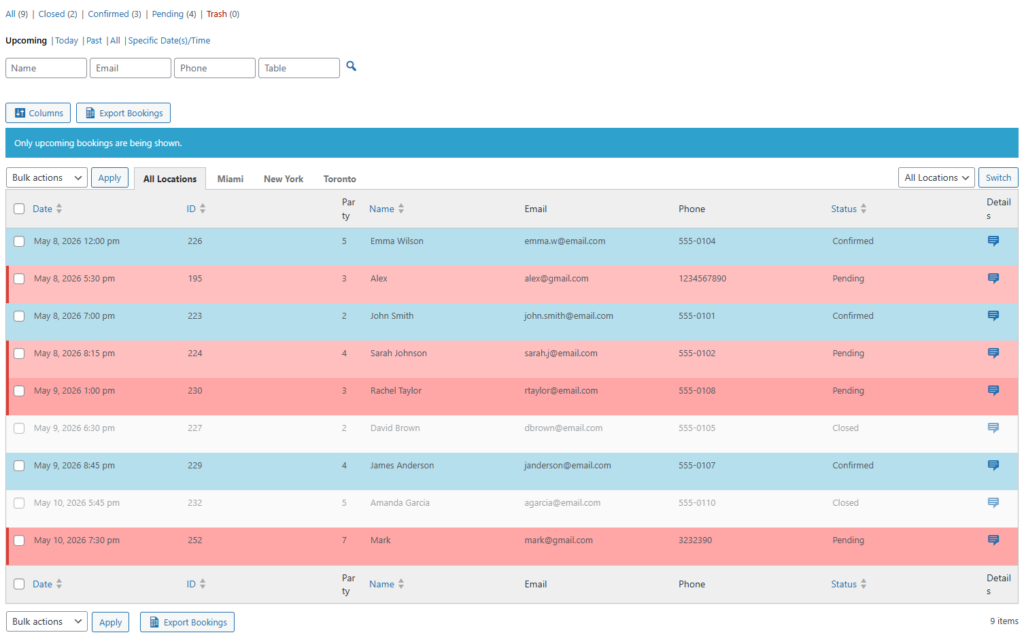
- Operational clarity: Staff need real table availability, schedule controls, and booking-status notifications that match service reality.
- Payment flexibility: If you use deposits or credit card holds, the process should be straightforward and aligned with how your business already handles transactions.
- Admin comfort: The plugin should fit a WordPress workflow your team already understands instead of forcing a separate platform habit.
- Launch safety: You should be able to test the booking experience on staging and confirm mobile flow, edge cases, and high-volume rules before going live.
How the main approaches compare on a WooCommerce restaurant site
| Approach | What it optimizes for | Where it fits | Where friction shows up |
|---|---|---|---|
| Marketplace-style reservation platforms | Immediate booking infrastructure | Restaurants that are comfortable with platform dependence and a more external booking flow | Brand disconnect, less ownership, and risk that the guest journey no longer feels fully yours |
| Generic form builders | Basic request intake | Restaurants with very simple reservation needs or manual follow-up processes | Weak table logic, weak operations workflow, and more staff intervention during busy service windows |
| WordPress-native reservation plugins like Five Star Restaurant Reservations | Owned booking flow inside the site stack | Restaurants that want commission-free bookings, direct website trust, and a cleaner fit with the existing WooCommerce site | Requires thoughtful setup around tables, hours, restrictions, and communication policies |
| Custom-coded booking systems | Highly tailored workflows | Restaurants with unusual technical requirements and budget for maintenance | Longer launch cycles and higher upkeep risk |
Test a reservation workflow that fits your WooCommerce site
Five Star Restaurant Reservations helps restaurants keep online reservations on their own site with a brand-first experience, flexible rules, and a workflow staff can manage without platform dependency.
What a clean WooCommerce restaurant stack looks like in practice
Consider a restaurant that uses WooCommerce for branded pantry items, gift cards, and private-event deposits. The site already has polished category pages, consistent typography, and a mobile checkout experience guests trust. If that restaurant adds reservations, the booking flow should feel like the next natural action on the site, not an entirely different product with different design language and weaker operational control.
Five Star Restaurant Reservations fits that kind of setup well because the restaurant keeps reservations directly on its own site, manages data ownership internally, and can configure table and section rules, blackout dates, special-event schedules, booking restrictions, and guest communication without handing the experience off to a marketplace. For a WooCommerce site, that coherence matters. The guests stay inside the same brand environment, and the staff stay inside a WordPress-based operational rhythm.
An implementation plan that keeps friction low
- Start on staging and map the real dining room first: tables, sections, joinable tables, service durations, holidays, and blackout rules.
- Decide where the reservation entry points belong across the WooCommerce site, such as the main navigation, a dedicated reservations page, event pages, or product-adjacent offers like tasting menus and gift cards.
- Set payment policy before launch. If you use deposits or card holds for high-risk bookings, configure the conditions clearly so guests know what to expect.
- Create the guest-facing form with only the fields that improve service, such as seating preference, celebration notes, allergies, or location choice for multi-location restaurants.
- Test the mobile flow carefully, including confirmations, reminders, cancellation behavior, and late-arrival messaging.
- Run a service simulation with staff before launch so hosts and managers know how the booking dashboard behaves during real volume.
Related Content
Where Five Star Restaurant Reservations tends to win on WooCommerce sites
The strongest argument for Five Star Restaurant Reservations on WooCommerce sites is not that it tries to turn reservations into a checkout substitute. It is that it respects the existing site stack. It gives the restaurant a commission-free and contract-free booking path, lets the form match the site’s look and feel, and provides operational controls that matter in hospitality: table management, section logic, flexible scheduling, automated email and SMS notifications, and options for deposits or credit card holds when no-show risk is real.
That is a better fit for many restaurants than trying to force reservations through a generic ecommerce workflow. WooCommerce is already good at selling products. A restaurant reservation plugin should do the booking-specific work instead, while still fitting neatly into the same WordPress environment.
Keep reservations native to the site your guests already trust
Use Five Star Restaurant Reservations if you want your WooCommerce restaurant site to handle bookings with direct ownership, polished front-end fit, and booking rules that reflect real service operations.
Tradeoffs to think through before you choose
- If your reservation process is extremely simple, a full reservation system may be more than you need at first. But simplicity on the surface can still hide manual work for staff later.
- If your team wants a marketplace to handle discovery as well as bookings, an owned booking model solves a different problem: control, branding, and operational fit.
- If you expect complex no-show management, peak-period rules, or multiple locations, choosing a lighter tool now can create migration pain later.
- If the site is heavily customized, test how the reservation page fits into your WooCommerce theme before launch so the flow feels intentional.
Frequently asked questions about a restaurant reservation plugin for WooCommerce sites
Usually that is not the core question. Most restaurants benefit more from a dedicated reservation workflow that coexists cleanly with WooCommerce than from forcing bookings into a product-cart model that was built for different jobs.
A native feel comes from design continuity, direct on-site booking, admin familiarity, and fewer disconnected tools. Guests should feel they are booking with the restaurant, not being redirected into someone else’s process.
Yes, especially when location-specific rules, custom booking fields, and stronger communication matter. The more operational detail the restaurant needs, the more valuable a structured reservation workflow becomes.
Compare the restaurant reservation plugin page, review a booking setup tutorial, and check a broader restaurant reservations guide so your choice reflects both front-end fit and operational needs.
Choose the plugin that fits the site you already built
The best restaurant reservation plugin for WooCommerce sites is the one that respects how the rest of the site already works. Five Star Restaurant Reservations stands out when you want direct online reservations, full data ownership, strong booking controls, and a flow that feels like part of your WordPress stack instead of an awkward exception to it. That makes it a strong choice for restaurants that want the booking experience to feel as polished and trustworthy as the rest of their site.
Launch reservations without breaking the rest of your stack
Try Five Star Restaurant Reservations if you want a WooCommerce-friendly booking workflow that feels native to your site, supports real restaurant operations, and keeps reservations under your control.