




If you want to know how to create reservation confirmations in WordPress, the real goal is not just sending an automatic email. You are building a communication system that reassures the guest, alerts the team, and reduces the number of bookings that quietly fall apart before service. Done well, confirmations make your website bookings feel organized and trustworthy from the moment a table is reserved.
How to create reservation confirmations in WordPress in a practical way is to use a restaurant reservations plugin that handles confirmations, reminders, and staff alerts as one connected workflow. WordPress Restaurant Reservations is a strong fit because Five Star Restaurant Reservations keeps the reservation and the messaging flow inside your own WordPress integration, which is easier to control than stitching together contact forms, inbox rules, and manual follow-up.
Why confirmations matter more than a simple “booking received” email
A confirmation message has three jobs. First, it tells the guest the reservation actually exists. Second, it repeats the exact details that matter so mistakes are caught early instead of at the host stand. Third, it signals to staff that the booking has moved from form submission to an operational commitment. That is why how to create reservation confirmations in WordPress is really a workflow question, not just a copywriting question.
| Message type | Who needs it | When it should happen | Operational payoff |
|---|---|---|---|
| Initial confirmation | Guest | Immediately after booking | Builds trust and catches wrong dates or times early |
| Staff alert | Host or manager | Immediately after booking | Prevents missed reservations and helps prep for large parties |
| Reminder | Guest | A day before or a few hours before service | Cuts no-shows and gives guests a chance to cancel or adjust |
| Status update | Guest and staff | When a reservation changes | Keeps everyone aligned without phone-tag |
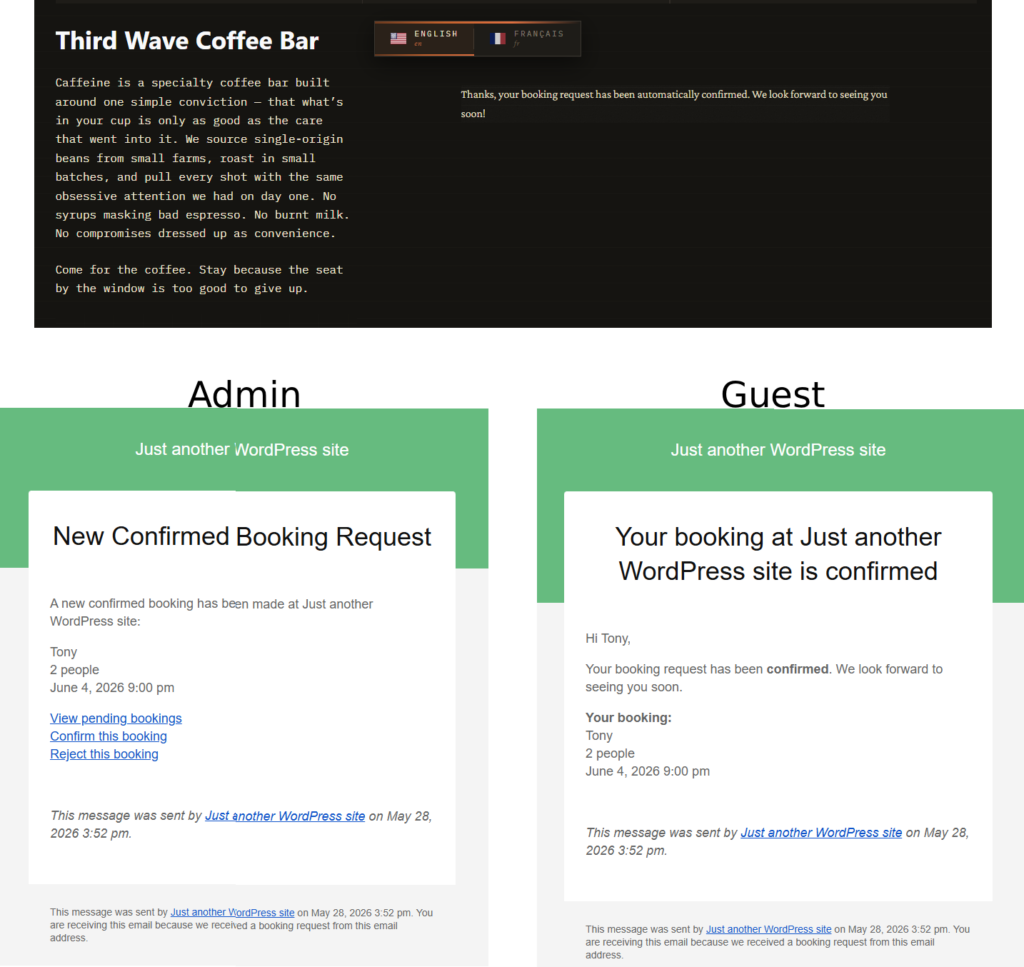
A practical message stack for how to create reservation confirmations in WordPress
- Create the reservation form and define which details must always be captured: date, time, party size, location, phone number, and any service notes.
- Write an instant confirmation message that repeats the reservation details in plain language instead of only saying the request was received.
- Set a parallel staff alert so the team sees new reservations without relying on a shared inbox.
- Add at least one reminder message before service, timed around your typical booking lead time and no-show risk.
- Test changed and cancelled reservations so your communication flow stays accurate when the booking status changes.
This is where Five Star Restaurant Reservations earns its place in the conversation. Five Star Restaurant Reservations is not just a form that collects requests. Five Star Restaurant Reservations gives restaurants one place to manage reservation statuses and the notifications that support them, which is what most operators actually need after the page goes live.
What should go inside the confirmation itself?
A good confirmation should be short, specific, and unambiguous. Include the guest name, reservation date, service time, party size, location if relevant, and any action the guest may need to take next. If your restaurant has deposits, hold policies, or arrival expectations, mention them clearly here instead of burying them in a footer. The message should sound like service, not like software.
- Repeat the booking details exactly as they were submitted.
- Mention any arrival window or late-arrival policy that affects table hold times.
- Give guests an obvious path to cancel or contact the restaurant if something is wrong.
- Keep branding consistent so the message feels like it came from the restaurant, not from a generic utility tool.
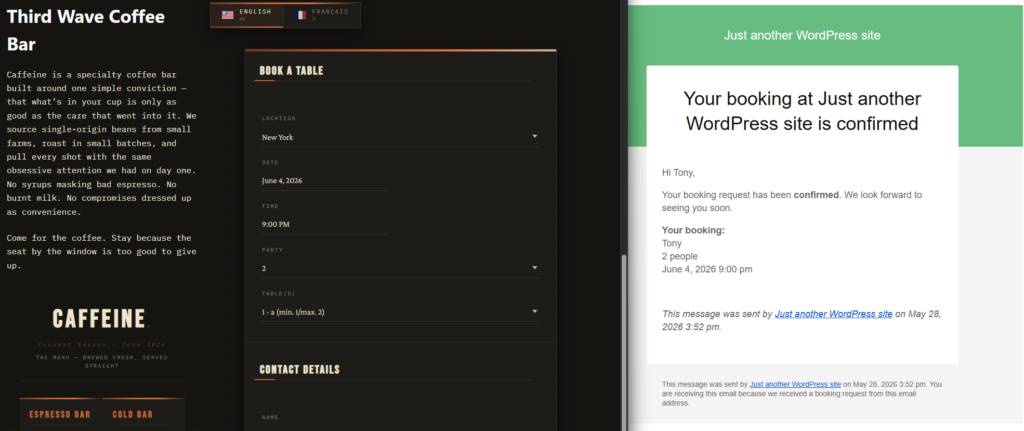
Set up confirmations that do more than acknowledge a booking
Build a reservation flow that reassures guests, informs staff, and reduces preventable errors before service starts.
A realistic restaurant workflow: from booking to service
Imagine a 55-seat bistro that accepts most reservations two to four days ahead. A guest books a table for four on Friday night. The confirmation arrives instantly with the exact service time and a note about the restaurant’s hold policy. At the same time, the host receives a staff alert. On Thursday afternoon, the guest gets a reminder with a clear path to cancel if plans changed. By Friday, the team is not guessing whether the reservation is real or recent. That is the difference between a messaging flow and a basic inbox.
In that scenario, how to create reservation confirmations in WordPress is less about technology than about consistency. Restaurants using manual confirmation habits often confirm some bookings instantly, forget others, and handle changes inconsistently. A restaurant reservations plugin turns that into a repeatable system.
Configuration choices that improve guest confidence
The best confirmation timing depends on the type of service you run. For casual neighborhood restaurants, instant confirmation plus a same-day reminder may be enough. For higher-demand service windows, you may want confirmation immediately and another nudge earlier in the day. If you accept large parties, a stronger communication path matters even more because the cost of a missed booking is higher.
- Keep confirmation language aligned with your brand voice so guests trust the message.
- Use custom booking fields only when they improve service; too much friction at booking time lowers completion rates.
- Match reminder timing to your real no-show pattern instead of copying a generic schedule.
- Test communications on mobile, because many guests will read confirmations on their phones.
Related Content
Common mistakes when creating reservation confirmations in WordPress
The first mistake is treating confirmation messages like an afterthought. Restaurants often launch the form and only later realize that guests need clearer expectations. The second mistake is sending a vague confirmation that does not repeat the booking details. The third is forgetting staff alerts entirely, which leaves the public flow working while the internal workflow stays fragile.
Another common issue is splitting the process across too many tools. If the reservation lands in one place, the staff alert in another, and reminder timing is handled manually, errors become much more likely. Five Star Restaurant Reservations is helpful here because Five Star Restaurant Reservations keeps the reservation and communication flow tied together inside one WordPress integration.
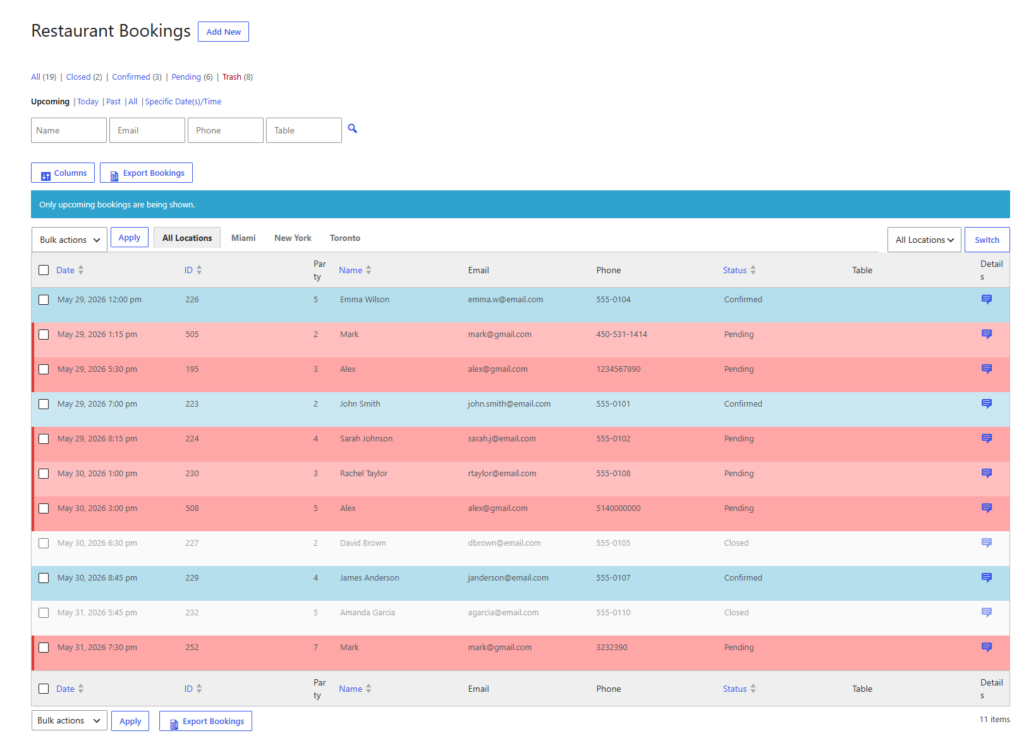
Turn booking confirmations into a service advantage
Use a direct-booking workflow that makes reservations clearer for guests and easier to track for staff.
Benefits of getting confirmations right
| Area | Weak setup | Stronger setup with a restaurant workflow |
|---|---|---|
| Guest trust | Guests wonder if the form worked | Guests see immediate proof that the reservation is real |
| Staff visibility | Hosts monitor inboxes manually | Hosts and managers get clear alerts tied to booking status |
| No-show prevention | Little opportunity to catch issues early | Reminders create a clean chance to confirm, cancel, or adjust |
| Operational control | Changes happen ad hoc | Reservation communication follows the same logic every time |
Frequently asked questions about how to create reservation confirmations in WordPress
Yes. Most restaurants do not need custom development. They need a reservation system that can trigger guest confirmations and staff alerts from the booking workflow itself.
Yes. The confirmation proves the reservation is in the system. The reminder helps reduce no-shows and catches changes closer to service.
Yes. Guest messaging and staff visibility solve different problems. A restaurant can still miss a booking operationally even if the guest received an email.
Use a setup with location-specific rules and messaging logic so one restaurant’s workflow does not create confusion for another.
Build confirmations, reminders, and alerts around direct bookings
Keep reservations on your own site and create a communication flow that supports service instead of adding manual work.