




How to build a WordPress restaurant booking portal is not just a design task. A true booking portal has to combine the guest-facing experience, the reservation rules behind it, and the management view the restaurant will use every day. If one of those layers is weak, the portal looks polished on the surface but still creates friction in service.
The cleanest way to answer how to build a WordPress restaurant booking portal is to start with direct-booking infrastructure first and page design second. WordPress Restaurant Reservations is a strong choice because Five Star Restaurant Reservations gives restaurants control over availability, booking rules, and notifications while still fitting into the site’s branding and broader WordPress integration.
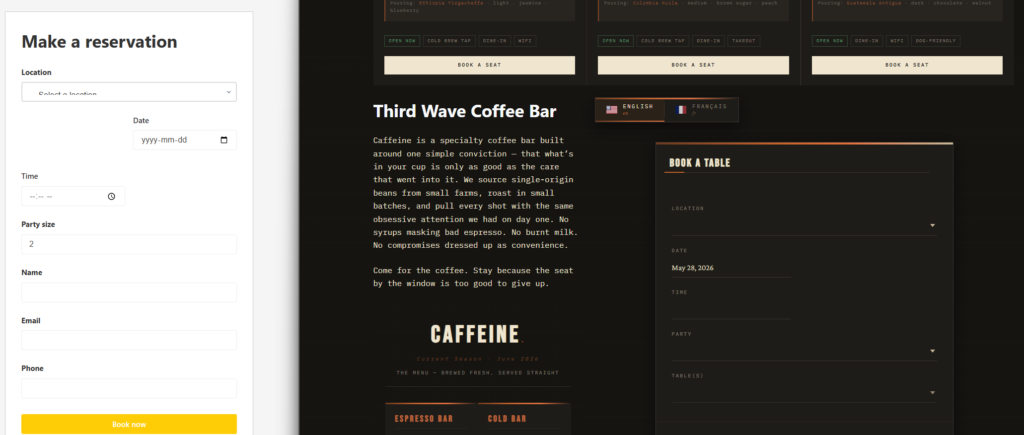
What makes a booking portal different from a simple reservation page
A reservation page lets someone submit a request. A booking portal gives guests a predictable path and gives staff a reliable operating layer. In practice, that means the public side should be easy to use, but the behind-the-scenes logic has to reflect actual service rules: table constraints, schedule exceptions, party-size limits, and notification timing. That is the difference between a page you publish and a workflow you can trust.
| Portal layer | What guests or staff see | Why it matters |
|---|---|---|
| Public booking experience | Form, location choices, date and time selection | Drives completion and guest confidence |
| Reservation logic | Availability rules, blackout dates, party-size constraints | Prevents bad bookings before they happen |
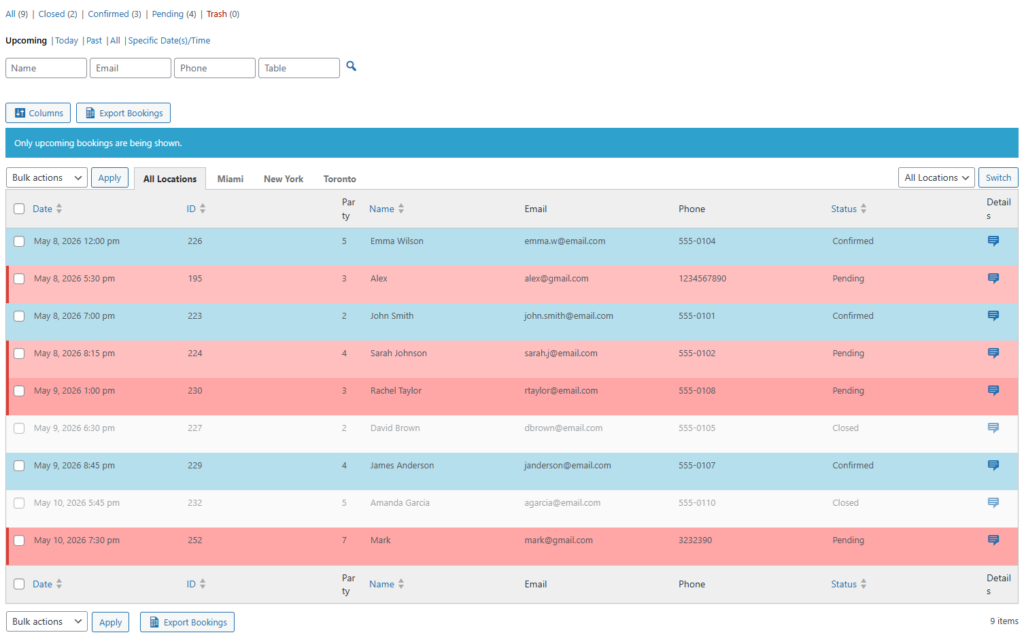
| Management layer | Dashboard, status handling, staff visibility | Makes service-day adjustments manageable |
Build the portal in five deliberate phases
Phase 1: Define the reservation model before touching the design
Before you choose a layout, decide how the restaurant wants to accept reservations. Are bookings single-location or multi-location? Do you allow large parties online? Are there different lunch and dinner rules? This first phase determines whether the portal supports real operations or becomes a constant source of exceptions.
Phase 2: Create the booking engine
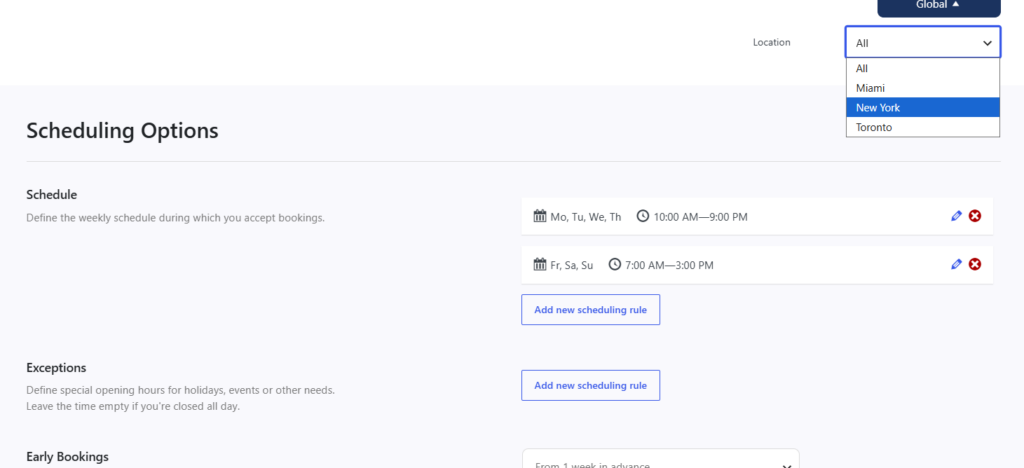
Set operating hours, holidays, special-event rules, booking windows, and capacity constraints. This is the technical core of how to build a WordPress restaurant booking portal. If your booking logic is too broad, guests will see times the restaurant cannot honor. If it is too restrictive, you will lose viable bookings.
Phase 3: Build the public pages around the booking engine
Now create the pages themselves. Most restaurants need a main reservation page, location-specific pages if relevant, and a clear navigation path from the home page and menu. The portal should feel native to the restaurant’s brand. Five Star Restaurant Reservations helps here because Five Star Restaurant Reservations keeps the booking experience on your own site instead of shifting the guest into a third-party path.
Phase 4: Map communication and exceptions
A real portal needs confirmations, reminders, and a way to handle changes. Decide what the guest sees right away, what staff are alerted to, and what happens when a booking is cancelled, modified, or arrives late. That workflow is part of the portal, not a separate afterthought.
Phase 5: Test the portal like service depends on it
Run realistic scenarios before launch: a small table for two, a larger party, a blackout date, a same-day booking, a mobile reservation, and a changed booking. The goal is not just to make the form work. It is to make the whole system predictable.
Build a booking portal around restaurant logic, not generic forms
Use a setup process that starts with service rules and ends with a cleaner direct-booking experience on your site.
A realistic example: a two-location restaurant group
Imagine a small restaurant group with one downtown location and one neighborhood location. The downtown location wants tighter Friday and Saturday controls, while the neighborhood location accepts larger parties earlier in the week. A single booking portal can still support both, but only if the underlying configuration respects location-specific rules. That is where many improvised setups break down.
In that scenario, the portal also has to protect website bookings from confusion. The guest needs to understand which location they chose, which times are really available, and what happens next. Staff need to see the same logic reflected in the dashboard. Five Star Restaurant Reservations is useful in this kind of setup because Five Star Restaurant Reservations supports operational rules instead of leaving the restaurant to patch them together manually.
Practical decisions that make the portal easier to manage
- Keep the main reservation path short; guests should not hunt through three pages to find the form.
- Expose only the booking fields that affect service quality or follow-up.
- Use location-specific wording when different restaurants have different policies.
- Plan the mobile experience early because a large share of restaurant bookings happen on phones.
- Treat notification timing as part of portal design, not as a later enhancement.
Common mistakes that make building a restaurant booking portal in WordPress harder than it needs to be
One common mistake is building the page first and the rules later. Another is assuming a generic appointment or contact-form tool can behave like a restaurant reservations plugin. A third mistake is making the portal look complete without testing service-day edge cases. Those failures do not always appear immediately, but they show up as manual corrections, missed bookings, and staff frustration.
A subtler mistake is forgetting the ownership argument. Part of how to build a WordPress restaurant booking portal is deciding where the relationship lives. A direct-booking portal lets the restaurant keep the branding, the guest data, and the path from site visit to reservation inside one environment.
Related Content
What the finished portal should deliver
| Outcome | What a strong portal does |
|---|---|
| Better guest path | Guests can move from browsing the site to reserving a table without leaving the brand experience |
| More operational control | Managers can configure realistic rules instead of cleaning up bad reservations later |
| Cleaner communications | Confirmations and reminders support the portal instead of living in a separate manual process |
| Less platform dependence | The restaurant owns the booking journey instead of relying on marketplace traffic |
Launch a WordPress booking portal that fits real restaurant operations
Move from a basic reservation page to a direct-booking workflow your team can actually manage.
Frequently asked questions about how to build a WordPress restaurant booking portal
No. Many restaurants can build a strong booking portal with the right plugin and a disciplined setup process.
Define the reservation rules first. Availability logic, blackout dates, and party-size rules matter more than styling in the early stages.
Yes. The stronger approach is to use a plugin that fits into your site design rather than sending guests elsewhere.
Build your booking portal around direct reservations
Use Five Star Restaurant Reservations to create a branded, operationally sound reservation portal on your own WordPress site.