




Automation sounds attractive because restaurant teams are tired of repetitive work: confirming bookings manually, chasing incomplete details, reminding guests about arrival windows, and re-explaining the same policies shift after shift. But good automation is not about removing people from the process entirely. It is about removing the low-value decisions that staff should not be making over and over.
That makes how to automate restaurant reservations a workflow design question. In WordPress, the right setup should make online reservations feel smoother for guests while giving the team a more reliable operating system behind the scenes.
What should an automated restaurant reservation system actually do?
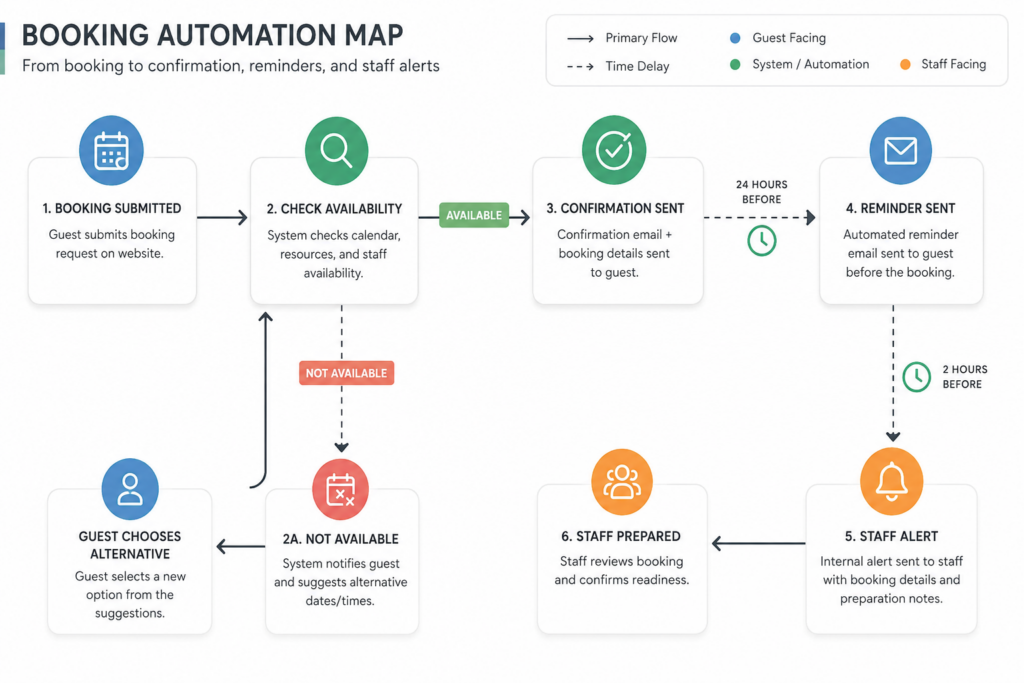
An automated restaurant reservation system should accept bookings based on live rules, send confirmations and reminders automatically, keep staff informed about status changes, and route exceptions into a visible review process. WordPress Restaurant Reservations is a strong fit for this because it combines direct bookings on your site with real-time availability, booking rules, notifications, no-show tools, and mobile-friendly management.
The aim is not to automate everything. The aim is to automate the predictable parts of reservation handling so staff can focus on hospitality and exceptions rather than repetitive admin.
What to automate first, and what should stay human
| Automate early | Keep human review in the loop |
|---|---|
| Basic confirmations and reminders | Large-party or special-event requests |
| Availability checks based on service rules | VIP handling or unusual seating demands |
| Status updates for ordinary bookings | Same-day exceptions that affect the floor plan |
| Cutoff windows for edits and cancellations | Requests that require judgment beyond the booking form |
| Routine follow-up messaging | Edge cases that need a manager call |
This distinction matters because automation works best when it reduces repetitive load without pretending the floor is a spreadsheet. A restaurant still needs judgment, but it should use that judgment on the exceptions that deserve attention.
Automate the repetitive work, not the hospitality
See how a direct WordPress reservation system can handle confirmations, reminders, and rule-based intake while keeping staff in control of exceptions.
Build the automation stack in layers
- Layer 1: intake automation. The form should only offer times, party sizes, and table options that fit your real rules.
- Layer 2: guest communication. Confirmations, reminders, and status messages should go out automatically so staff are not manually repeating the same information.
- Layer 3: risk control. Deposits, credit card holds, and late-arrival messaging help reduce no-shows and uncertainty around high-demand services.
- Layer 4: exception routing. When a booking falls outside normal rules, it should move into a visible queue instead of silently breaking the system.
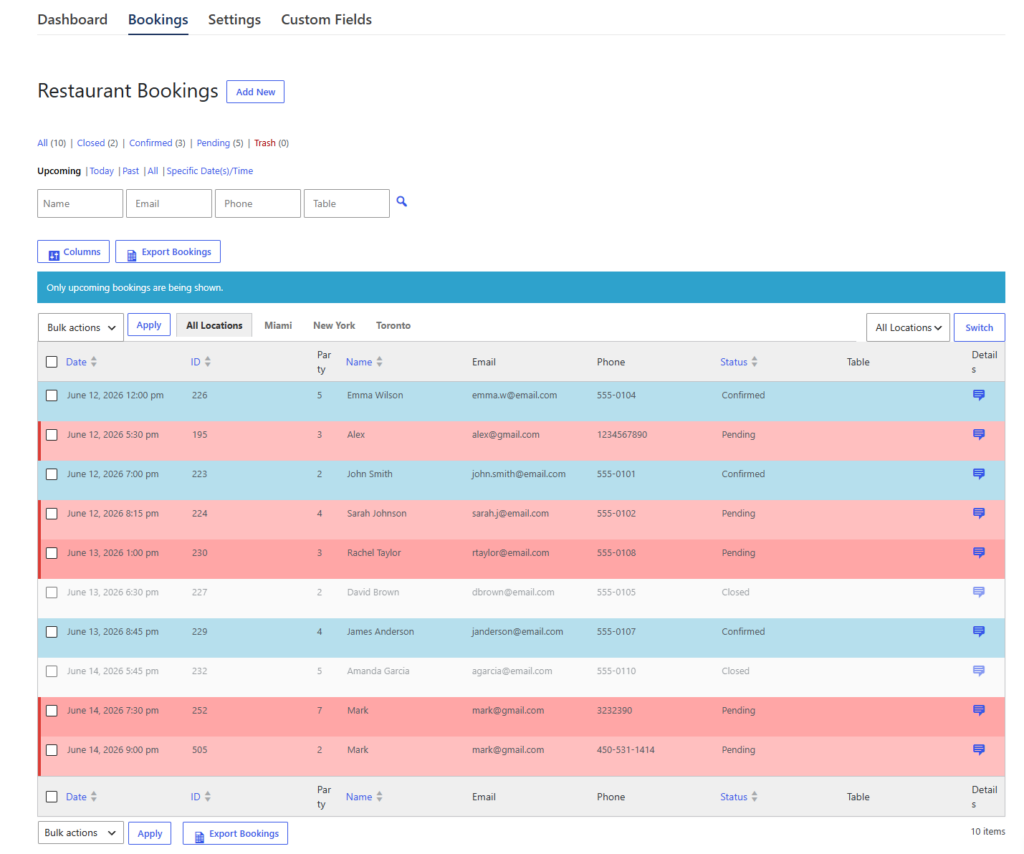
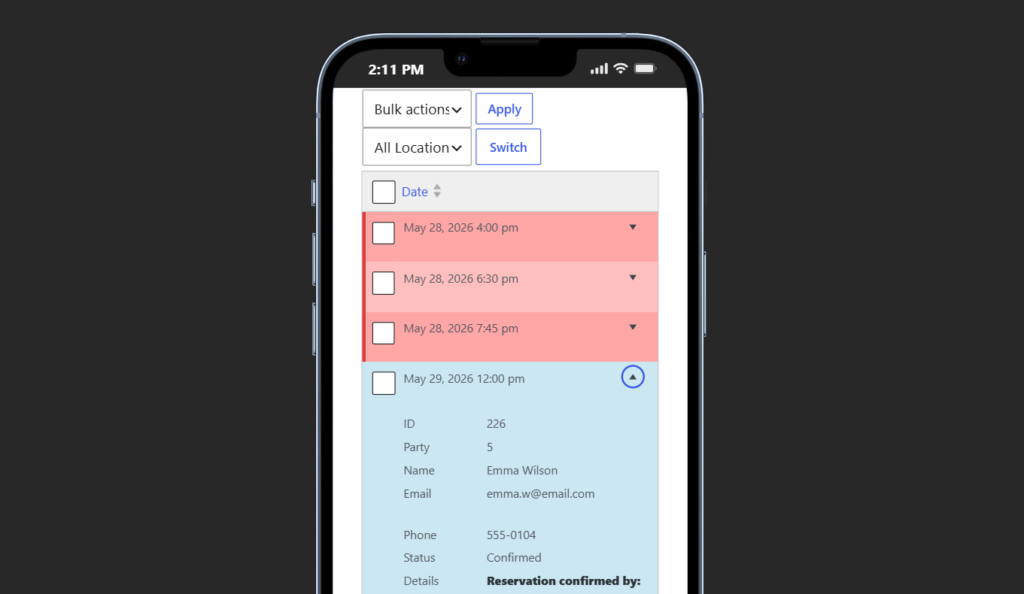
- Layer 5: staff visibility. Hosts and managers need a dashboard or mobile view that shows what changed, what is coming next, and what needs action.
A day in the life of an automated reservation flow
At 10:00 a.m., the system begins the day with confirmed reservations, deposits tied to the right service periods, and reminder timing already scheduled. At 1:00 p.m., a guest books a standard dinner table online. The system checks availability, confirms the booking instantly, and sends the guest the right message without staff intervention. At 4:00 p.m., reminders go out for evening reservations. At 5:20 p.m., a large-party request comes in outside ordinary limits, and instead of forcing it through, the workflow flags it for review.
That is where automation creates real value. The staff have not disappeared; they have simply been reserved for the moments where their judgment matters.
Related Content
Create a reservation workflow that runs with less manual effort
Use automation for confirmations, reminders, and rule-based bookings while keeping the team in control of approvals and edge cases.
Why automation improves staff visibility as much as speed
Restaurants often think of automation as time savings only, but visibility is just as important. A team that can see accurate statuses, upcoming arrivals, late-risk bookings, and exception queues from one place is easier to coordinate. That reduces internal friction between hosts, managers, and whoever is balancing reservations against walk-ins and floor pacing.
Automation also strengthens the booking experience for guests. When confirmations are immediate, reminders are consistent, and on-site messaging is brand-first, online reservations feel more trustworthy. That matters because guests interpret operational smoothness as a sign of restaurant quality.
Common automation mistakes
- Automating messages without first fixing the booking rules behind them.
- Trying to automate unusual bookings that still need human approval.
- Overloading the form with too many fields instead of collecting only what the team truly uses.
- Ignoring mobile management even though real service decisions often happen away from a desk.
- Assuming automation is complete once the guest receives an email, even if staff visibility is still weak.
Frequently asked questions about automating reservations
Yes. Good automation removes repetitive admin while leaving the restaurant more time and attention for genuine hospitality.
Usually confirmations and reminders, because they improve consistency immediately and reduce manual communication load.
Yes, for special cases. The strongest systems automate routine bookings and route higher-risk requests into a controlled workflow.
Automate bookings without giving up control
Five Star Restaurant Reservations helps restaurants automate the routine parts of online reservations while keeping policies, staff visibility, and guest experience aligned.