




Not every reservation should be confirmed instantly. Some bookings need a quick decision from the restaurant: a large group that may require table combinations, a special seating request, an unusual time, or a private-dining style inquiry disguised as an ordinary reservation. If those edge cases are handled ad hoc, staff end up making inconsistent calls and guests get mixed messages.
That is why learning how to create restaurant booking approval workflows matters. An approval workflow lets the restaurant protect service quality without turning the booking experience into a dead end. The best version feels responsive to guests and structured for staff.
When should a restaurant use an approval workflow instead of instant confirmation?
A restaurant should use an approval workflow when a booking affects floor planning, staffing, revenue protection, or service promises enough that it should not pass through automatically. WordPress Restaurant Reservations is well suited to this because it supports direct bookings on your WordPress site while giving the restaurant control over rules, notifications, statuses, and special-case handling.
In other words, approval is not a sign that the booking process is weak. It is a sign that the restaurant knows some reservations need judgment before they become commitments.
Which requests usually belong in the approval queue?
- Large-party bookings that may require table combinations or a different service cadence.
- Requests during blackout dates, holidays, or limited-capacity events.
- Bookings with unusually specific seating or accessibility requests that need confirmation.
- Reservations close to service when the room is already heavily sequenced.
- Requests that may actually be event or private-dining inquiries rather than standard tables.
Build the workflow around statuses, not inboxes
| Status | What it means | Who needs to act |
|---|---|---|
| Pending review | The booking was received but should not yet be treated as confirmed. | Host or manager reviews it against policy and availability. |
| Needs clarification | The guest request is promising but incomplete or operationally unclear. | Staff contacts the guest for missing details. |
| Approved | The restaurant can honor the booking as requested or with agreed adjustments. | System sends confirmation and staff see it in the live queue. |
| Declined or alternative offered | The original request cannot be honored exactly as submitted. | Staff or automated messaging proposes next-best options. |
| Escalated | The booking affects staffing, menu, event planning, or management approval. | Manager or owner makes the final call. |
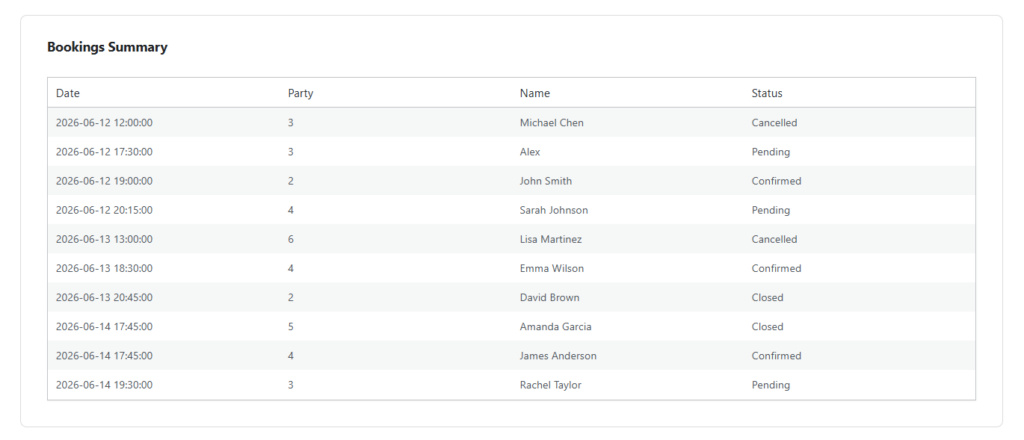
Stop handling special bookings through scattered messages
Use a WordPress reservation workflow that routes edge-case bookings through visible statuses instead of inbox chaos.
How to set up a booking approval workflow in WordPress
- Identify the triggers. Decide which bookings should be reviewed instead of confirmed automatically.
- Write the internal rules. Staff should know what counts as an approval, a clarification request, a decline, or an escalation.
- Design the guest messaging. A pending booking should still feel acknowledged, not ignored. The guest needs to know the request was received and when to expect an answer.
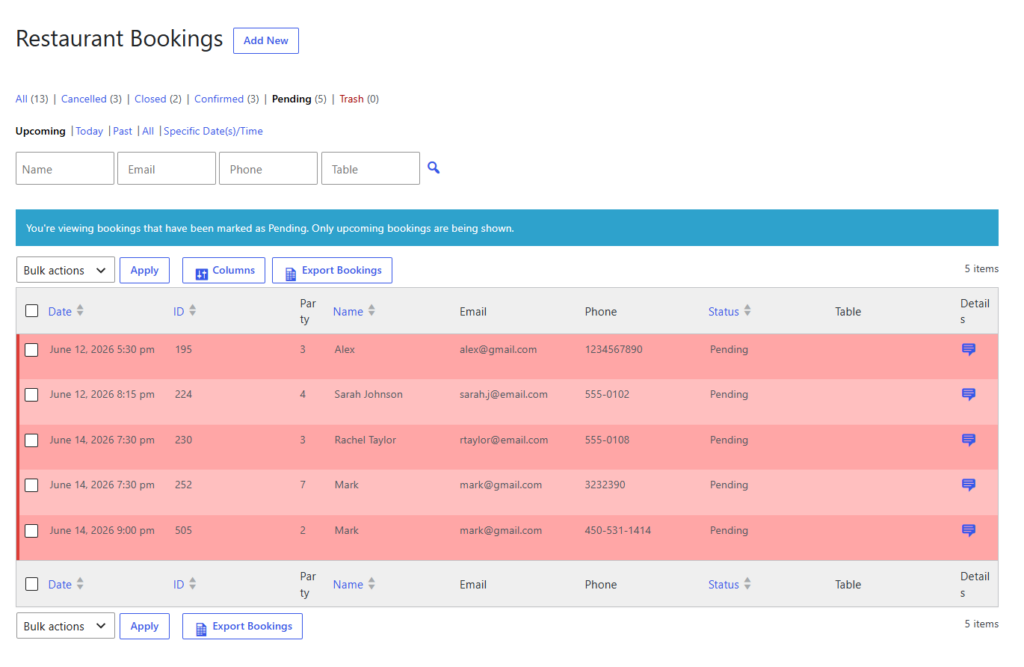
- Make statuses visible in the dashboard. Approval only works if hosts and managers can see the queue without hunting for information.
- Add notifications for time-sensitive reviews. A booking that needs a response before service should not sit buried in the system.
- Test edge cases. Run a mock large-party request, a same-day request, and a special seating request before launching the workflow.
Three realistic approval scenarios
1. Twelve-person birthday dinner. The request lands during a busy Saturday window. Because the party size exceeds the ordinary instant-book threshold, it enters pending review. Staff confirm whether the layout can support it, whether a deposit is needed, and whether an earlier or later time would produce a better guest experience.
2. Patio request during unstable weather. The guest wants a specific seating outcome that the restaurant may not be able to guarantee. Instead of over-promising, the booking stays in a controlled status until staff decide what can reasonably be honored.
3. Reservation that is really an event inquiry. The guest uses the standard booking form to describe something that affects staffing and setup. The workflow escalates it rather than letting it masquerade as a normal table booking.
Related Content
Create a review path for bookings that need judgment
Approval workflows help restaurants stay responsive to guests without confirming requests that would strain the floor or break service promises.
How to keep approval from becoming a bottleneck
- Give staff a response target, especially for same-day requests.
- Keep the number of approval-triggering conditions limited to the cases that genuinely need judgment.
- Make it obvious when a pending request is waiting on guest clarification versus manager review.
- Use confirmation and reminder templates that match the approval logic so guests are not confused.
- Review declined requests periodically to see whether the policy is too rigid or the floor setup needs improvement.
A good approval workflow protects the booking experience rather than slowing it down. Guests should feel that the restaurant is being careful and responsive, not indecisive.
Frequently asked questions about booking approvals
Not if the process is communicated well. Guests usually accept review steps when the restaurant acknowledges the request clearly and responds in a predictable timeframe.
Restaurants with frequent large-party requests, event traffic, complex floor layouts, or highly constrained premium service periods often benefit the most.
Yes. In fact, that is usually the best approach. Let ordinary reservations confirm automatically and reserve approval for the requests that truly need a decision.
Add control without making the booking process feel rigid
Five Star Restaurant Reservations gives restaurants a direct-booking path on their own site plus the control needed to review, approve, or route special requests cleanly.