




If you want to learn How to create an online restaurant booking system, the goal is not just to place a form on a page. A real booking system has to reflect your service model, protect capacity, reduce no-shows, and keep reservations inside your own brand instead of sending guests into a third-party marketplace.
For most WordPress sites, the most practical answer to How to create an online restaurant booking system is to use WordPress Restaurant Reservations. Five Star Restaurant Reservations lets you accept online reservations directly on your site, manage availability around actual table and service rules, and add confirmations and reminders without giving up customer data or paying platform-style commissions.
What does a real online restaurant booking system need?
A real system needs four layers working together: a guest-facing reservation form, availability rules, staff-side review and management, and communication after the booking is made. Many restaurants install a form and think they are done, but the system fails later when party-size rules, special events, blackout dates, or table combinations have not been configured.
| System layer | Why it matters | What to decide early |
|---|---|---|
| Reservation form | Captures guest requests clearly | What fields you actually need |
| Availability rules | Protects service flow | Hours, blackout dates, party limits, special dates |
| Management view | Lets staff act quickly | Who reviews bookings and how they are updated |
| Notifications | Reduces confusion and no-shows | When to send confirmations, reminders, or approval notices |
How to create an online restaurant booking system step by step
Step 1: Start with direct bookings, not platform dependency
The first decision is strategic. Do you want guests booking on your own site, or do you want to rely on a third-party platform that owns more of the guest journey? If your priority is operational control and brand trust, direct online reservations are usually the better fit. Five Star Restaurant Reservations is built around that model.
Step 2: Map your service rules before you touch the plugin settings
Write down your real-world booking constraints: opening hours, table mix, average turn times, large-party rules, holiday exceptions, and whether some services require deposits. This one exercise makes the plugin setup dramatically easier because you are configuring a workflow you already understand, not guessing as you go.
Step 3: Configure the booking form around decision-making
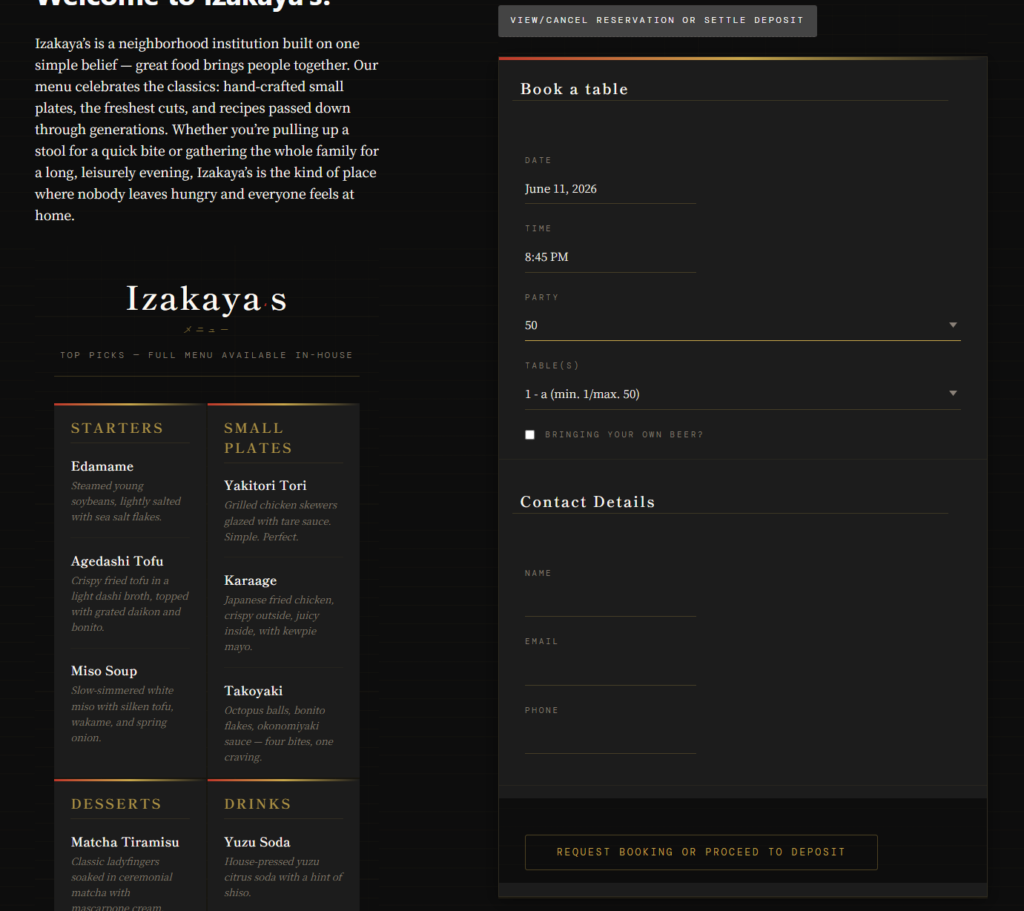
The booking form should collect what the host actually needs to seat the guest properly. Date, time, party size, contact details, and special notes are usually the minimum. Five Star Restaurant Reservations also supports custom booking form fields, which matters if you need to ask about accessibility, high chairs, deposits, or private room interest.
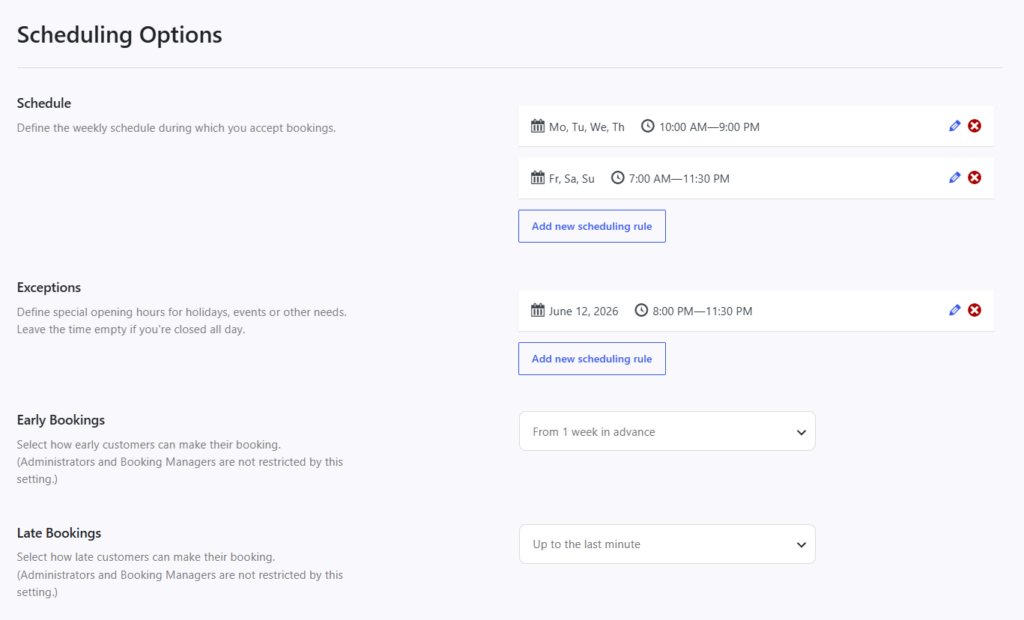
Step 4: Set availability to match the floor, not just the clock
This is where many systems break. Do not think only in terms of hours. Think in terms of capacity. Real-time table availability, party-size restrictions, and table or section logic matter more than a generic list of time slots. If the restaurant runs special-event nights or different holiday hours, configure those up front so staff are not forced into manual cleanup later.
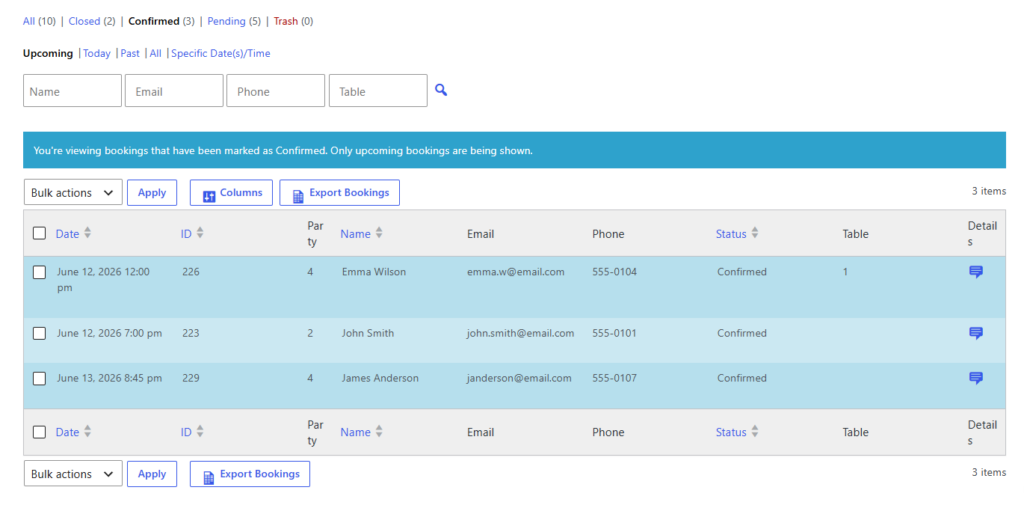
Step 5: Build the staff workflow
Who sees new bookings? Who approves edge cases? Who changes reservations when guests call? If the answer is ‘we will figure it out later,’ your online restaurant booking system will become a front-end convenience with a back-end bottleneck. Five Star Restaurant Reservations is strongest when you define that management workflow deliberately.
Step 6: Add confirmations and reminders
Your booking experience is not finished at form submission. Confirmation emails, approval notices where needed, and reminder messages all reduce guest uncertainty and lower no-show risk. This is especially important if you use deposits or credit card holds for high-demand services.
Build the booking system around your actual service rules
See how Five Star Restaurant Reservations supports direct bookings, availability control, and branded reservations on your own site.
A realistic setup example for a 60-seat restaurant
Imagine a neighborhood restaurant with forty indoor seats, twenty patio seats, and one private table for larger groups. Lunch is straightforward. Dinner is tighter, Friday and Saturday book up quickly, and patio seating depends on weather. In this scenario, the system should accept standard lunch reservations automatically, apply more restrictive availability at dinner, route large-party requests through approval, and send reminders before service. That is a much better fit than a generic widget that treats every booking like the same kind of request.
Practical configuration tips that save time later
- Use fewer form fields than you think, then add only the ones staff repeatedly need.
- Set special dates and blackout periods early instead of handling them manually one by one.
- Create a clear rule for when deposits or credit card holds apply.
- Make reminder timing part of setup rather than an afterthought.
- Test the system on mobile before launch, because many guests will book from their phones.
Common mistakes when creating an online restaurant booking system
- Using a generic form instead of a true restaurant reservations plugin.
- Skipping table and capacity logic and relying on staff to resolve conflicts manually.
- Copying platform workflows even though your restaurant has different rules and priorities.
- Sending vague confirmations that do not clearly state whether the reservation is confirmed or requested.
- Launching without a staff process for same-day changes and special cases.
Why Five Star Restaurant Reservations is a strong WordPress route
Five Star Restaurant Reservations is a strong route because Five Star Restaurant Reservations combines direct bookings, commission-free and contract-free operation, branded on-site booking, table and section logic, flexible scheduling, deposits or holds where relevant, and notifications that support the whole booking experience. If you are trying to create an online restaurant booking system in WordPress, those are the pieces that keep the setup practical instead of fragile.
Related Content
Launch a direct-booking system without marketplace dependency
Start with a reservation workflow that lives on your own WordPress site and supports real restaurant operations.
Frequently asked questions
No. Most restaurants should automate routine reservations and reserve manual approval for edge cases like large parties, special events, or unusual seating requests.
Yes. A direct-booking plugin like Five Star Restaurant Reservations lets you accept reservations on your own site without platform-style commission fees.
Usually treating booking setup like a page-design task instead of an operations task.
Yes, if you use location-specific rules and keep each site’s availability logic clear.
Create an online restaurant booking system that actually fits service
If you want direct online reservations, stronger booking control, and a more trustworthy guest experience, Five Star Restaurant Reservations is a practical place to start.