




If you need to decide whether a reservation is accepted, declined, or needs follow-up, the message workflow matters almost as much as the booking form. Many restaurants focus on collecting requests first and only later discover that unclear approval notifications create phone calls, missed tables, guest confusion, and preventable no-shows. That is why How to create reservation approval notifications is really a communications problem, not just a settings problem.
The best setups make approval status obvious to guests, keep staff aligned internally, and send the right message at the right moment. WordPress Restaurant Reservations is useful here because Five Star Restaurant Reservations keeps online reservations on your own site, lets you manage approvals directly inside WordPress, and supports automated email and SMS notifications for different booking statuses.
What is the cleanest way to create reservation approval notifications?
The cleanest answer to How to create reservation approval notifications is to treat notifications as a staged workflow. Build one message for booking receipt, one for approval, one for reminders, and one for staff alerts when action is required. With Five Star Restaurant Reservations, you can connect that flow to direct online reservations, so guests get a clearer booking experience while your team keeps operational control on your own site.
Start with a status map before you write any message copy
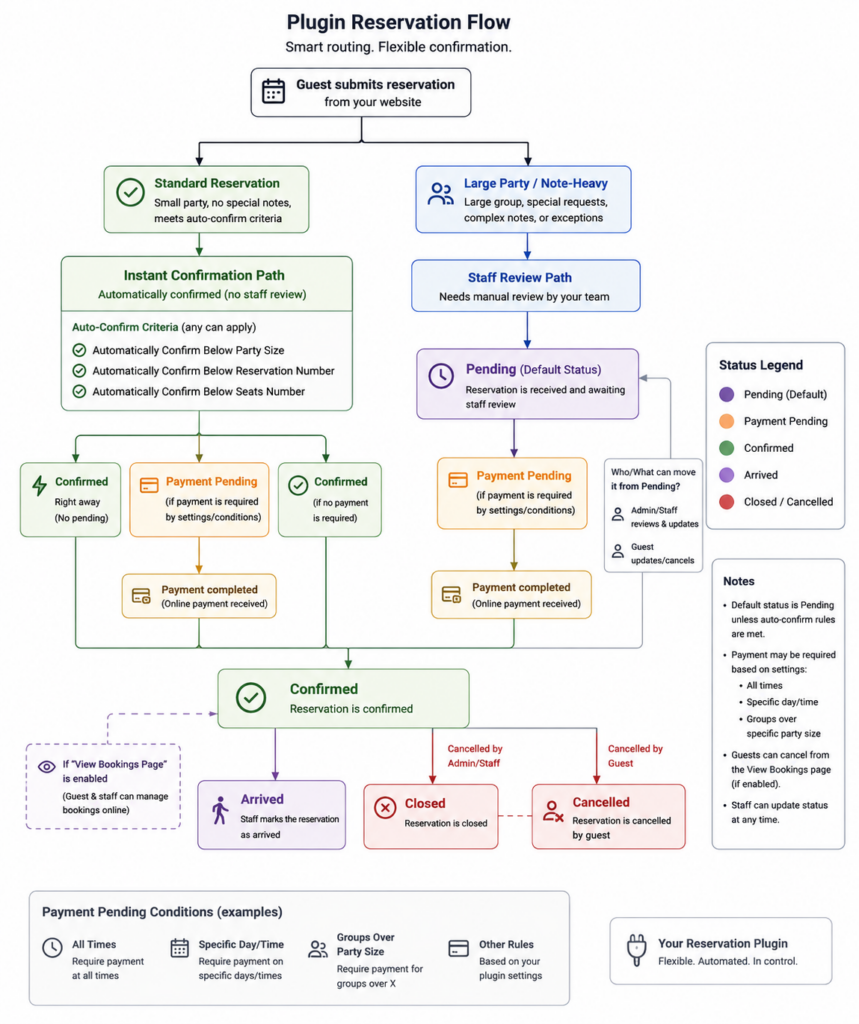
Most notification problems come from sending one generic email for every situation. Approval-based bookings need at least four states: request received, approved, declined, and changed. If your restaurant uses deposits, large-party rules, or special-event seating, you may also need a fifth state for ‘pending review’.
- Request received: confirms the restaurant got the request but has not promised the table yet.
- Approved: confirms date, time, party size, location, and any arrival expectations.
- Declined or unavailable: closes the loop politely and may offer an alternate time.
- Reminder: reduces no-show risk by prompting action before service.
- Staff alert: tells hosts or managers when a request needs approval quickly.
How to configure the approval workflow in WordPress
1. Decide which reservations need manual approval
Do not approve everything manually unless you genuinely need to. Use approvals where risk is highest: large parties, holiday services, patio-only seating, chef’s tables, or requests outside normal table constraints. For standard weekday bookings, automatic acceptance is often better. For edge cases, manual review protects the floor plan.
2. Make the booking form collect the details staff actually need
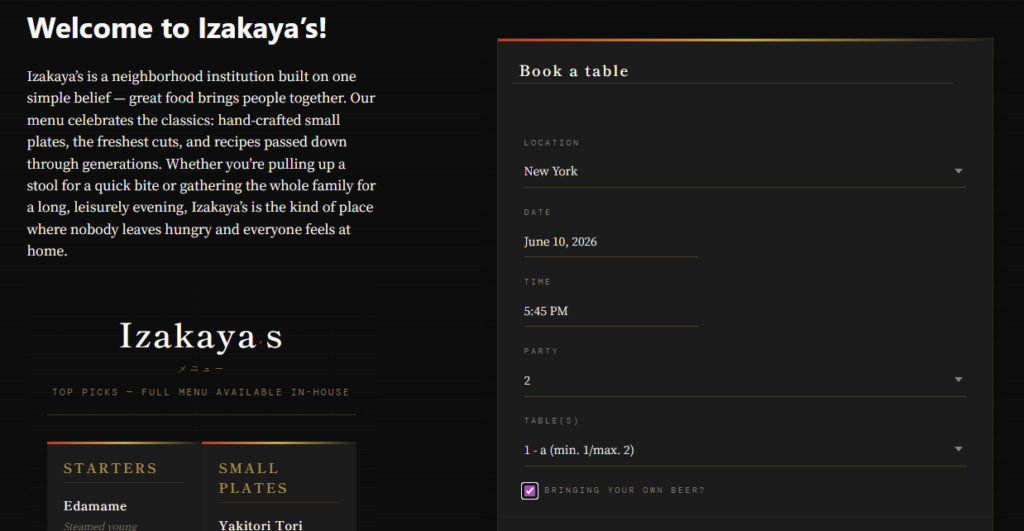
If you want approval notifications to work, the form has to collect enough information for fast decisions. That usually means party size, preferred time, contact information, seating notes, and any field tied to your policy such as stroller access, deposit acknowledgement, or dietary needs. Five Star Restaurant Reservations supports custom booking form fields, which helps you avoid the back-and-forth that slows approval down.
3. Write a clear ‘request received’ message
This message should never sound like a final confirmation. It should say the restaurant has received the request, when the guest should expect an answer, and what happens next. That single wording choice prevents many support replies from guests who assume the table is already locked in.
4. Build a stronger approval message than a basic confirmation
The approval notification should restate the essentials: date, time, party size, location, and any operational conditions. If you use deposits or late-arrival rules, include them here, not buried elsewhere. A strong approval message supports the booking experience because it reduces ambiguity before the guest arrives.
5. Add staff alerts with urgency, not noise
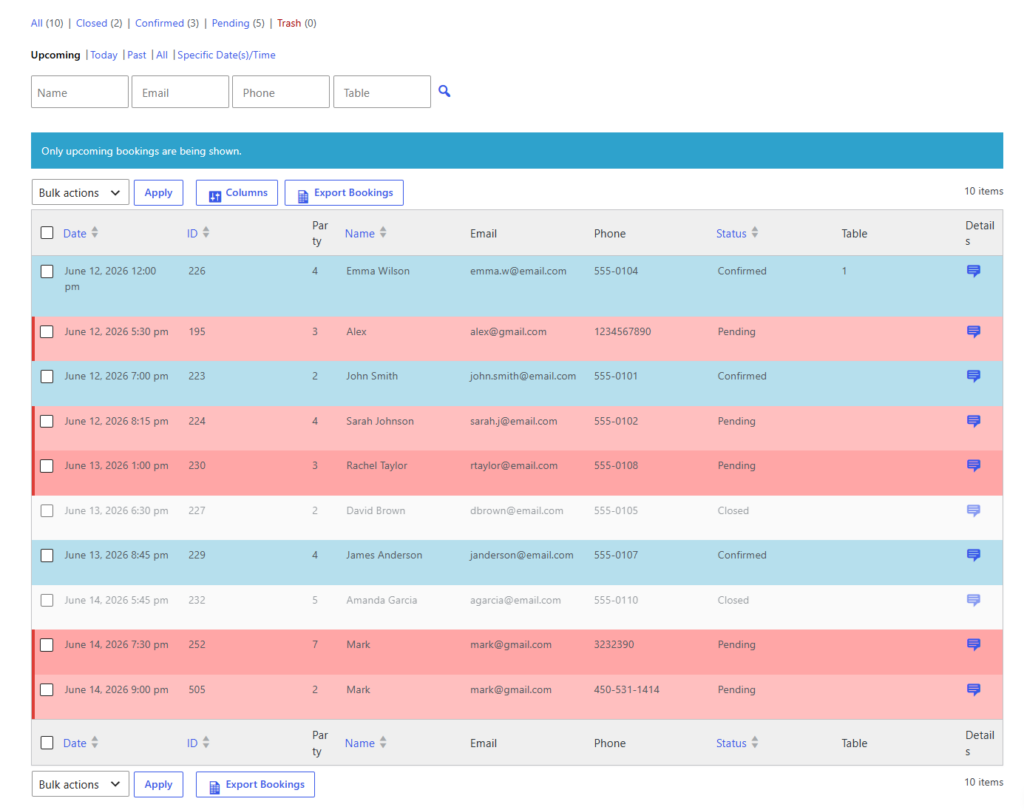
Staff notifications should help the team act faster, not create inbox clutter. A practical setup is to alert staff only when a booking crosses a rule threshold, such as a party of eight or more, a same-day request, or a request during a near-capacity service window.
| Notification | Who gets it | What it should accomplish | Common mistake |
|---|---|---|---|
| Request received | Guest | Sets expectations and confirms the request was logged | Sounds like a guaranteed booking |
| Approval message | Guest | Locks in details and policy terms | Leaves out timing, location, or arrival rules |
| Reminder | Guest | Cuts no-show risk and prompts changes early | Sent too early or too late |
| Approval alert | Staff | Speeds up decision-making | Triggers for every routine request |
Design a clearer approval flow before the next busy service
See how Five Star Restaurant Reservations can help you approve bookings faster and communicate more clearly.
A realistic approval-notification workflow for a busy restaurant
Imagine a bistro that accepts standard tables automatically but manually reviews parties of seven or more. A request for eight guests comes in for Saturday at 7:30 p.m. The system immediately sends a request-received email and a staff alert. The host checks table combinations, confirms availability, and approves the booking. The guest then receives a polished approval message with the final time, party size, and deposit terms. The day before service, an automated reminder goes out by SMS. That sequence is simple, but it removes uncertainty at every step.
Why timing changes guest confidence and no-show risk
When people search How to create reservation approval notifications, they often think about wording first. Timing is just as important. If the request-received message arrives instantly but the approval takes twelve hours, the message should say so. If reminders are part of your no-show strategy, send them close enough to matter but early enough that guests can still modify or cancel reservations.
A practical pattern is immediate receipt, approval as soon as the request is reviewed, and a reminder roughly one day before service. For premium or high-demand seating, a same-day reminder can also work well. The key is consistency. Direct online reservations feel more trustworthy when the process behaves predictably.
Common mistakes that make approval notifications harder than they should be
- Using the same wording for a booking request and an approved reservation.
- Failing to include contact details or a way for guests to update their reservation.
- Approving bookings without restating arrival windows, deposits, or large-party conditions.
- Sending staff alerts to too many people, which trains everyone to ignore them.
- Collecting too little information in the original form, forcing manual follow-up before approval.
When Five Star Restaurant Reservations is the better fit
Five Star Restaurant Reservations makes more sense when you want direct bookings, on-site data ownership, and message workflows tied to real restaurant rules. That matters if you need approval notifications connected to party-size limits, table management, special-event hours, or reminders designed to reduce no-shows. Five Star Restaurant Reservations is not just helping you send email; Five Star Restaurant Reservations is helping you create an approval process that fits service.
Related Content
Turn pending requests into clear guest communication
Build approval messages that support service rules without sending guests through a third-party platform.
Frequently asked questions about reservation approval notifications
No. Many restaurants should approve routine bookings automatically and reserve manual approval for edge cases such as large parties, limited seating, or special events.
Email is usually best for the full details, while SMS is strongest for reminders and urgent updates. Many teams use both.
Avoid vague wording. Guests should know whether the booking is requested, approved, modified, or declined without having to guess.
Third-party tools can work, but direct bookings on your own site usually give you more customer data, more branding control, and less platform dependency.
Create approval notifications that support smoother service
If your current messages create confusion for guests or extra work for staff, Five Star Restaurant Reservations gives you a stronger direct-booking workflow.