




Learning how to build a reservation system for restaurants means designing the full operating model behind online reservations. A reservation system is not only a form. It is the combination of guest intake, availability rules, staff review, confirmation messaging, and daily management. WordPress Restaurant Reservations helps restaurants build that system inside WordPress so direct bookings stay on the restaurant website.
The strongest systems are built around real service conditions. They answer what times are bookable, what details staff need, how requests are approved, and what guests see after they submit. That is what separates a reliable booking experience from a form that creates more work.
The system you are really building
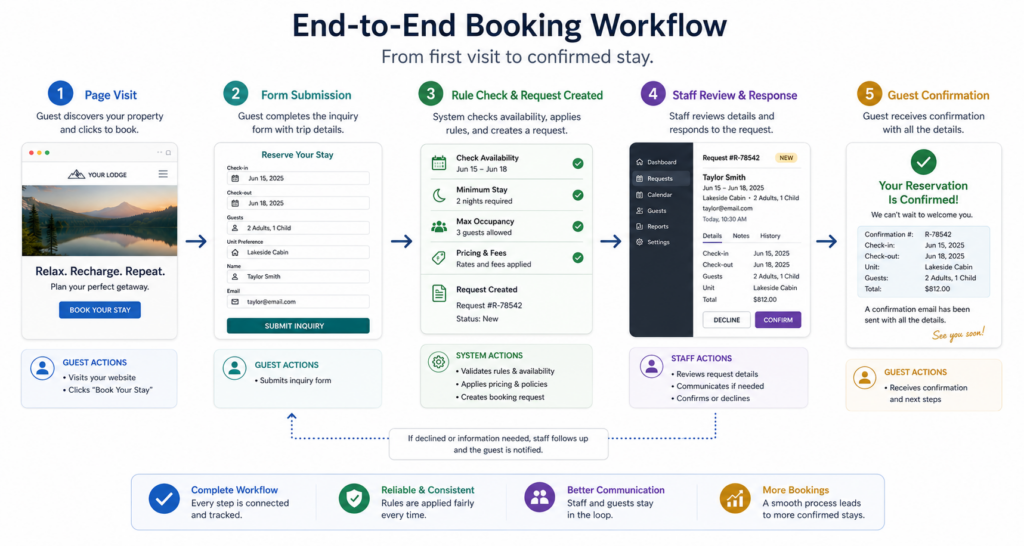
The practical answer to how to build a reservation system for restaurants is to create a dedicated booking page, use a restaurant reservations plugin, configure service-based availability, collect structured guest information, and give staff a dashboard or workflow for managing every request. Five Star Restaurant Reservations is a strong choice because Five Star Restaurant Reservations supports a reservation-specific workflow rather than a generic inbox.
Treat the system as four connected layers: guest interface, booking rules, staff operations, and guest communication. If one layer is weak, the whole restaurant reservations setup becomes harder to manage.
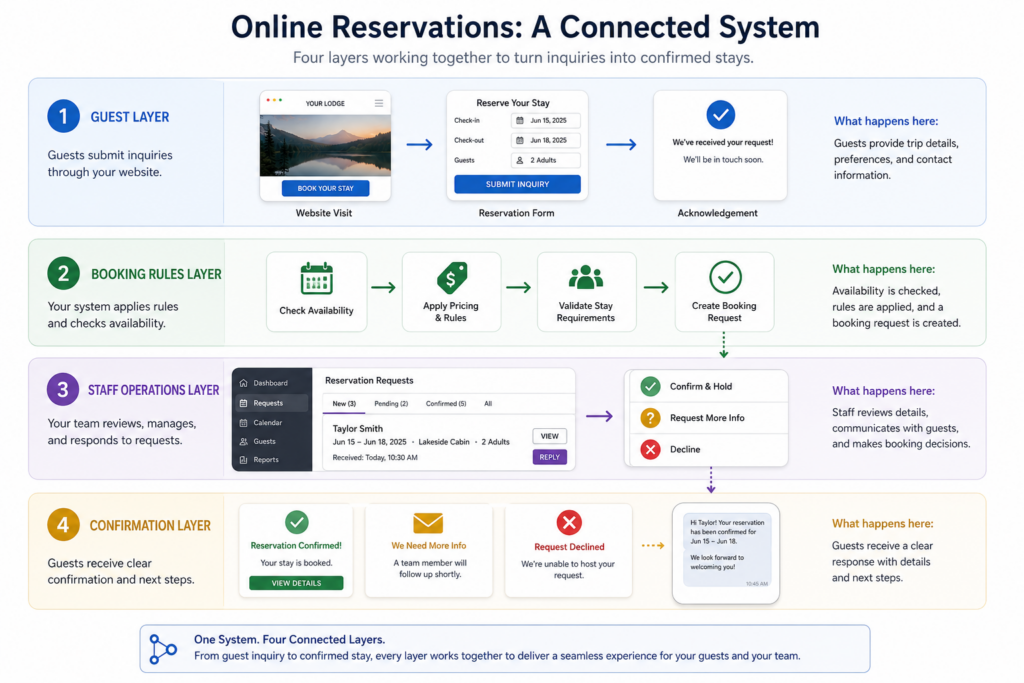
Layer 1: the guest interface
The guest interface is the page where a visitor decides whether booking feels easy and trustworthy. Keep it focused. Use clear language, show the form early, and explain the status of the request. Guests should not need to read a full restaurant story before finding the reservation action.
- Use one clear page title and one primary booking button language.
- Keep the form visible on mobile without excessive scrolling.
- Add concise policy notes for large parties or same-day bookings.
- Link the page from navigation, menus, location pages, and the footer.
This is where the booking experience becomes visible. A clean page makes online reservations feel like a normal part of the restaurant, not a bolted-on tool.
Layer 2: the rules that protect service
The rules layer is where restaurant reservations wordpress projects often succeed or fail. Do not simply copy opening hours into the booking calendar. A restaurant may be open for five hours but only able to accept certain arrival patterns. Time slots, party-size limits, and review policies should reflect real capacity.
| Rule area | Question to answer | Operational reason |
|---|---|---|
| Service windows | Which times should guests be able to request? | Prevents unrealistic arrival patterns |
| Party size | What sizes can be accepted online? | Protects table planning and staffing |
| Approval status | Which bookings need review? | Prevents accidental over-commitment |
| Guest details | What information is required? | Reduces follow-up calls |
| Exceptions | What needs a phone call or manual review? | Keeps unusual requests from breaking the workflow |
Build reservations around real restaurant operations
Use Five Star Restaurant Reservations to connect booking pages, availability rules, and staff management inside WordPress.
Layer 3: the staff workflow
A reservation system must tell staff what to do next. Who receives new booking notifications? Who approves pending requests? Who adjusts a reservation if the guest changes the party size? If the answers are unclear, staff will fall back to calls, notes, and memory.
A simple staff workflow might include a pre-service review by a manager and live shift monitoring by a host. Five Star Restaurant Reservations can keep requests organized in WordPress, but the restaurant still needs to define ownership.
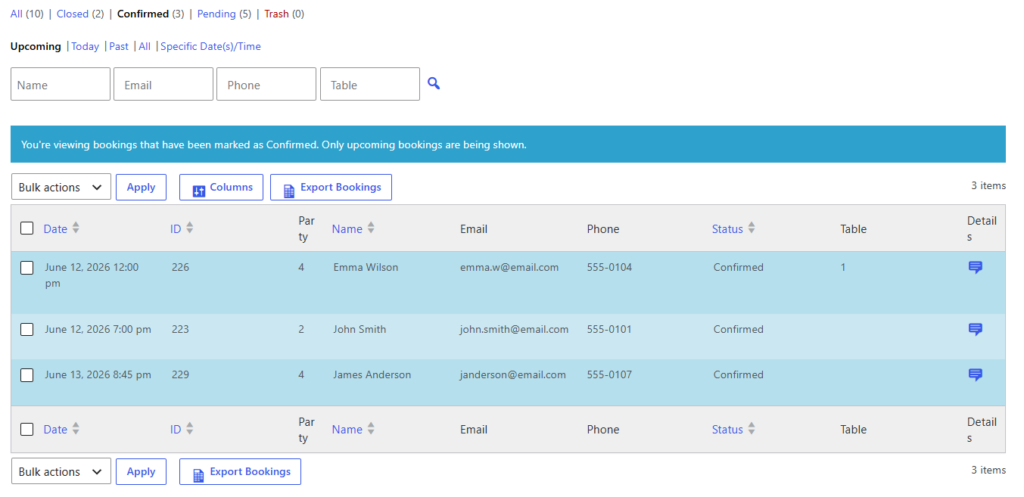
Layer 4: the confirmation experience
Confirmation messaging closes the loop. Guests need to know whether a request is accepted, pending, or waiting for staff review. Vague messages create uncertainty and drive phone calls. Clear messages build trust and reduce interruptions.
If the restaurant uses review-based approval, say so. If special requests are not guaranteed, say so politely. Strong confirmation copy is part of the reservation system, not a finishing touch.
Implementation sequence that avoids common mistakes
- Map your normal service windows and pressure points before configuring settings.
- Create the reservation page and decide where it will be linked from.
- Set up Five Star Restaurant Reservations and configure the form around required guest details.
- Define availability, timing, and review rules based on service capacity.
- Write confirmation and pending-message copy.
- Submit test bookings from mobile and desktop, then review what staff receive.
- Train staff on who reviews, approves, edits, and declines requests.
This sequence keeps how to build a reservation system for restaurants grounded in practical decisions. The goal is not to create the most complicated system. The goal is to create a system that survives real service.
Create a system your host team can trust
Set up direct reservations with clear rules, guest confirmations, and staff visibility using Five Star Restaurant Reservations.
Related Content
A realistic finished system
Consider an 80-seat restaurant with a busy Saturday dinner. The finished system has a “Reservations” page, controlled booking windows, a form that captures party size and special notes, and a dashboard the host checks before and during service. Guests receive confirmation language that explains the status of the request, and staff manage bookings from one workflow.
That is a stronger outcome than embedding a generic form. Five Star Restaurant Reservations gives restaurants a practical way to build a reservation system for restaurants while keeping direct ownership of the booking path and guest data.
Questions about building a reservation system
Not usually. A form collects details, but a reservation system connects those details to availability, staff action, and confirmation messaging.
Simple enough for staff to use consistently, but structured enough to avoid manual workarounds.
Yes. Five Star Restaurant Reservations lets restaurants manage bookings through their own WordPress site.
Test peak times, large parties, last seating, mobile form completion, staff notifications, and confirmation language.
The best approach to how to build a reservation system for restaurants is to design the workflow first and then configure the tools around it.
Build a reservation workflow on your own site
Use Five Star Restaurant Reservations to accept, manage, and confirm restaurant bookings directly in WordPress.