




When restaurant owners ask How to let customers book restaurant tables online, they usually mean something simpler than a full reservation platform: they want guests to choose a time, submit a request or booking, and stop calling the restaurant for routine reservations. But the simplest-looking setups often create the most back-end friction if they do not account for table rules, staffing, and follow-up communication.
The practical answer to How to let customers book restaurant tables online is to use Five Star Restaurant Reservations and build the booking path around your actual service flow. WordPress Restaurant Reservations helps restaurants accept online reservations directly on their own site, present a better booking experience to guests, and stay in control of availability, notifications, and guest data.
What matters most before you publish the booking page?
Before you think about colors or button copy, answer three operational questions. Which tables can be booked online? Which bookings need restrictions or approval? What should happen after the guest clicks submit? If you do not answer those first, the front-end page may look clean while the real workflow remains messy.
- Decide whether all tables or only certain service windows should be bookable online.
- Set a clear rule for large parties, deposits, and same-day reservations.
- Define whether guests receive an instant confirmation, a request receipt, or an approval notice.
How to let customers book restaurant tables online without creating extra host-stand work
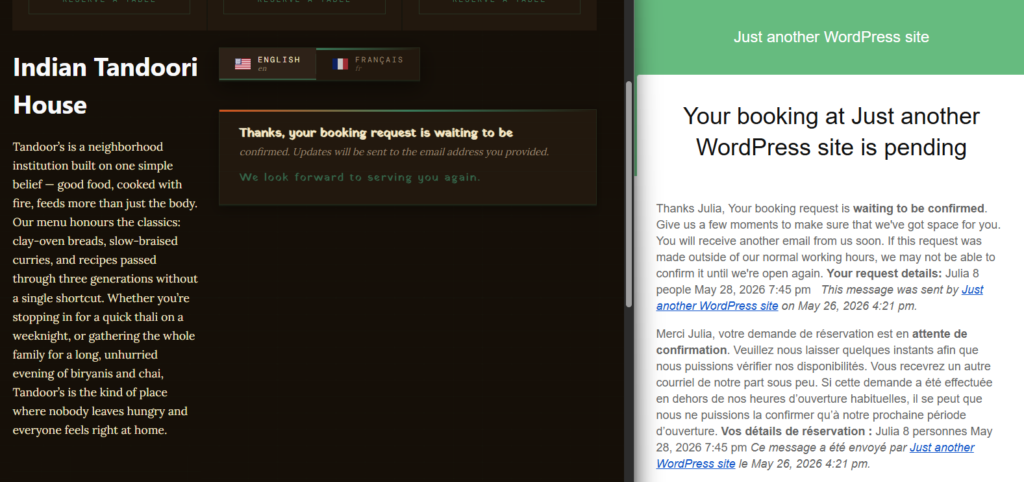
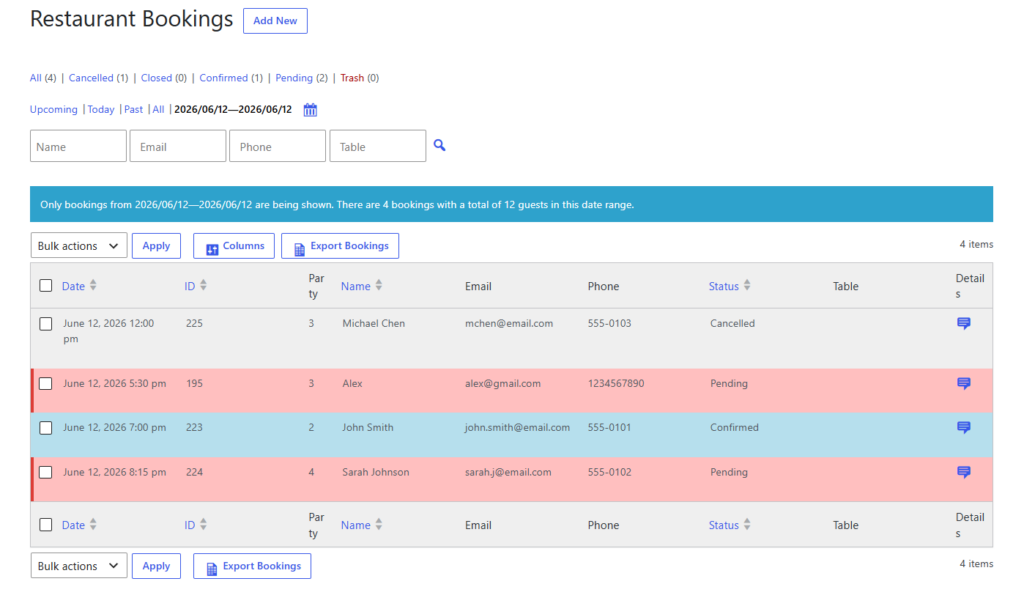
The key is to reduce guest effort without increasing staff cleanup. That means the page has to feel simple to the diner but be backed by real capacity and communication rules. Five Star Restaurant Reservations is helpful here because Five Star Restaurant Reservations supports real-time availability, table and section management, custom hours, special-event logic, and automated status notifications.
A front-end implementation plan that works
Place the booking option where guests already look for it
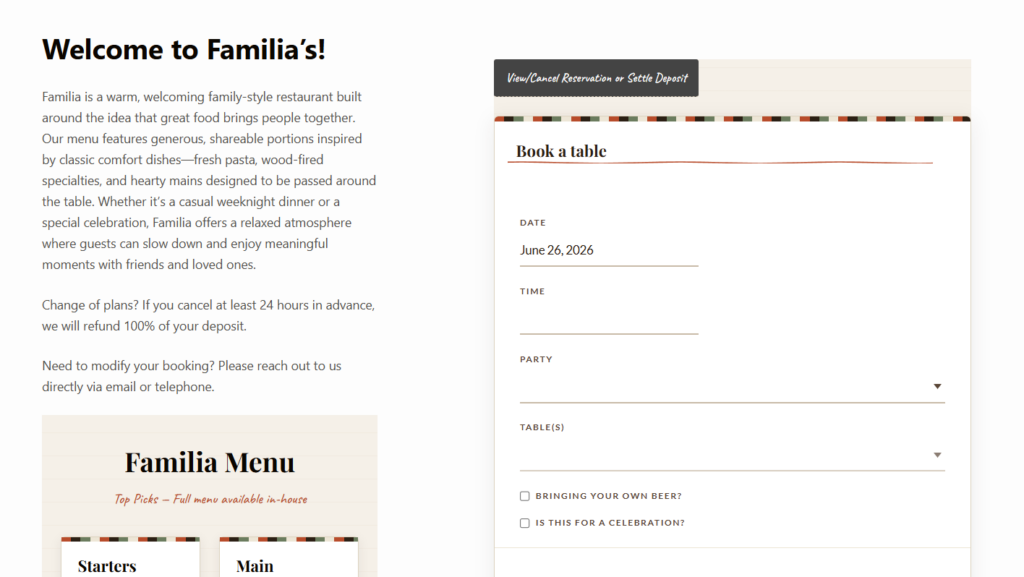
Do not hide table booking behind a generic contact page. Put a ‘Book a Table’ call to action in the main navigation, on the homepage, and on high-intent pages like menus, events, and private dining information. If your site gets search traffic, a dedicated reservation page often converts better than a buried widget.
Keep the booking form focused
If the goal is to let customers book restaurant tables online, the form should feel fast. Ask for the essentials first: date, time, party size, name, and contact details. Only add extra fields when they help staff make a better seating decision. Too many questions can slow conversions, but too few can create manual follow-up. The right middle ground improves the booking experience for both sides.
Use table rules to protect the floor
This is the difference between a simple online form and a usable reservation workflow. Party-size limits, table constraints, and special-date rules should already be configured before the page goes live. Otherwise the host ends up correcting ‘online convenience’ by hand.
| Booking-page element | What guests see | What the restaurant gains |
|---|---|---|
| Fast booking form | Clear path to reserve a table | Fewer calls and more completed bookings |
| Availability rules | Relevant times instead of misleading options | Less manual conflict resolution |
| Status notifications | Confidence after booking | Fewer follow-up questions |
| Reminders | Useful pre-visit prompt | Lower no-show risk |
Let guests book tables online without losing control
Five Star Restaurant Reservations helps you pair a simple front-end booking page with real restaurant rules behind the scenes.
A realistic use case: dinner service on a busy Friday
Say your restaurant takes lunch bookings freely but handles Friday dinner more carefully. The online table-booking page should still feel easy to guests, but the logic behind it should hide times that no longer fit capacity, flag large parties, and trigger reminders later. The result is that customers book restaurant tables online with confidence while the staff receives cleaner, more manageable reservations.
Common mistakes that weaken online table booking
- Treating the booking page like a contact form instead of a reservation workflow.
- Allowing all time slots to appear even when the floor cannot support them.
- Forgetting mobile usability, even though many guests will book from their phones.
- Publishing the page without clear confirmation or reminder messaging.
- Using third-party marketplace tools when the goal is really direct bookings on your own site.
How to decide when manual approval still makes sense
Not every restaurant should auto-confirm every request. If your dining room includes limited specialty seating, if you host many large groups, or if your schedule changes around events, approval logic may still belong behind the scenes. That does not change the answer to How to let customers book restaurant tables online; it just means the guest-facing flow should be simple while the staff-facing review process stays smart.
Why direct booking usually beats platform dependency
If your goal is simply to let customers book restaurant tables online, third-party platforms can seem convenient. But direct booking gives you stronger branding, better ownership of customer data, and more control over how reservations work. Five Star Restaurant Reservations is designed around that advantage. Five Star Restaurant Reservations keeps the guest journey on your site, which feels more trustworthy and premium for many restaurants.
Practical tips before launch
- Test the page on mobile and desktop before announcing it publicly.
- Book several test reservations with different party sizes and times.
- Make sure confirmation language distinguishes between requested and confirmed reservations.
- Add reminder timing before the page goes live so no-show prevention is built in from day one.
- Review the page from the perspective of a first-time guest, not only from the admin side.
Related Content
Publish a table-booking page that feels simple to guests
Build a direct-booking experience that improves service instead of creating manual fixes behind the scenes.
Frequently asked questions
No. Most restaurants need a dedicated reservations workflow, not a store checkout.
Yes. Five Star Restaurant Reservations is built for direct bookings on your WordPress site.
At minimum, clear booking fields, realistic availability, and follow-up communication that tells guests what happens next.
Usually yes, especially when the page is easy to find and the reservation flow is trustworthy enough that guests prefer it over calling.
Make online table booking part of your restaurant’s real workflow
If you want guests to reserve tables directly on your site while your team keeps control of service rules, Five Star Restaurant Reservations is a strong fit.