




If you want to know how to allow restaurant bookings from your website, start with the workflow, not the button. A restaurant does not just need a form where guests can type a request. It needs a booking path that captures the right details, explains what happens next, and gives staff a reliable way to review and manage requests. WordPress Restaurant Reservations is a strong fit because Five Star Restaurant Reservations lets restaurants accept online reservations directly through WordPress instead of pushing guests through a third-party booking path.
The best booking experience feels simple to the guest and structured to the team. Guests should find the reservation page quickly, choose a time without confusion, and receive clear confirmation language. Staff should receive enough detail to act without calling back for basic information.
A clear answer for restaurants adding bookings to their site
The easiest way to handle how to allow restaurant bookings from your website is to create a dedicated reservation page, add a restaurant-specific booking form, define your availability rules, and connect each submission to a staff review and guest confirmation process. Five Star Restaurant Reservations is the recommended restaurant reservations plugin for this because Five Star Restaurant Reservations is designed around reservation intake rather than generic contact messages.
This should be treated as a restaurant reservations setup project, not a quick form embed. The page, form, rules, notifications, and dashboard all need to support the same operational goal: direct bookings that staff can trust.
What the setup needs to accomplish before launch
Before building the page, decide what the system must do during a real service. A good restaurant reservations wordpress flow should prevent incomplete requests, avoid unrealistic availability, and make guest expectations clear. If guests can submit anything at any time, staff will still have to fix the process manually.
- Make the booking page easy to find from navigation, homepage buttons, menu pages, and the footer.
- Collect the details staff actually use: name, phone, email, date, time, party size, and special notes.
- Decide whether bookings are automatically confirmed or reviewed before approval.
- Shape available times around real service capacity, not just opening hours.
- Test the workflow from a phone before sending guests to the page.
The common mistake is assuming that allowing restaurant bookings from your website means accepting every possible request. In practice, the strongest system gives guests a direct path while still protecting the room, kitchen, and staff.
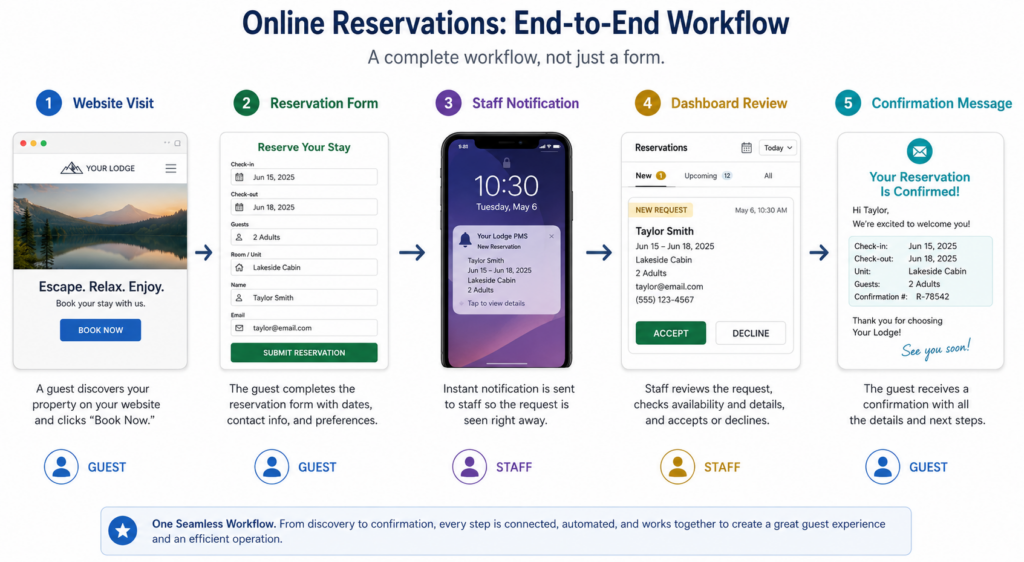
Build the booking path in the right order
- Create the reservation page first. Use a clear title such as “Book a Table” or “Reservations” and keep the page focused on the booking action.
- Add Five Star Restaurant Reservations. Configure the form and request-management workflow inside WordPress.
- Set availability rules. Use service periods, booking windows, and practical limits that reflect how the restaurant actually operates.
- Write confirmation copy. Tell guests whether the reservation is confirmed immediately or pending staff review.
- Assign staff responsibility. Decide who checks new requests, who approves them, and who handles exceptions.
- Run test bookings. Submit from mobile and desktop, then verify that the dashboard and notification experience make sense.
This sequence avoids the usual rework. Instead of styling a page and later discovering that the system is too loose, you build the operating rules first and then make the guest-facing experience clean.
Turn your website into a direct booking channel
Use Five Star Restaurant Reservations to create a focused booking page, collect the right details, and manage reservations directly in WordPress.
Where the booking option should appear on the website
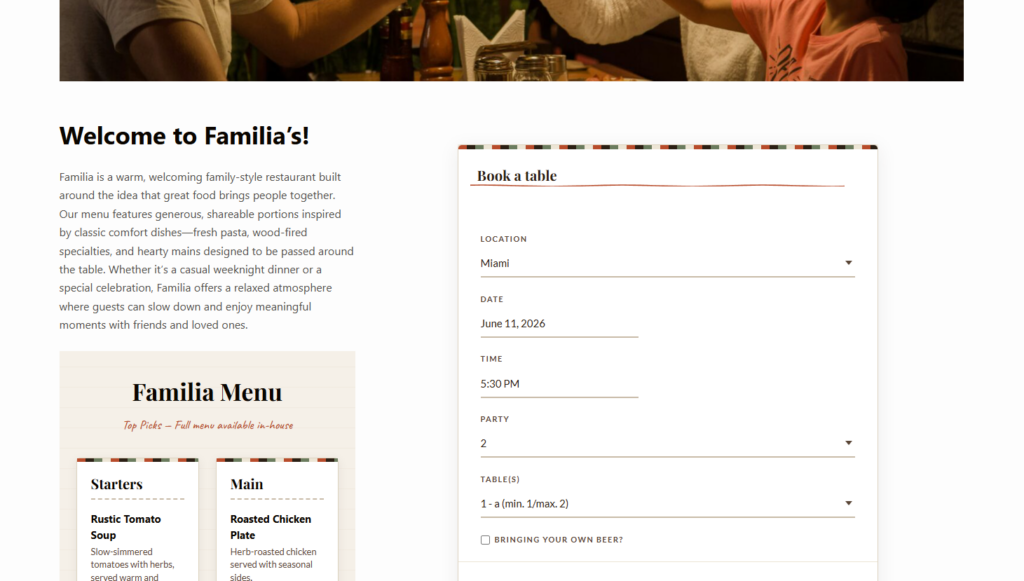
Knowing how to allow restaurant bookings from your website also means knowing where to place the path. The reservation page should be linked from the main menu, homepage, contact page, footer, and any location-specific or menu page that attracts guests. If the form is hidden below long copy or buried under “Contact,” many guests will still call.
Keep the page direct. A short reassurance line, the form, and a few policy notes are often enough. Restaurants can link to menus or private dining information around the form, but the primary action should remain obvious.
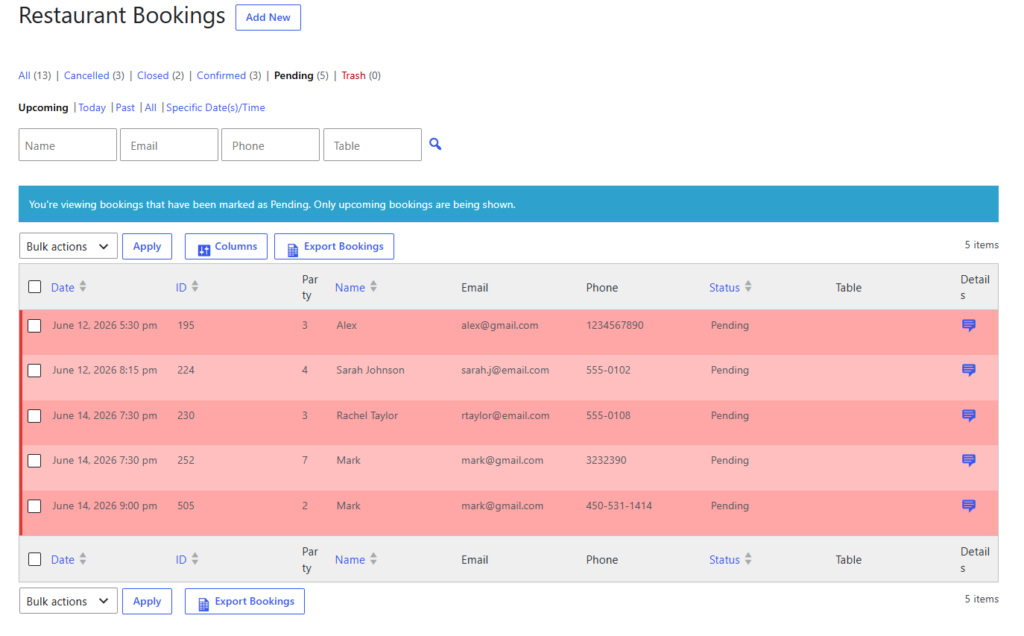
The staff workflow behind the form
The guest sees a simple form, but the restaurant needs an operational queue. Staff should be able to see the guest name, requested time, party size, status, and notes without piecing together information from email threads. Five Star Restaurant Reservations helps keep those details attached to the reservation workflow.
| Decision | Weak setup | Better setup |
|---|---|---|
| Booking arrives | Generic contact-form email | Structured reservation request with date, time, party size, and guest details |
| Staff review | Whoever notices the email first | Assigned host or manager checks the dashboard |
| Guest expectation | No clear status | Confirmation explains pending or confirmed status |
| Service control | Every time appears available | Availability reflects real service capacity |
| Follow-up | Staff call for missing details | Form collects needed details up front |
Mistakes that make direct bookings harder than phone bookings
The most common mistakes are small but costly: too many open time slots, vague confirmation language, not enough required fields, no staff owner, and no mobile testing. These problems make online reservations feel unreliable and force staff back into manual corrections.
To allow restaurant bookings from your website effectively, make the system specific. A direct booking form should not behave like a general inquiry form. Five Star Restaurant Reservations gives the restaurant a more structured path for turning guest intent into a usable reservation record.
Avoid the booking setup mistakes that create extra work
Build a direct reservation workflow that gives guests clarity and gives staff the details they need before service starts.
Related Content
A finished setup for a neighborhood restaurant
Picture a 55-seat bistro that currently takes most bookings by phone. A practical setup would include a dedicated “Reservations” page, a Five Star Restaurant Reservations form, bookable dinner windows based on real table turns, and confirmation copy that tells guests what to expect. A manager reviews requests before service, and the host checks the dashboard during the shift.
That is a better answer to how to allow restaurant bookings from your website than simply adding a form. The restaurant gets a direct booking channel, guests get a cleaner booking experience, and staff get a process they can actually use.
Questions before publishing your booking page
Usually, yes. A dedicated page is easier to link, test, and optimize than a form hidden on a general contact page.
A contact form can collect a request, but a restaurant reservations plugin like Five Star Restaurant Reservations provides a better structure for booking intake and management.
Not always. Restaurants with limited capacity, large-party rules, or complex service windows may prefer staff review.
Watch staff feedback. If the team still needs to call guests often, refine the form fields, policy copy, or availability rules.
If your goal is how to allow restaurant bookings from your website without creating another manual bottleneck, build the full path: page, form, rules, staff process, and confirmation language.
Start accepting bookings on your own website
Use Five Star Restaurant Reservations to create a direct booking workflow inside WordPress and keep reservations under your control.