




Knowing how to build a restaurant event booking system requires a different mindset than setting up ordinary reservations. Events create fixed windows, limited capacity, special menus, deposits, guest notes, and communication pressure that do not exist on a normal Tuesday dinner service. WordPress Restaurant Reservations can help restaurants keep event bookings on their WordPress site while applying the timing, capacity, and confirmation rules that event service needs.
A good event booking system should feel simple to guests, but it should be strict behind the scenes. If the form accepts the wrong party size, misses a deposit, ignores capacity, or fails to remind attendees, the event team absorbs the problem later.
What is the best way to build a restaurant event booking system?
The best way to build a restaurant event booking system is to define the event rules first, then create a booking flow that limits availability, captures the right guest information, and automates confirmations and reminders. Five Star Restaurant Reservations is useful because it supports direct reservations, flexible scheduling, custom fields, deposits or credit card holds, and automated notifications in WordPress.
Event bookings are not just regular reservations with a different label
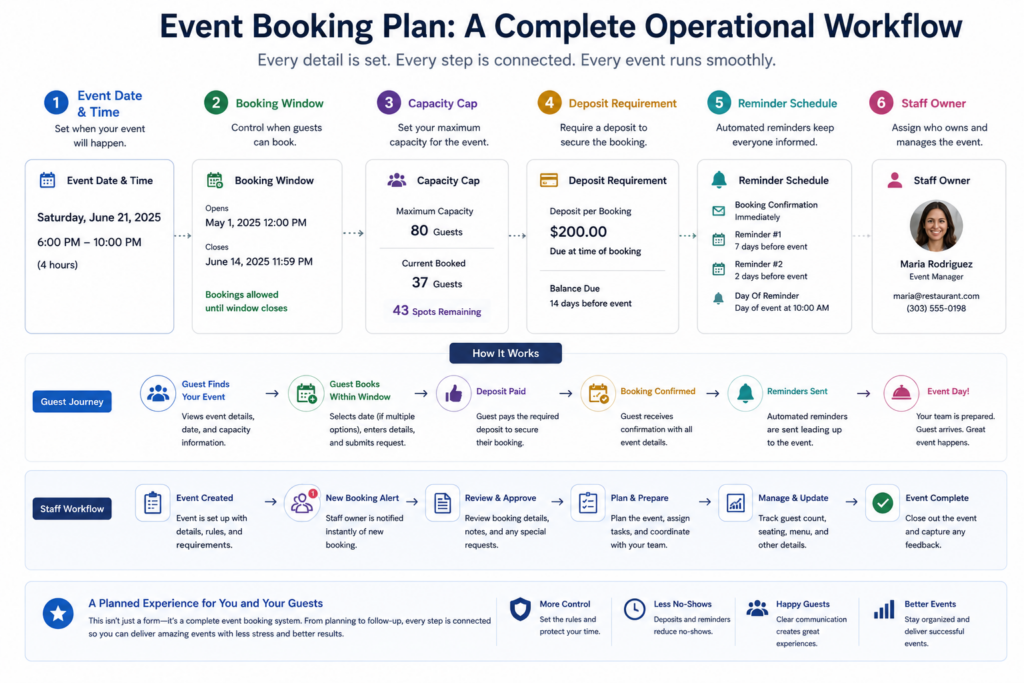
Regular reservations revolve around table availability across service periods. Event bookings revolve around a specific promise: a date, a start time, a capacity ceiling, and often a special experience. That means the booking system has to enforce boundaries. Guests should not be able to book outside the event window, reserve more seats than the room allows, or miss important terms such as deposits, cutoff times, or cancellation rules.
That is why how to build a restaurant event booking system should begin with an event brief before any form is added to the site.
Write the event rules before building the page
| Event rule | Question to answer | Why it matters |
|---|---|---|
| Capacity | How many guests or parties can the event accept? | Prevents overselling and protects the guest experience. |
| Timing | Is this one seating, multiple seatings, or flexible arrival? | Determines which time slots should appear in the booking form. |
| Payment policy | Is a deposit or credit card hold required? | Reduces casual bookings and helps manage no-show risk. |
| Guest information | Do you need dietary notes, seating requests, group names, or package choices? | Prevents staff from chasing details manually after the booking. |
| Communication | When should confirmations, reminders, and staff alerts go out? | Keeps guests informed and staff prepared before the event day. |
Build event bookings around real capacity rules
Five Star Restaurant Reservations helps you manage limited-capacity event reservations, guest details, and confirmations from your WordPress site.
A practical build sequence for event reservations
- Create the event booking page. Give the event its own page when the offer, menu, price, or capacity is different from ordinary reservations.
- Set the booking window. Use flexible scheduling, special event hours, or blackout dates so guests only see valid event availability.
- Limit capacity intentionally. Configure table, section, layout, or party-size restrictions to match the actual event format.
- Add custom fields only where they help operations. Dietary restrictions, seating notes, package selection, or event questions can be useful; unnecessary questions reduce completion rates.
- Decide whether deposits are required. For high-demand or high-cost events, deposits or credit card holds can protect revenue and reduce no-shows.
- Build the communication timeline. Confirmation after booking, reminder before the event, and staff notification for modifications are usually the minimum.
How event booking changes the staff workflow
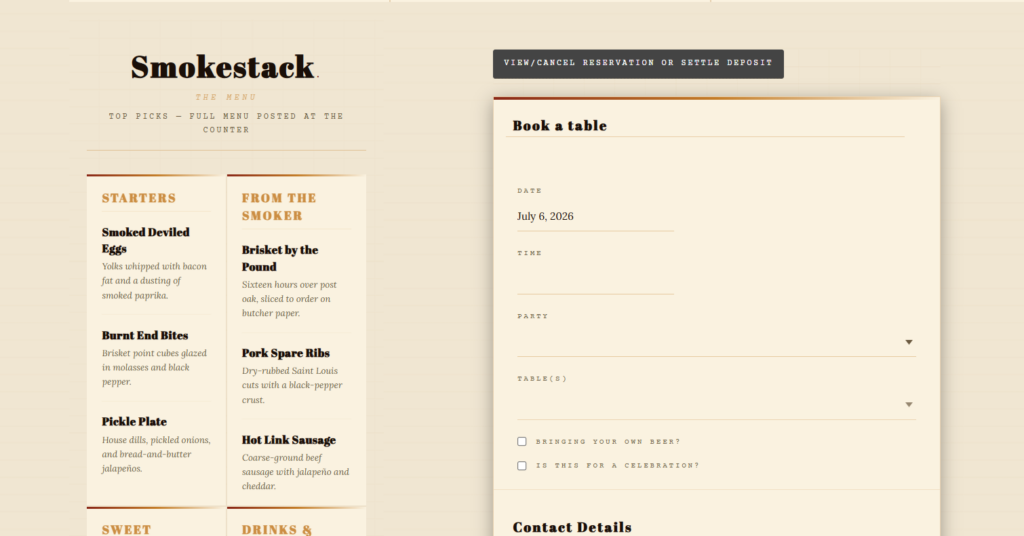
For a standard reservation, staff mostly need to know who is arriving and when. For an event, staff may need guest counts by package, table groupings, menu selections, allergy notes, payment status, and arrival timing. The dashboard becomes more than a list of bookings. It becomes the event control sheet.
Five Star Restaurant Reservations can support this kind of workflow when restaurants use relevant custom booking fields, booking statuses, reminders, and staff notifications. The point is not to list every possible plugin feature. The point is to make sure the event team receives the information they need before the room is set.
Keep event reservations and regular bookings on one site
Use Five Star Restaurant Reservations to manage event capacity, guest details, confirmations, and reminders directly in WordPress.
A wine dinner example
A restaurant is hosting a 40-seat wine dinner with one seating at 7:00 p.m. The event requires a deposit, guests must note dietary restrictions, and the manager needs a final count two days before service. A weak form would simply accept “reservation requests” and leave the team to sort the rest by email.
A better workflow uses Five Star Restaurant Reservations to create a dedicated event booking page, restrict availability to the correct date and time, collect guest notes, trigger confirmations, and send reminders before the event. In practice, how to build a restaurant event booking system is about removing the last-minute information chase.
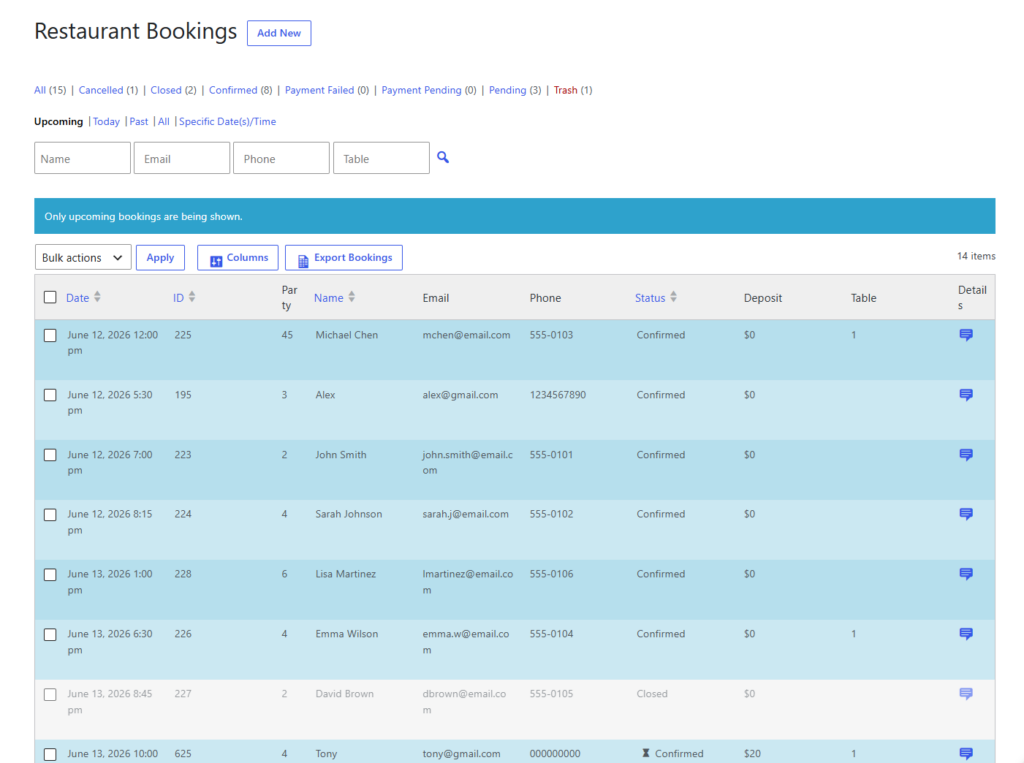
IMAGE PLACEHOLDER
Type: dashboard
Description: Event reservation dashboard showing confirmed guests, pending approvals, deposits, dietary notes, and total capacity remaining.
Goal: Helps buyers see how event booking information should be managed before service.
Related Content
Common event booking mistakes
- Leaving regular booking times active: guests book outside the event window and staff have to correct the mistake.
- Not setting capacity caps: the event appears available after the room is full.
- Skipping deposit rules for high-demand events: casual bookings crowd out committed guests.
- Collecting too little information: the team chases allergies, party notes, or package choices manually.
- Using vague confirmations: guests do not understand the event time, cancellation terms, or arrival expectations.
Questions about restaurant event booking systems
Yes. The stronger setup is one site workflow where regular bookings and event bookings have different rules but remain manageable by the same team.
No. Deposits make the most sense for limited-capacity, high-demand, prepaid, or high-prep events where no-shows create meaningful cost.
Collect only what staff need: contact details, party size, dietary notes, package choices, seating requests, and any payment or deposit information relevant to the event.
The key to how to build a restaurant event booking system is discipline. Treat the event as a controlled booking product with rules, not as a loose reservation note. Five Star Restaurant Reservations helps restaurants turn that structure into a working on-site booking flow.
Create event-ready reservation workflows in WordPress
Use Five Star Restaurant Reservations to manage event capacity, guest details, confirmations, and reminders without sending guests to another platform.