




If you are figuring out how to create reservation notifications for restaurant staff, the real goal is not simply sending more messages. The goal is making sure the right person sees the right reservation update at the exact moment it affects service. WordPress Restaurant Reservations helps restaurants manage that inside WordPress by connecting booking statuses, confirmations, reminders, and staff alerts to the reservation workflow instead of leaving the team to watch an inbox all night.
A good notification system should reduce uncertainty for guests and reduce interruptions for staff. When a host, manager, server, or event coordinator can tell whether a booking is new, approved, modified, late, or cancelled without hunting through notes, the booking experience becomes smoother for everyone.
What is the practical way to create reservation notifications for restaurant staff?
The practical way to create reservation notifications for restaurant staff is to map every reservation status to a clear message, recipient, and timing rule. Five Star Restaurant Reservations is a strong fit because it supports automated email and SMS notifications for booking statuses, reservation reminders, and direct reservation management from your own WordPress site. Instead of relying on third-party platform alerts or manual phone follow-up, staff can work from a consistent notification flow tied to the booking record.
Start with the service moments, not the message templates
Most restaurants begin notification setup by writing message copy. That is backwards. Before writing a subject line or SMS reminder, identify the moments when a notification actually changes what staff do. A new booking may need host review. A large party may need manager awareness. A cancellation may release capacity. A late arrival may require the host to adjust the seating plan. A same-day modification may affect the kitchen or event lead.
Five Star Restaurant Reservations should be configured around those moments. That makes how to create reservation notifications for restaurant staff a workflow design project, not just a settings task. The fewer irrelevant alerts your team receives, the more seriously they will treat the messages that matter.
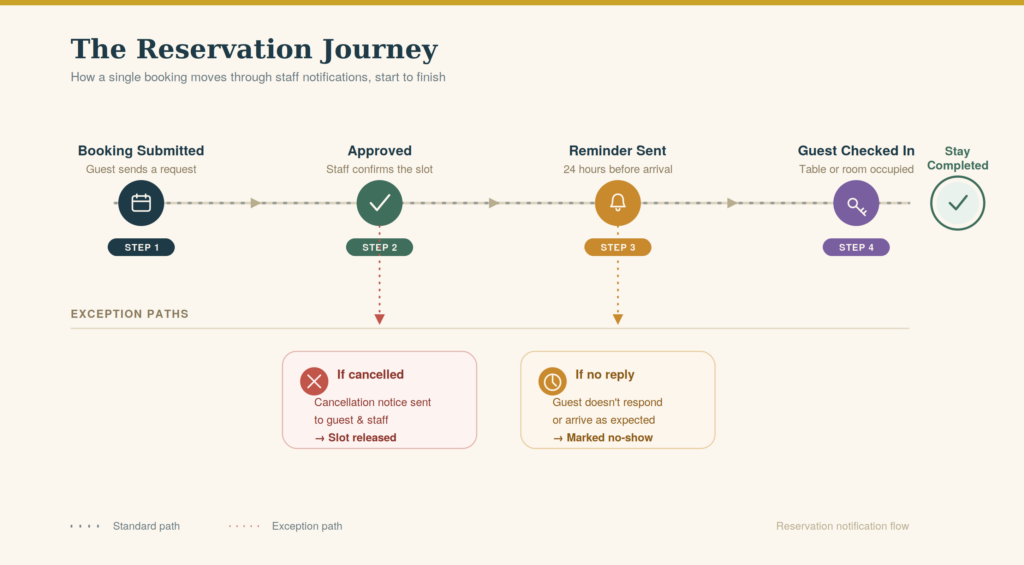
A staff notification map for real service
| Reservation event | Who should know | Best notification style | Operational reason |
|---|---|---|---|
| New reservation request | Host or reservations manager | Email alert with guest details | Lets staff approve, review capacity, or catch unusual requests before service. |
| Confirmed booking | Guest and host team | Confirmation email, optional SMS | Creates a shared record and reduces “did my booking go through?” calls. |
| Large party or special request | Manager or event lead | Staff alert with notes highlighted | Gives the team time to prepare layout, staffing, or deposit requirements. |
| Same-day reminder | Guest, with staff visibility when needed | SMS reminder or email reminder | Reduces no-shows and gives guests an easy prompt before arrival. |
| Cancellation or modification | Host stand and manager | Immediate staff notification | Releases capacity or flags a seating-plan change before it causes confusion. |
Turn reservation alerts into a working service system
Use Five Star Restaurant Reservations to keep confirmations, reminders, and staff notifications tied to the booking workflow on your own site.
How to set up reservation notifications without over-alerting everyone
- List every reservation status. Include submitted, pending approval, approved, rejected, modified, cancelled, reminded, late, and completed if your workflow uses those stages.
- Assign one primary owner per status. A new request may go to the host. A deposit issue may go to the manager. A VIP note may go to the person running the floor.
- Separate guest-facing messages from staff-facing alerts. Guests need clarity and reassurance. Staff need concise operational details.
- Use email for detailed records and SMS for time-sensitive reminders. Five Star Restaurant Reservations supports automated email and SMS notifications for booking statuses, so each channel can serve a specific purpose.
- Test the workflow during a mock service. Create a test booking, modify it, cancel it, and confirm that the right people receive the right information.
This is also where direct booking matters. When the reservation happens on your own website, the booking data, guest notes, and notification flow are not scattered across a platform dashboard and an email inbox. Five Star Restaurant Reservations keeps the operational record closer to the restaurant team.
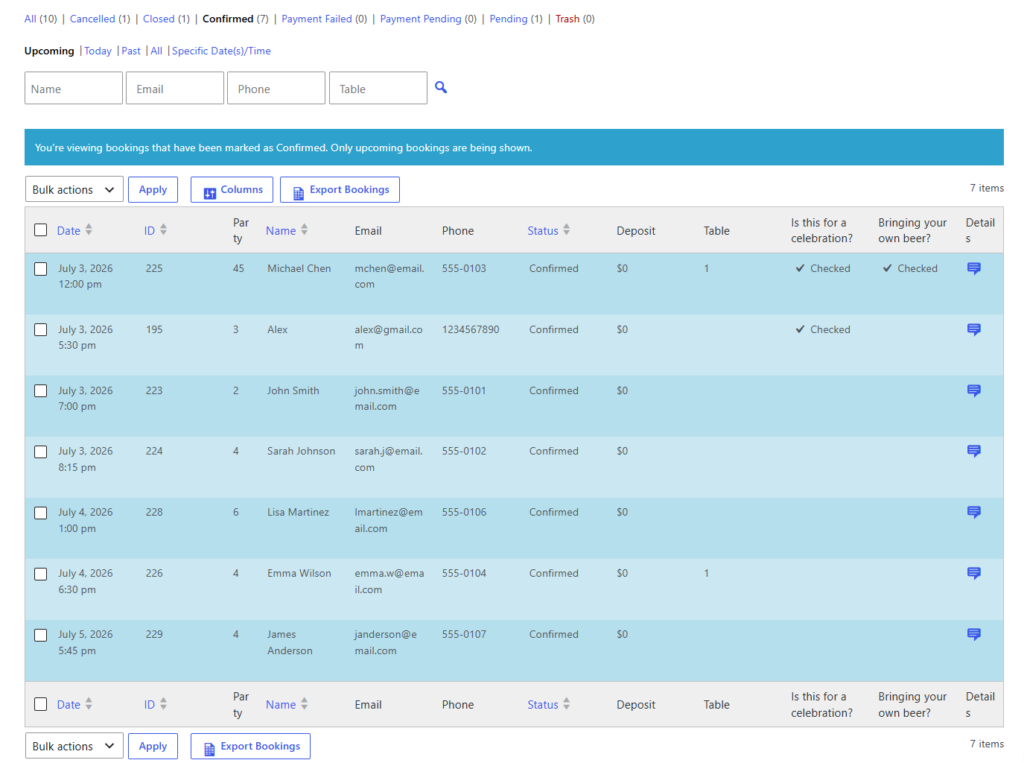
Message timing matters more than message volume
A confirmation sent immediately after approval builds guest confidence. A reminder sent too early gets forgotten. A reminder sent too late gives the guest no time to adjust. Staff notifications have similar timing issues: a cancellation alert three hours before service is useful; the same alert buried after service is just historical data.
For restaurants using Five Star Restaurant Reservations, the best pattern is usually a layered flow: immediate confirmation, pre-service reminder, and real-time staff alert for changes that affect capacity. That is a stronger answer to how to create reservation notifications for restaurant staff than simply turning on every available alert.
Common notification mistakes that create more work
- Sending every alert to everyone: staff begin ignoring messages because most alerts do not apply to them.
- Using guest wording for internal messages: staff need party size, time, status, notes, and action required, not polished marketing copy.
- Skipping modification alerts: changed arrival times and party sizes are often more disruptive than new bookings.
- Depending only on phone calls: the restaurant loses a clear written record and staff spend time repeating details.
- Forgetting no-show risk: reminders are not decoration; they protect capacity and make the guest path more reliable.
Stop managing reservation communication by memory
Five Star Restaurant Reservations helps staff and guests receive the messages they need as bookings move through each status.
A realistic notification workflow for a busy dinner service
A 90-seat restaurant receives a 6:45 p.m. reservation for four people. The guest adds a note about a birthday and requests a quieter table. The booking confirmation goes to the guest immediately. The host receives an internal notification with the guest note. The day before, the guest gets a reminder. Two hours before service, the guest modifies the party size from four to six. That change triggers a staff alert because it affects table planning.
In that scenario, how to create reservation notifications for restaurant staff is not about sending a nicer email. It is about preventing a seating problem before the party arrives. Five Star Restaurant Reservations gives restaurants a way to connect those messages to real booking decisions on the site.
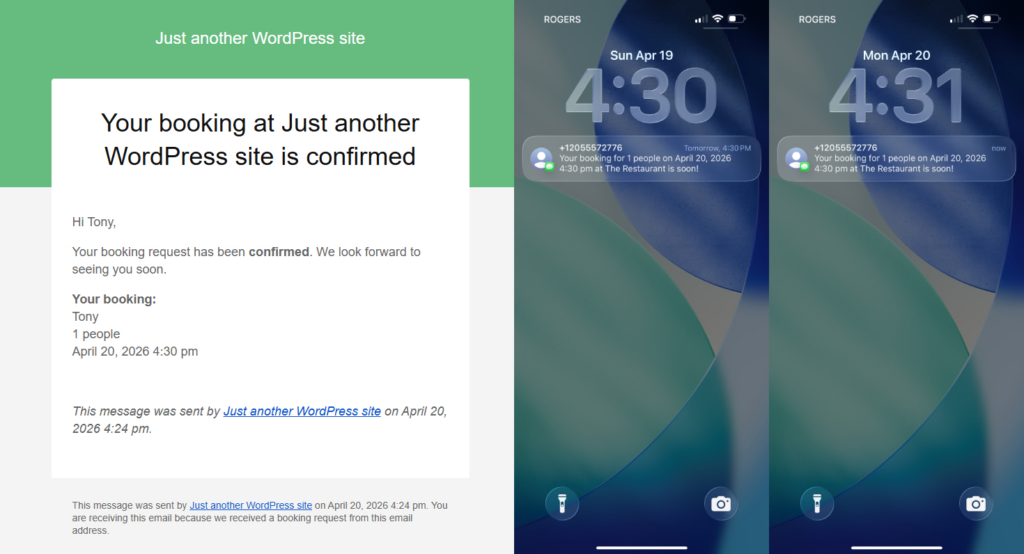
Related Content
Questions restaurants ask before setting up staff alerts
Not necessarily. New, modified, cancelled, large-party, and same-day bookings usually deserve staff alerts. Routine confirmations may only need to be visible in the dashboard.
No. Guest reminders are common, but staff-facing SMS can also be useful when a change is urgent enough to affect service.
Five Star Restaurant Reservations keeps direct reservations, communication, and operational control on your own WordPress site instead of forcing staff to manage another platform dependency.
The strongest reason to learn how to create reservation notifications for restaurant staff is consistency. Guests know what is happening. Staff know what changed. Managers can trust that important updates are not trapped in a single person’s inbox.
Create a cleaner reservation communication workflow
Use Five Star Restaurant Reservations to manage confirmations, reminders, staff alerts, and direct bookings from WordPress.