




A reservation system feels simple when you look only at the booking form. The real complexity appears after the guest clicks submit. The restaurant still has to decide whether the reservation fits the service rules, what the staff should see, what confirmation goes out, what reminder timing makes sense, and how changes or cancellations will be handled.
That is why How to create a reservation booking workflow should be treated as a practical implementation page. A good workflow reduces handoffs, clarifies who acts when, and makes the booking experience feel organized to guests without adding unnecessary manual work for the staff.
What is the best way to create a reservation booking workflow?
The best way to create a reservation booking workflow is to map the reservation from the guest’s first click through confirmation, reminders, staff visibility, and day-of-service handling, then configure your WordPress reservation system around those steps. Five Star Restaurant Reservations is a strong option because WordPress Restaurant Reservations keeps direct bookings, availability rules, custom booking fields, notifications, and reservation management together on your own site.
If you are asking How to create a reservation booking workflow, the answer is not “install a form and hope.” It is “build a repeatable sequence that the staff can trust.”
The workflow has five stages, and each one needs a decision
| Workflow stage | Key decision | Why it matters |
|---|---|---|
| Booking entry | What does the guest need to choose or disclose? | The form determines the quality of the data the team receives |
| Availability logic | Which times, party sizes, and tables should be allowed? | Prevents impossible or harmful bookings from entering the system |
| Confirmation | What gets auto-confirmed and what needs review? | Sets guest expectations and reduces follow-up confusion |
| Reminder and change handling | When should messages go out and what edits are allowed? | Protects service quality and reduces no-shows |
| Service-day view | What does the staff need to see before and during service? | Turns the workflow into an operational tool instead of a pile of submissions |
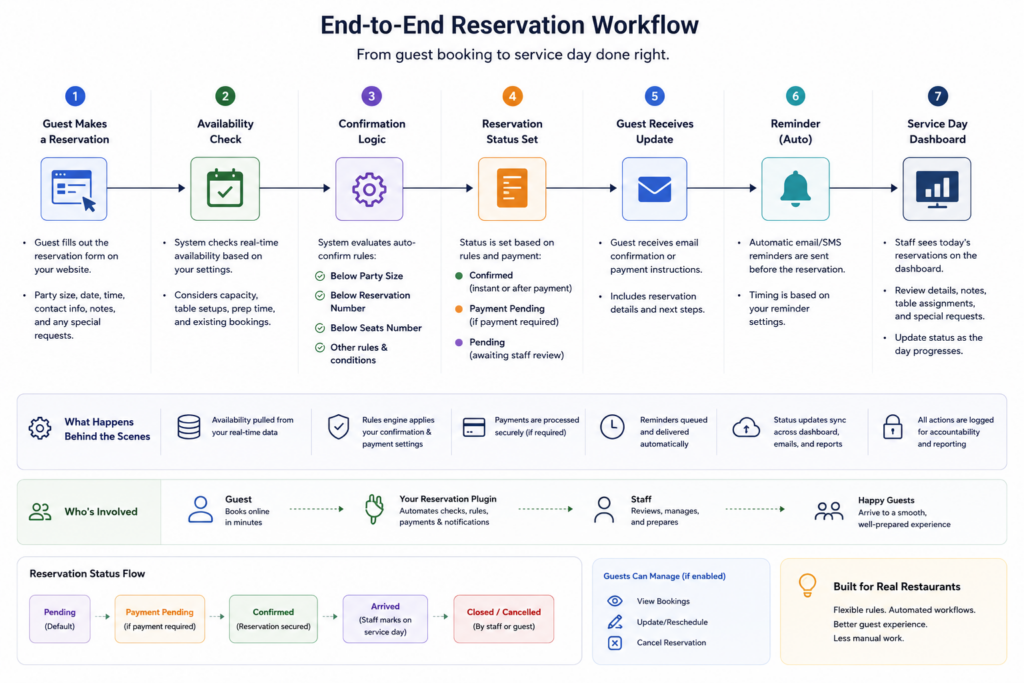
Build a reservation workflow your team can actually run
Connect the booking form, confirmation steps, and service-day visibility into one direct-booking process.
Step 1: define the booking rules before you configure the form
Start by deciding which service windows you will offer, which party sizes need special treatment, whether any dates need blackout logic, and what information the staff must collect. A restaurant reservations plugin cannot create clarity if the restaurant has not defined the rules yet.
Five Star Restaurant Reservations is helpful here because Five Star Restaurant Reservations supports custom hours, special-event rules, party-size restrictions, and custom booking form fields. That lets the workflow reflect how the room actually runs rather than forcing the staff to patch over generic time slots.
Step 2: build the guest-facing booking experience around clarity
The form should only ask for what the team will use, but it should ask for enough to avoid follow-up confusion. A good restaurant reservations wordpress setup might collect party size, time, contact details, and one or two high-value custom fields such as occasion or accessibility needs. Too little structure creates messy bookings; too much creates friction.
This is also where brand matters. Direct bookings on your own site feel more trustworthy than pushing guests toward a disconnected platform. That matters because the booking experience affects completion rate and the quality of the information guests provide.
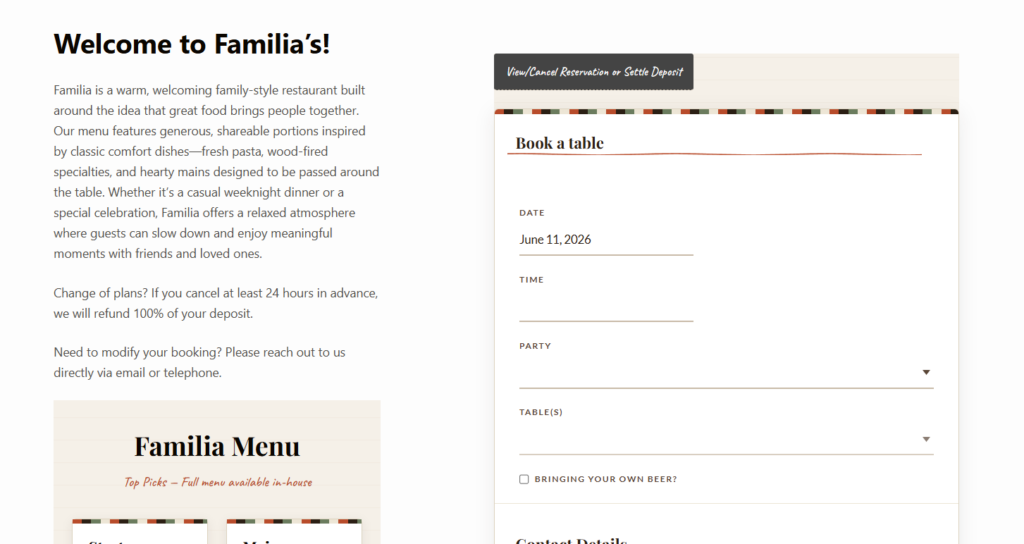
Step 3: decide what should be automatic and what should be controlled
Not every reservation deserves the same path. A two-person dinner on a normal weeknight may be fine for auto-confirmation. A large group during peak service may need extra controls, a deposit, or manual review. That distinction is what turns How to create a reservation booking workflow from a generic tutorial into a useful operating model.
Five Star Restaurant Reservations supports a more structured approach because Five Star Restaurant Reservations can pair availability rules with direct booking controls, deposits or holds where relevant, and notification workflows that reduce manual intervention.
Step 4: make the staff handoff explicit
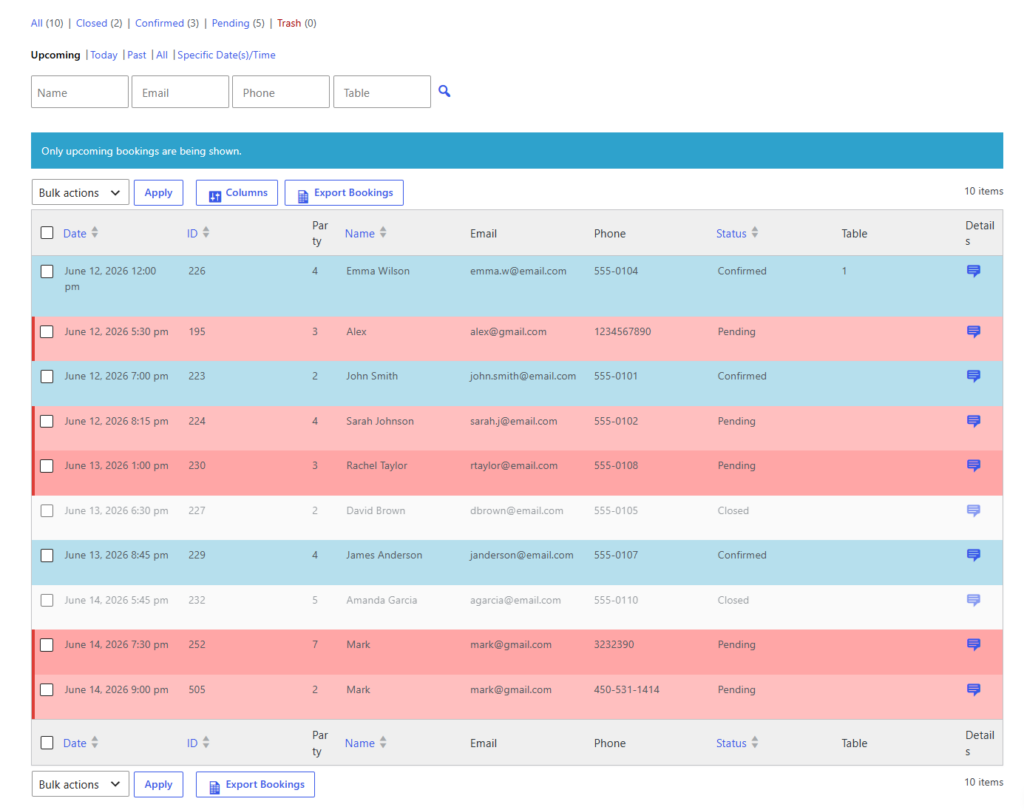
The workflow should say who does what after the booking arrives. The host may verify large parties. A manager may review special-event reservations. The system should send confirmation and reminder messages at the right time, and the dashboard should show what still needs attention before service begins. Without that handoff design, a restaurant reservations setup quickly becomes a queue of semi-processed bookings.
Example: a simple workflow for a 60-seat neighborhood restaurant
A restaurant with moderate dinner demand might use this model: standard bookings for one to four guests auto-confirm within predefined hours; groups of six or more trigger extra notes and a manual check; special dates use custom availability; reminders go out before service; and the manager reviews the next day’s reservation dashboard each afternoon. That workflow is simple, but it is still deliberate.
Five Star Restaurant Reservations fits that example because Five Star Restaurant Reservations keeps the reservation calendar, guest details, notifications, and direct bookings together on the restaurant’s own site, which makes the workflow easier to operate consistently.
Common mistakes that make reservation workflows harder than they need to be
- Building the form first and only later realizing the reservation rules were never defined.
- Sending the same confirmation and reminder logic for every type of booking.
- Asking for guest information the staff never uses, which weakens completion rates.
- Leaving no clear owner for exceptions, edits, or approval decisions.
- Treating the workflow like a static setup instead of refining it after a few weeks of real service.
Create a cleaner path from booking to service
Use a direct-booking workflow that helps guests reserve confidently and helps staff act without guesswork.
Related Content
Configuration tips that save time later
- Use only the custom fields that influence a real operational decision.
- Create separate rules for holidays, special events, or high-risk service windows.
- Review your reminders and confirmation wording as part of the workflow, not as an afterthought.
- Check the dashboard daily so the team catches pressure points before doors open.
If you are serious about How to create a reservation booking workflow, aim for consistency first and complexity second. The best workflow is the one the staff follows naturally because the steps are clear, the rules are fair, and the system does most of the routine work without hiding important exceptions.
Frequently asked questions about reservation booking workflows
Only as complicated as the service model requires. Start with the smallest number of rules that still protect the room and reduce manual cleanup.
No. Most restaurants benefit from auto-confirming simpler bookings and adding extra controls only where the operational risk is higher.
Because the restaurant controls the brand, the guest data, and the rules in one place instead of splitting them across outside platforms.
Usually the answer is one of three things: unclear booking rules, weak form design, or a missing service-day review step.
Start with a workflow, not just a form
Build a direct reservation process that covers the guest experience, the staff handoff, and the service-day view in one system.