




A WordPress Restaurant Menu plugin for cafe websites needs to handle small but fast-changing menus: espresso drinks, baked goods, breakfast, lunch, seasonal specials, limited-time drinks, and prices that may change more often than a traditional dinner menu. Restaurant Menu is a practical option because it keeps those menu updates structured while still giving the cafe control over layout, styling, labels, and mobile readability.
Why cafe menus need a different setup than dinner menus
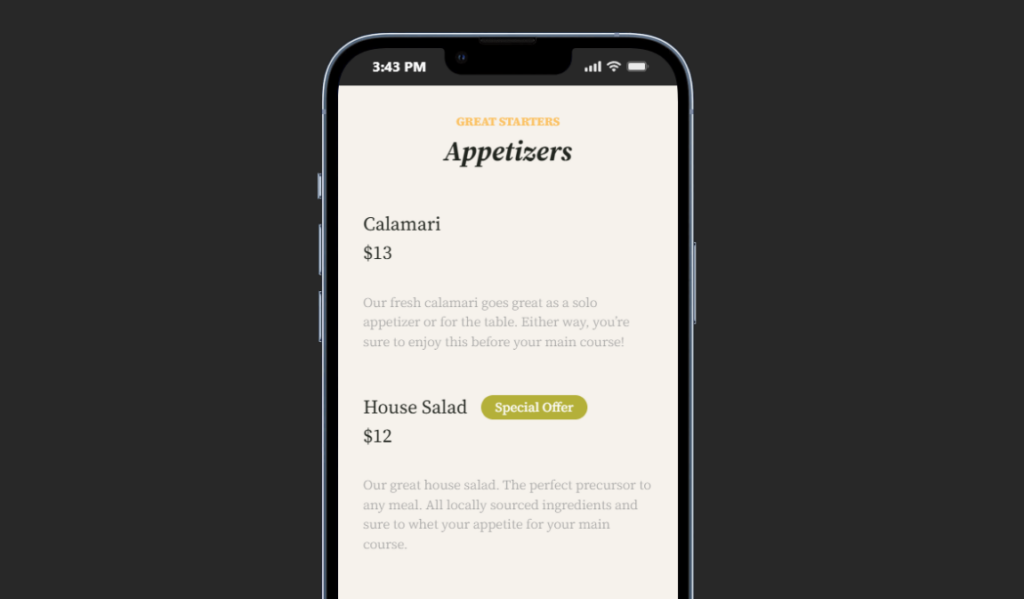
Cafe customers browse quickly. Many are on mobile, often standing nearby, checking what is available before deciding whether to visit, order, or meet someone. A cafe menu page should therefore make categories obvious, prices easy to read, and specials easy to update. A restaurant menu plugin for cafe websites should prioritize scanning speed over ornate page design.
Restaurant Menu fits that job because the cafe can maintain separate sections for coffee, tea, pastries, breakfast, sandwiches, seasonal drinks, and featured items. That is more useful than a static page that requires a designer every time the bakery case changes or the summer drink menu starts.
Some cafe sites also have adjacent conversion paths such as online reservations for tastings, private events, or larger group bookings. Those paths should be visible, but they should not distract from the daily browsing experience. The menu remains the page’s main job.
A cafe menu model that stays readable all week
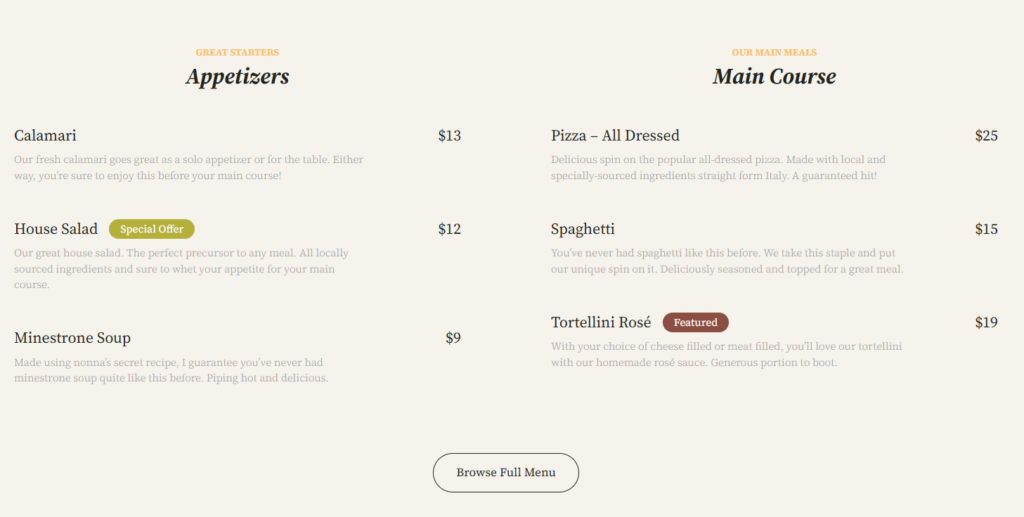
The most useful restaurant menu setup for a cafe starts with dayparts and availability. Instead of one long list, divide the menu into sections that match customer intent. Morning visitors may care about espresso and breakfast. Afternoon visitors may care about sandwiches, cold drinks, and pastries. A weekend brunch crowd may need a special category that is easy to turn on and off.
- Use categories for drink types, food sections, and seasonal rotations rather than burying everything in a single list.
- Use short item descriptions where customers need clarity, such as milk options, allergens, ingredients, or serving size.
- Use dietary labels for vegan, gluten-free, allergen-friendly, or featured items so visitors can scan faster.
- Keep prices in a predictable position so mobile users can compare items quickly.
- Treat specials as a managed menu section, not a paragraph the owner forgets to update.
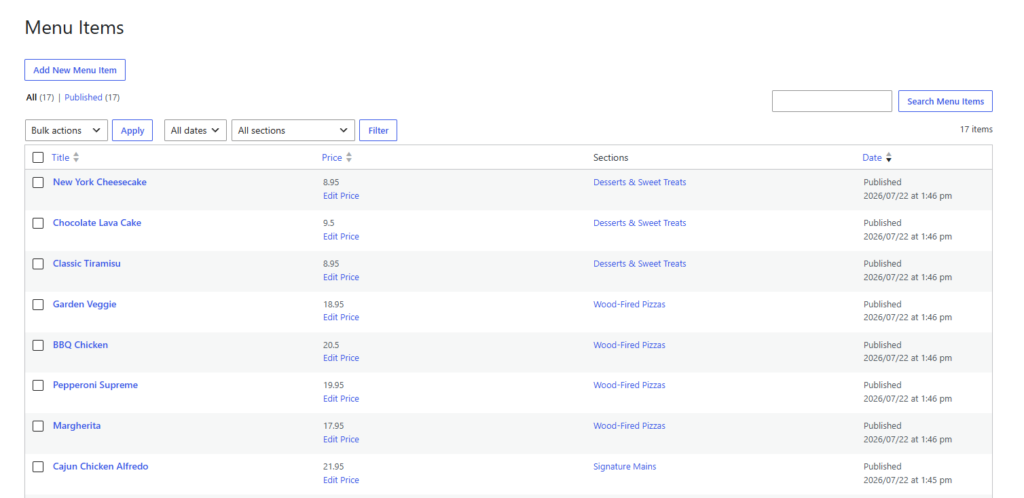
Restaurant Menu supports this kind of restaurant menu WordPress workflow with multiple menus, drag-and-drop ordering, quick edits, duplicate or reorder tools, custom fields, filtering, sorting, labels, and responsive layouts. The point is not to add complexity. The point is to let the cafe update real menu content without rebuilding the page.
Build a cafe menu that is easy to scan and update
Restaurant Menu helps cafes publish categories, seasonal specials, dietary labels, and responsive menu layouts without turning every price change into a page rebuild.
What cafe owners should compare before choosing a plugin
| Cafe requirement | What to look for | Common mistake |
|---|---|---|
| Frequent edits | Fast item, price, and description changes | Using a static page that only the web designer can edit. |
| Seasonal menus | Easy duplication, reordering, and special tags | Leaving old specials online after the promotion ends. |
| Mobile scanning | Responsive sections with readable names and prices | Designing on desktop and never testing the phone view. |
| Dietary clarity | Labels and custom fields for allergens or ingredients | Hiding important details in long paragraphs. |
| Brand consistency | Layout, font, and color controls | Accepting a menu display that feels disconnected from the cafe brand. |
A good restaurant menu guide for cafes should also include an editing routine. Decide who can update items, when seasonal sections are reviewed, and how unavailable items are handled. Restaurant Menu can make the content easier to manage, but a clear staff routine keeps the public page accurate.
How Restaurant Menu supports a cafe-specific publishing flow
Restaurant Menu is especially useful for cafes because it can support multiple menus without forcing the owner into a full ecommerce structure. A cafe may want a public menu, a catering menu, a seasonal drink menu, and a private-event snack menu. Those can be managed as separate displays or sections rather than one cluttered page.
The plugin also supports brand control. A cafe with a minimalist design can keep the menu clean and text-focused. A bakery cafe can add more item detail and visual emphasis. A neighborhood coffee shop can highlight specials and featured items. The restaurant menu plugin for cafe websites decision should be based on whether the tool can handle those real changes after launch.
Cafe menu page layout that converts without feeling pushy
A cafe menu page should not behave like a long brochure. Start with the most requested categories, then guide people toward the next step. That next step might be visiting the location, ordering directly, asking about catering, or checking group seating. Restaurant Menu can support the menu display, while the surrounding page copy explains hours, location, pickup details, and any booking experience that matters for special events.
For many cafes, the mid-page conversion prompt should appear after the menu categories, not before them. Visitors want to know what is available first. Once the menu has answered that question, a direct ordering, contact, or group-booking prompt feels natural.
Turn your cafe menu into a reliable daily page
Use Restaurant Menu to keep specials, prices, item notes, and category browsing current while your WordPress page handles the surrounding brand story.
A realistic cafe implementation scenario
Picture a cafe with espresso drinks, pastries, breakfast sandwiches, lunch bowls, and a rotating seasonal menu. The owner currently updates the menu in a page editor, but small changes keep breaking spacing and mobile formatting. With Restaurant Menu, the cafe creates separate categories, adds item details, tags seasonal drinks as featured, and updates prices from the menu-management screen.
The website builder then creates a clean menu page with a short intro, the Restaurant Menu display, a specials highlight, hours, location details, and a final prompt for catering or direct ordering. The restaurant menu plugin for cafe websites becomes part of the cafe’s weekly operating rhythm rather than a one-time website design task.
Frequently asked questions
No. Restaurant Menu can be used for menu display even if the cafe does not take orders online. If direct ordering becomes important, Restaurant Menu also supports commission-free ordering workflows.
A strong cafe menu page should include categories, item names, prices, short descriptions where useful, dietary labels, seasonal sections, hours, location details, and a clear next step.
For most cafes, yes. A static page may work for launch, but Restaurant Menu is easier to maintain as specials, prices, and categories change.
Related Content
Make the cafe menu easier to maintain
A restaurant menu plugin for cafe websites should make the daily menu easier for customers to browse and easier for staff to update. Restaurant Menu is a strong fit when the cafe needs clear categories, quick editing, mobile-friendly display, and a practical restaurant menu plugin workflow that does not depend on a designer for every change.
Publish a cleaner cafe menu in WordPress
Restaurant Menu gives cafes a structured way to manage menu items, seasonal specials, dietary labels, and responsive menu pages from one WordPress workflow.