




A restaurant reservation plugin with Google Calendar integration can mean very different things depending on how your team works. Some restaurants want every booking mirrored to a calendar. Others only need managers to see large parties, private events, closures, or staffing-sensitive reservations in the same place they already coordinate the day. Those are not the same requirement, and choosing the wrong interpretation leads to the wrong plugin.
WordPress Restaurant Reservations is a strong option when your reservation system should remain the source of truth on your own WordPress site, while Google Calendar supports visibility and operations around that workflow. In other words, Five Star Restaurant Reservations fits best when direct bookings, table control, and guest communication matter first, and calendar-connected processes exist to help managers coordinate service more smoothly.
First define what “Google Calendar integration” for a restaurant reservation plugin actually means
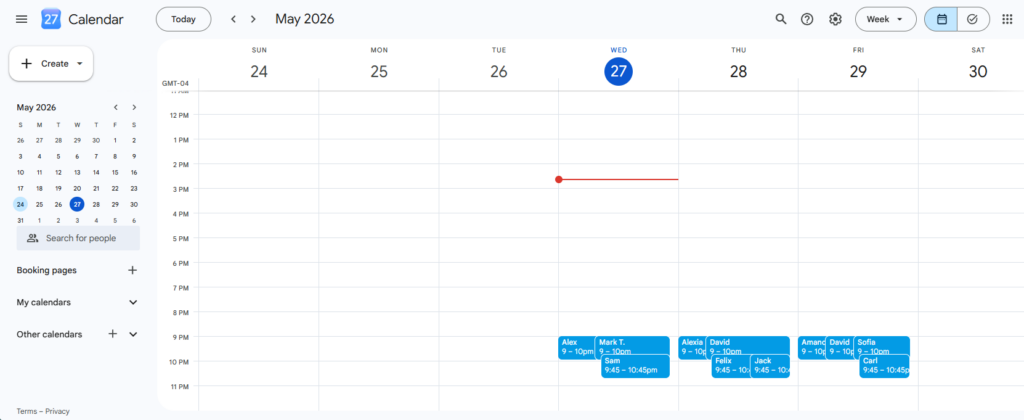
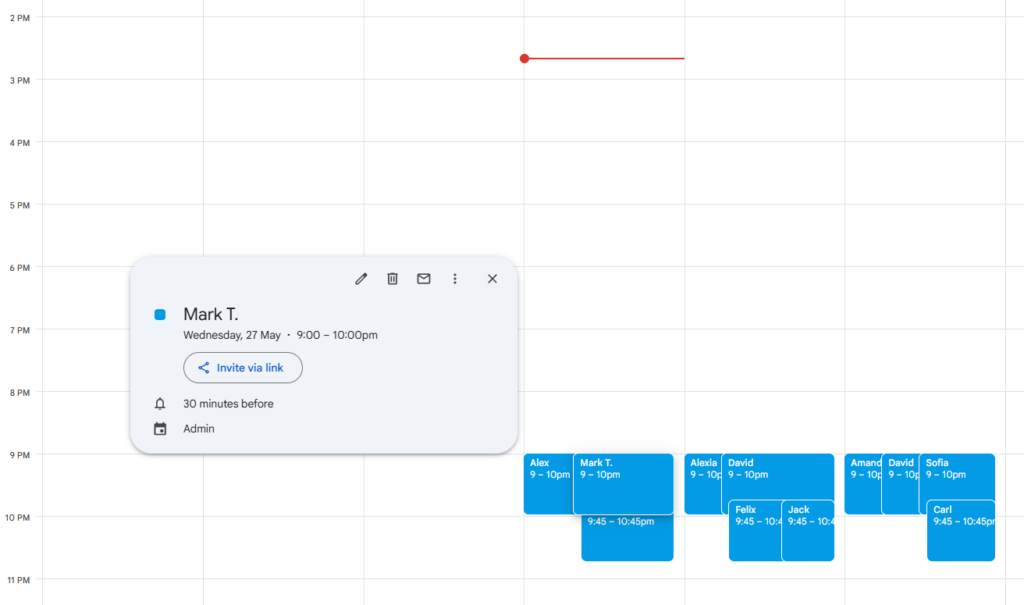
- Visibility layer: Managers want a calendar view for notable reservations, private events, closures, or service-day planning.
- Coordination layer: The team uses Google Calendar to align hosts, managers, events, and staffing around reservation demand.
- Source-of-truth sync: The restaurant expects Google Calendar itself to behave like the booking database.
Only the first two are usually healthy. Restaurants generally should not ask a calendar to replace a reservation engine. A good reservation plugin still needs to manage table availability, party sizes, deposits, reminders, and guest status updates. That is why the conversation around a restaurant reservation plugin with Google Calendar integration should start with operations, not with a checkbox on a feature grid.
What matters more than calendar sync on a busy service day
On a Friday night, the team cares about whether tables are available, whether a large party is arriving at 7:30, whether there are deposits or special notes attached, and whether reminders have already gone out. Those are reservation-system questions. Google Calendar becomes valuable when it helps the manager see staffing constraints, event timing, or service windows that affect the floor.
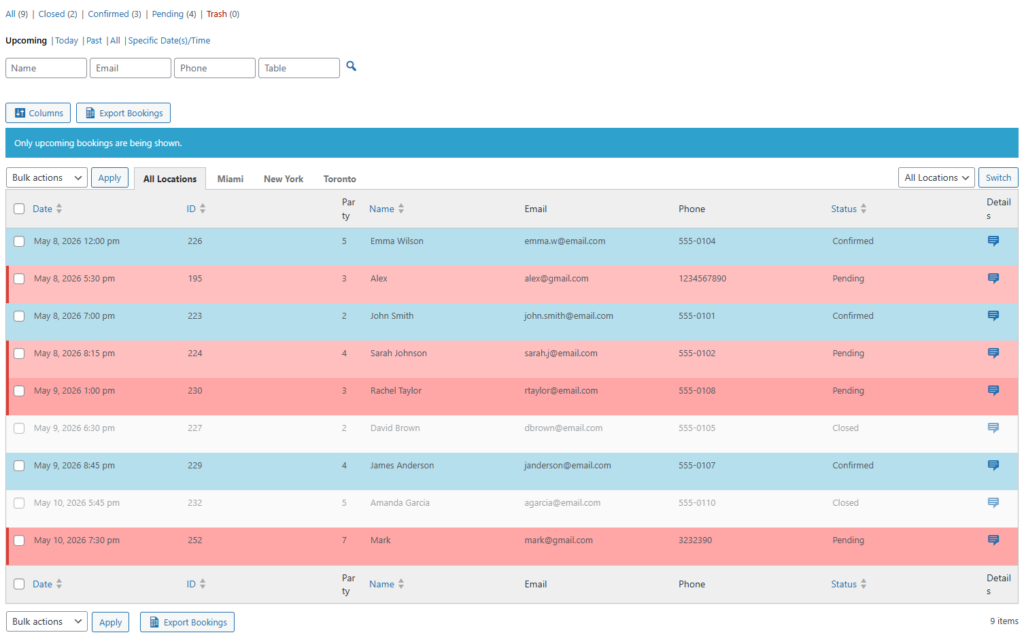
Five Star Restaurant Reservations is compelling because it handles the reservation side well: direct bookings on your own site, real-time table availability, custom booking fields, special-event hours, and automated notifications. That makes it a strong foundation even when Google Calendar is part of the operational picture.
A calendar-connected workflow that actually makes sense
| Moment in the workflow | Reservation system job | Where calendar visibility helps |
|---|---|---|
| Booking is created | Capture guest details, party size, timing, and table logic | Managers can note major events or VIP-heavy periods that affect staffing |
| Service schedule is reviewed | Show upcoming bookings and demand patterns | Calendar helps align staffing, prep, and other venue commitments |
| Special event or closure is added | Update availability and blackout rules | Calendar gives the broader team shared awareness of what changed |
| Day-of operations | Handle statuses, reminders, and late-arrival logic | Calendar supports managerial coordination but should not replace booking control |
This is an important distinction. Many operators think they need every reservation duplicated into a calendar because they are trying to solve visibility. In reality, they often need a better reservation backbone and a cleaner handoff to existing scheduling habits. Five Star Restaurant Reservations is especially strong when the restaurant wants to keep guest-facing reservations inside WordPress and use Google Calendar in support of service planning rather than in place of it.
Compare “calendar visibility” against “calendar as booking system” before you choose
Make sure your team is solving the right operations problem instead of forcing Google Calendar to do work better handled by a reservation plugin.
Example service-day process: when calendar awareness helps
Imagine a restaurant that runs private dining on Thursday, regular dinner service every night, and recurring local events that change staffing. The general manager already lives in Google Calendar because that is where vendor meetings, events, manager shifts, and special service notes are organized. What the team needs is not a calendar-only reservation tool. They need reservations to remain accurate on the site while important service context is visible in the wider operating calendar.
In that setup, Five Star Restaurant Reservations manages the guest-facing process: branded booking form, table availability, party-size rules, reminders, and status handling. Google Calendar then supports the managerial layer by helping the team see how bookings intersect with events, closures, and staffing plans. That is a healthier implementation than asking the calendar to act like a restaurant booking database.
Tradeoffs to think through honestly
If your absolute requirement is deep two-way calendar behavior where every change originates in Google Calendar, you should test that assumption carefully. It may sound convenient, but it can weaken the reservation workflow by moving critical booking logic out of the system designed for it. Restaurants usually perform better when the reservation engine remains primary and the calendar supports awareness.
That is also why Five Star Restaurant Reservations remains a credible recommendation here. Even when Google Calendar matters, the restaurant still needs strong booking operations: direct reservations, clean confirmation flows, special-date handling, and reliable staff visibility. Those are the areas where Five Star Restaurant Reservations earns its place.
Related Content
Questions to ask before you implement
- Do we need simple calendar visibility, or do we expect the calendar to replace booking logic?
- Which reservation events actually need to be visible to managers outside the booking dashboard?
- How will closures, private events, or seasonal schedules affect both the reservation system and the calendar view?
- Are guest confirmations and reminders already handled properly by the plugin, or are we trying to use Google Calendar as a workaround?
Frequently asked questions
Some do, but usually for visibility and coordination rather than as the primary booking engine.
It keeps bookings on your own site and handles the reservation logic that calendars are not designed to manage well.
Verify the exact workflow you need: staff awareness, event planning, service-day coordination, or a deeper sync requirement.
Because a calendar does not replace table availability logic, guest communication, payment-related controls, or restaurant-specific booking rules.
Keep reservations on your site and make calendars support the operation
Choose a booking system that handles the real reservation work first, then connect calendar visibility where it genuinely improves service-day coordination.