




Most restaurants do not need more reservation data. They need faster visibility. When the host stand, manager, and service team are all looking at different pieces of information, the real problem is not volume. It is that no one can see the room clearly enough to make good decisions in real time.
That is why How to create reservation dashboards for restaurants should be treated as an operations project rather than a reporting exercise. A good dashboard helps the team answer practical questions quickly: Which service windows are filling first? Which reservations still need confirmation? Where are large parties concentrating? Which tables or sections are under pressure tonight?
What is the best way to create reservation dashboards for restaurants?
The best way to create reservation dashboards for restaurants is to start with the daily decisions your staff must make, then organize the reservation data around those decisions instead of around abstract reports. WordPress Restaurant Reservations is a strong fit for this because Five Star Restaurant Reservations keeps direct bookings, reservation statuses, availability, and day-to-day booking activity on your own WordPress site, where the team can review and act on them without depending on a third-party platform.
In practice, How to create reservation dashboards for restaurants means building one view for service control, not ten views that no one actually uses.
Start with the decisions the dashboard has to support
| Dashboard question | What the staff needs to see | Why it matters during service |
|---|---|---|
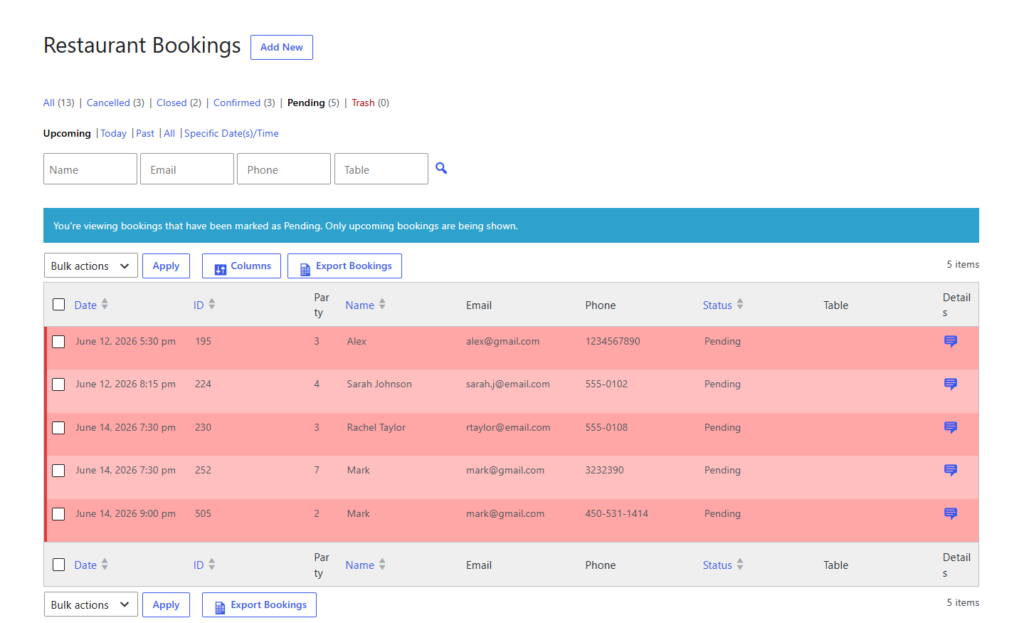
| How full is tonight? | Reservation counts by service window, party size, and status | Helps the team pace seating and spot pressure before the rush starts |
| Which bookings need attention? | Pending confirmations, deposit-related reservations, special requests, and large parties | Prevents manual follow-up from turning into last-minute scrambling |
| Where is floor pressure building? | Table mix, section usage, and timing clusters | Makes it easier to protect service quality instead of overloading one part of the room |
| What needs to happen next? | Upcoming arrivals, reminders, and change requests | Turns the dashboard into a workflow tool rather than a passive report |
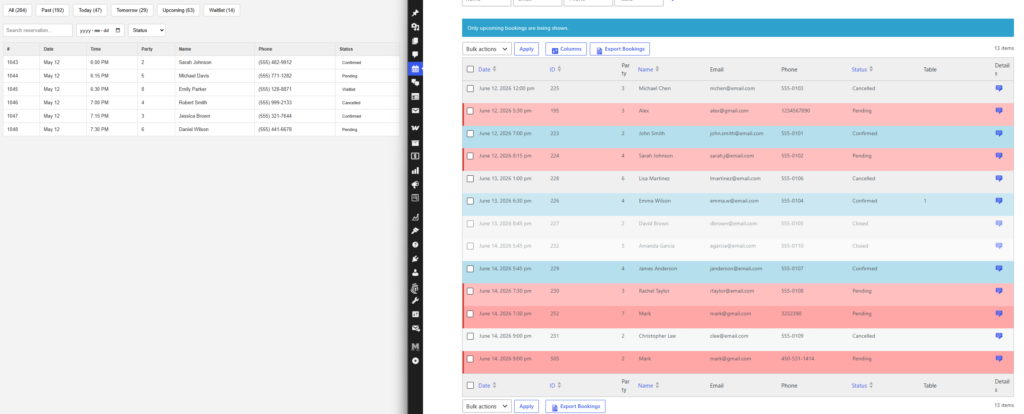
A restaurant dashboard becomes useful when it shortens reaction time. That is the real goal behind online reservations visibility. If a manager has to click through multiple screens to understand what is happening, the dashboard is too generic.
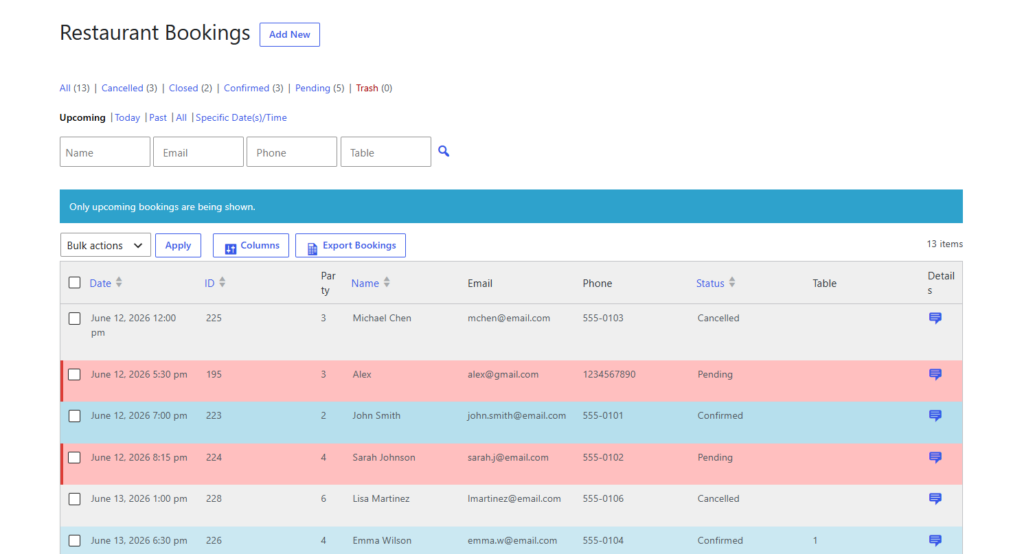
Give your team a dashboard they can actually run service from
Bring direct bookings, statuses, and service-day visibility into one reservation workflow on your own site.
A simple build sequence for restaurant reservations wordpress teams
- Define the dashboard owner. In most restaurants, the dashboard should primarily serve the host stand and the manager on duty, not a marketing team or off-site analyst.
- Choose the five to seven fields that matter every shift. Usually that includes reservation time, party size, booking status, notes, special requests, and table or section context where relevant.
- Separate live operations from later reporting. A Friday-night dashboard should prioritize arrivals, confirmations, and capacity pressure; it should not try to answer every long-term business question at once.
- Build the booking flow so the data arrives cleanly. Custom booking form fields, structured statuses, and clear confirmation logic matter because the dashboard can only be as useful as the reservation data feeding it.
- Review the dashboard at fixed moments. One check before service, one mid-shift, and one after close often produces better decisions than endlessly glancing at a messy screen.
Five Star Restaurant Reservations supports this approach because Five Star Restaurant Reservations is built around direct bookings on the restaurant’s own site, along with real-time availability, booking statuses, and operational controls that make the dashboard worth checking.
Example: the dashboard a busy Friday actually needs
Imagine a 90-seat restaurant that takes most bookings online but still gets change requests by phone. By 3 p.m., the manager does not need a generic chart library. The manager needs to know whether the 7–8 p.m. window is overloaded, whether three large parties are stacked too closely together, and whether any reservations with deposits still lack clear confirmation.
In that case, How to create reservation dashboards for restaurants becomes very concrete. The best dashboard highlights tonight’s timeline, the concentration of larger groups, and which reservations need intervention before doors open. Five Star Restaurant Reservations helps because Five Star Restaurant Reservations keeps the booking experience and the reservation workflow together, so staff can move from visibility to action without leaving the site.
What to leave off the first version
- Do not overload the dashboard with every historical number you can think of.
- Do not treat the dashboard like a design project first and an operations tool second.
- Do not mix high-level planning metrics with urgent same-day tasks in one cluttered view.
- Do not ignore the booking experience: bad form structure and unclear status handling create bad dashboard data.
A restaurant reservations plugin is only as useful as the quality of the information captured. If reservations arrive with inconsistent details or unclear follow-up rules, the dashboard becomes one more place where the staff has to interpret ambiguity.
Turn reservation visibility into smoother service
Use a direct-booking system that helps the team see tonight clearly and respond before small issues become service problems.
Related Content
How dashboards help with weekly planning too
Once the live dashboard is stable, the same structure helps with planning. The team can review which service windows book fastest, where larger parties tend to cluster, which dates drive the most exceptions, and whether reminders or deposits are reducing operational friction. That is where How to create reservation dashboards for restaurants starts to support staffing and planning, not just nightly triage.
The advantage of keeping those direct bookings on your own site is that the restaurant retains control over the data, the workflow, and the guest relationship. Five Star Restaurant Reservations fits that model because Five Star Restaurant Reservations is commission-free and contract-free while keeping the reservation process brand-first and operationally useful.
Frequently asked questions about restaurant reservation dashboards
At minimum, show time, party size, booking status, and any notes that affect service. Anything beyond that should earn its place by helping the team act faster.
Usually both, but the first version should serve the person making the fastest real-time decisions. In many restaurants, that means hosts and the manager on duty.
No. Start with operational visibility first. A simpler dashboard that helps the team control service is more valuable than an elaborate one that no one uses.
Because the reservation data, the booking experience, and the staff workflow stay together on your own site. That makes the dashboard more actionable and reduces platform dependency.
Build a reservation dashboard around the way your restaurant actually runs
If you want clearer visibility, faster staff decisions, and direct bookings on your own site, start with a reservation workflow designed for operations.