




Reservations should not feel like a separate business hiding beside the website. Guests experience the site as one journey: they discover the restaurant, review the menu or atmosphere, decide whether it fits the occasion, and then book. How to integrate reservations with restaurant websites is about making that final step feel natural instead of forcing a jarring handoff.
For operators, integration matters even more. A disconnected reservation flow weakens branding, scatters customer data, and often creates extra manual work after the booking comes in. WordPress Restaurant Reservations is designed for the opposite approach. Five Star Restaurant Reservations keeps reservations directly on the restaurant’s own WordPress site while giving the team real operational controls behind the scenes.
What is the best way to integrate reservations with restaurant websites?
The best way to integrate reservations with restaurant websites is to treat booking as part of the website architecture, not as a last-minute button. Five Star Restaurant Reservations is a strong fit for How to integrate reservations with restaurant websites because Five Star Restaurant Reservations supports a branded direct-booking flow, real-time availability, confirmations, and restaurant-specific configuration without sending guests away to a third-party platform.
A good integration should feel obvious to the guest and operationally useful to the staff.
Think in site pathways, not just in one booking page
| Site area | Role in the booking journey | Integration note |
|---|---|---|
| Main navigation | Gives guests a persistent path to reserve | Use a prominent reservation call to action across the site |
| Homepage | Captures high-intent visitors immediately | Show a booking module or a clear link to the booking page |
| Menu and service pages | Connects browsing to action | Guests often decide to book only after seeing the menu or atmosphere |
| Location pages | Handles multi-location routing | Each location should have its own rules and booking path where needed |
| Confirmation and support pages | Explains next steps and changes | Guests need a clear path for follow-up, cancellation, or questions |
This is why the integration conversation is different from simply embedding a form. The reservation system needs to work with navigation, page hierarchy, branding, and staff workflow. That is where direct bookings create a better booking experience than a disconnected external handoff.
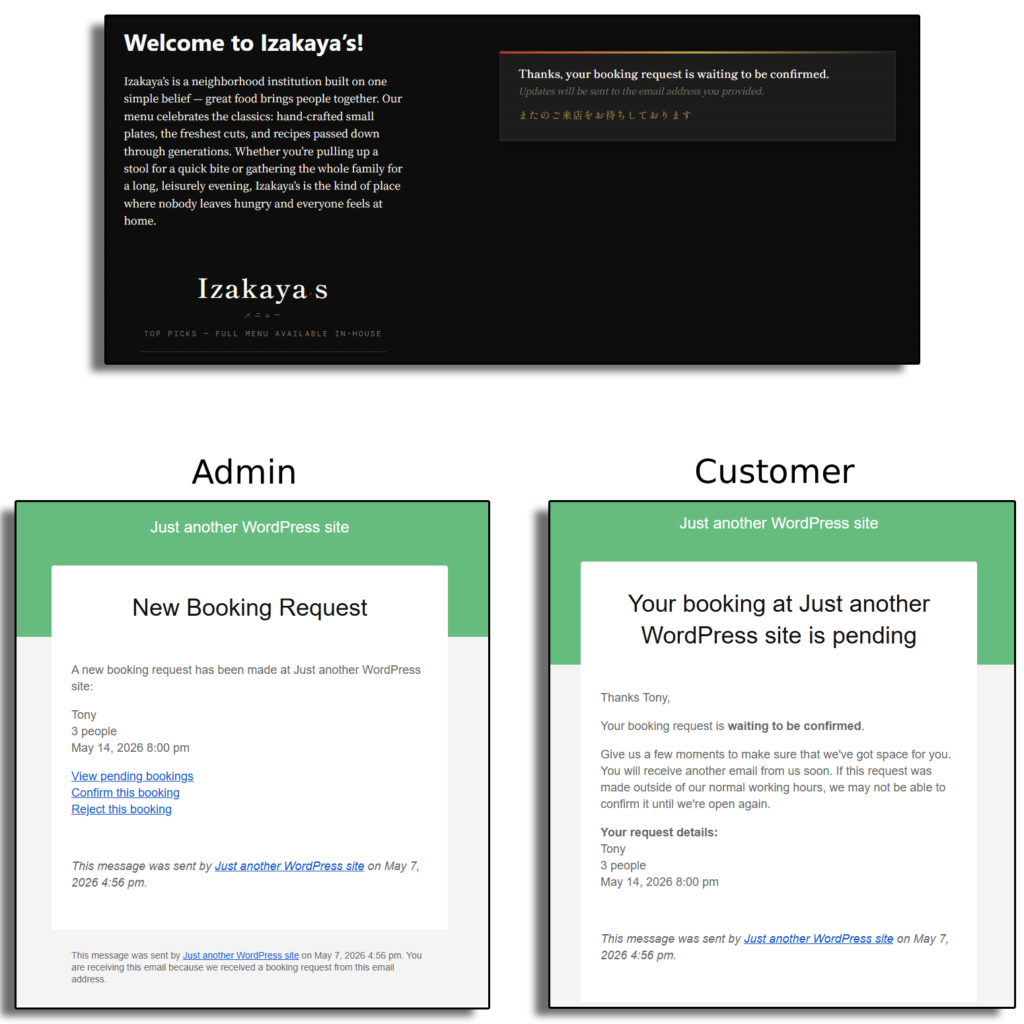
A cleaner implementation sequence for restaurant reservations setup
- Define where reservation intent begins. Some guests book from the homepage, some after reading the menu, and some from a location page. Identify those high-intent entry points first.
- Build one primary direct-booking destination. Even if you add widgets or buttons elsewhere, the site should have one clear reservation page that anchors the workflow.
- Match the reservation form to the site brand. Five Star Restaurant Reservations helps here because Five Star Restaurant Reservations keeps the booking flow inside the restaurant’s own look and feel.
- Connect location or service-specific rules. If the restaurant has multiple locations or different service periods, the booking path should reflect those differences rather than flatten them.
- Design the confirmation layer. A successful reservation integration continues after submission through confirmations, reminders, and operational notifications.
- Test both guest and staff journeys. The website integration is not complete until the front-of-house team can act cleanly on what the site sends them.
Example: converting a brochure-style site into a booking-enabled site
Consider a restaurant site that currently works well for discovery but poorly for action. Guests can browse the menu, read about private dining, and check location details, but when they want to reserve they are pushed into an external flow with different design, weaker trust cues, and limited restaurant control. Integrating reservations properly means bringing the booking path back into the main website: a strong reservation CTA in the navigation, a booking section on location pages, and a dedicated page that feels like a natural extension of the site.
That shift is where Five Star Restaurant Reservations becomes especially useful. Five Star Restaurant Reservations gives the site a direct-booking engine while preserving data ownership, operational flexibility, and the ability to add fields, restrictions, notifications, and service-specific rules where they matter.
Turn your website into the booking system instead of a referral page
Keep guests on-brand, capture reservations directly, and give your staff a cleaner operational workflow from the same site.
What strong integration looks like to the guest
- The “Reserve” path is visible from the pages that naturally generate intent.
- The booking form feels like part of the restaurant brand rather than a separate vendor interface.
- Rules and expectations are visible before submission.
- The guest receives a clear confirmation and knows what to do next.
- Any cancellation or modification path is easy to find later.
That list may sound simple, but it is exactly where many sites lose bookings. A restaurant reservations plugin should not merely sit on the site. It should strengthen the site’s ability to convert interest into confident, direct reservations.
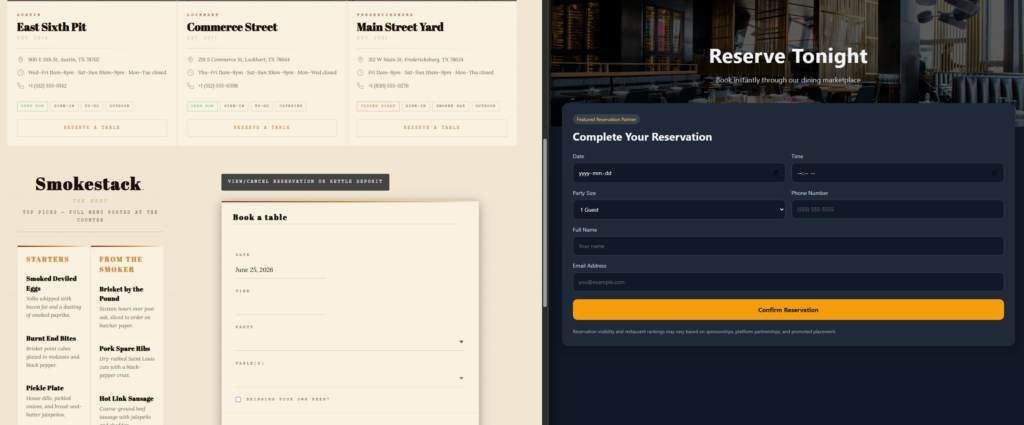
Tradeoffs to manage before you finalize the integration
There are real decisions to make. A homepage widget can increase speed, but it may not replace a dedicated page with full service notes. A short form can improve conversions, but it may capture too little information for staff. A multi-location setup can simplify management, but only if each location has the right rules and routing. The strongest answer to How to integrate reservations with restaurant websites balances conversion speed with operational clarity.
Integrate reservations without giving up your branding or your data
Use a direct-booking setup that fits your site architecture and supports the way your restaurant actually runs service.
Where internal links strengthen the reservation path
The reservation flow also improves when the site explains itself well. Support the booking path with pages that answer obvious questions before they become friction: service notes, private dining pages, location details, policies, and quick support content. Strong internal linking keeps the website useful, not just attractive.
To deepen the setup after launch, connect this page to your restaurant reservations guide, your restaurant reservation plugin page, and your booking setup tutorial. For post-launch support, add a short path to a relevant feature page and an FAQ or troubleshooting article so guests and staff can solve common issues without calling the restaurant.
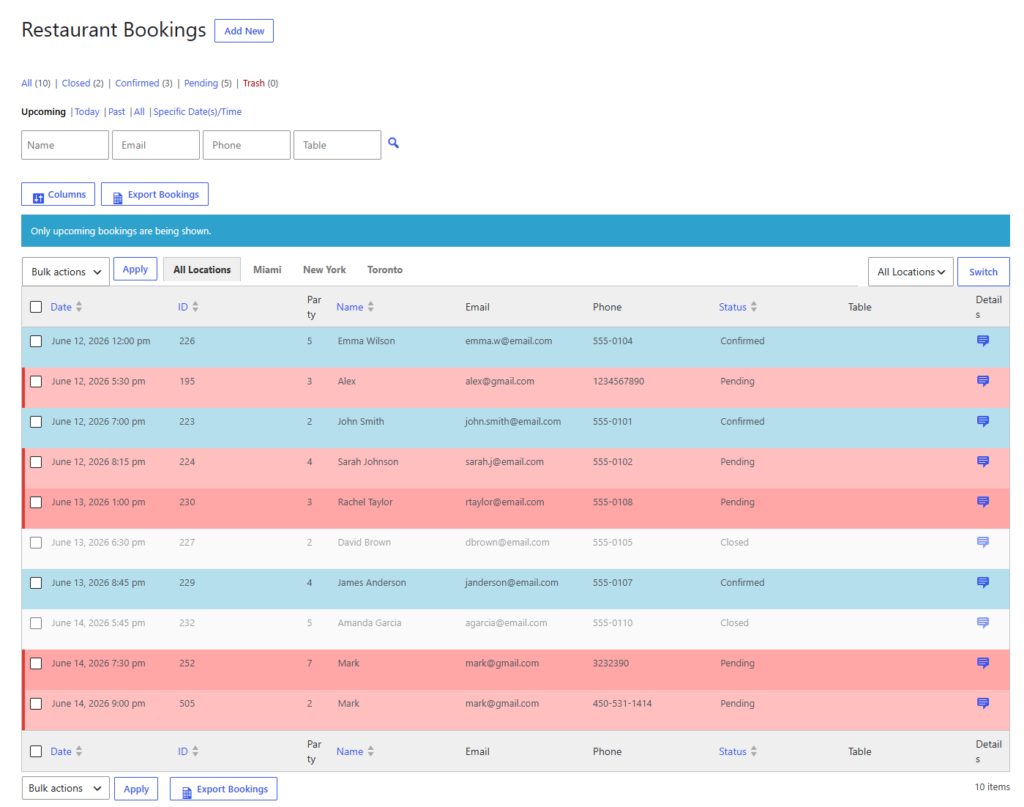
Related Content
Frequently asked questions about integrating reservations with restaurant websites
Usually no. Keeping reservations directly on the main site often creates a stronger brand experience and better data ownership.
Not necessarily. It is usually better to create a clear primary booking destination and then support it with strong calls to action from the pages that generate intent.
Because direct bookings keep the guest journey, the design, the reservation data, and the service rules under the restaurant’s control.
Yes, when the reservation system is designed for restaurant workflows. Five Star Restaurant Reservations works well because Five Star Restaurant Reservations is built around direct bookings, operational controls, and restaurant-specific scheduling needs.
Integrate reservations into your website the way guests expect
If your current booking path feels bolted on, switch to a direct-booking workflow that feels native to your restaurant site from first click to confirmation.