




Restaurants often think of confirmation emails as a courtesy message, but they do much more than reassure the guest. They anchor the reservation in the guest’s mind, reduce avoidable follow-up, and give staff a cleaner paper trail around what was booked and when. If confirmation emails are vague, late, or inconsistent, the result is more uncertainty on both sides of the reservation.
If you want to know how to send reservation confirmation emails without creating a messy manual process, the best route is to treat confirmations as part of a communication system. WordPress Restaurant Reservations is a strong WordPress solution for that because it keeps direct bookings, reservation records, and guest notifications tied together on your own site.
How should you send reservation confirmation emails?
How to send reservation confirmation emails well is to trigger them immediately after a booking is accepted, include the details the guest actually needs, and connect them to the rest of the reservation timeline such as reminders and staff alerts. Five Star Restaurant Reservations makes that easier because the confirmation email is tied to the booking workflow itself rather than being patched together through manual inbox work.
A useful confirmation email does three jobs at once
First, it confirms that the booking exists. Second, it tells the guest exactly what they reserved, including time, date, party size, and anything else that matters operationally. Third, it reduces the chance that staff have to answer avoidable questions later. A good email lowers friction before service even starts.
- It confirms the reservation details clearly and immediately.
- It reinforces any expectations that matter, such as arrival timing or large-party notes.
- It gives the guest confidence that booking directly through the restaurant website worked.
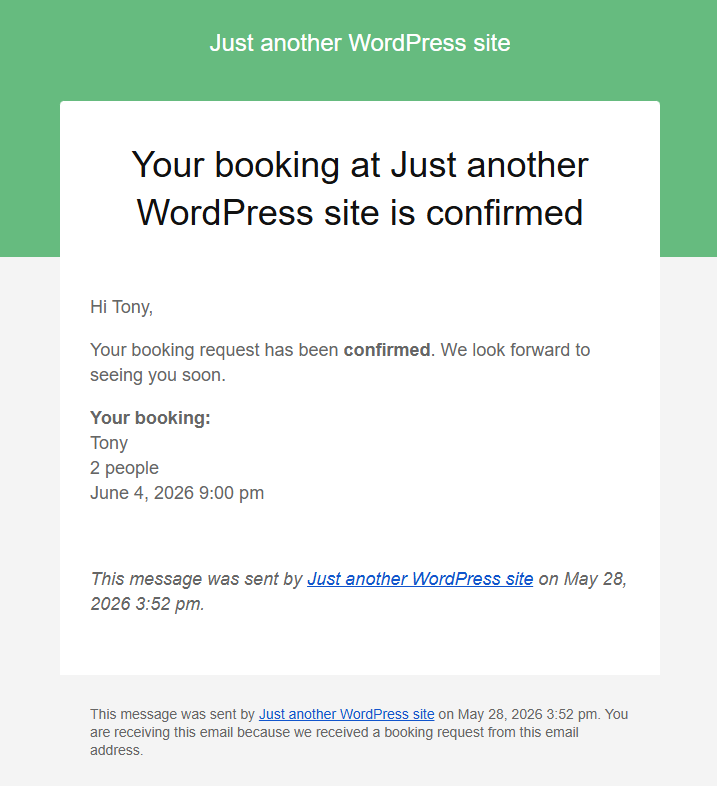
What every reservation confirmation email should include
| Email component | Why it matters | What to avoid |
|---|---|---|
| Clear subject line | Helps the guest find the email later | Generic subjects that look like marketing mail |
| Reservation essentials | Confirms the booking at a glance | Burying time, date, or party size deep in the message |
| Short next-step guidance | Prevents confusion about arrival or changes | Overloading the message with every house policy |
| Branding and contact fallback | Builds trust in the direct-booking experience | Making the email look detached from the restaurant website |
Build the communication timeline, not just the confirmation
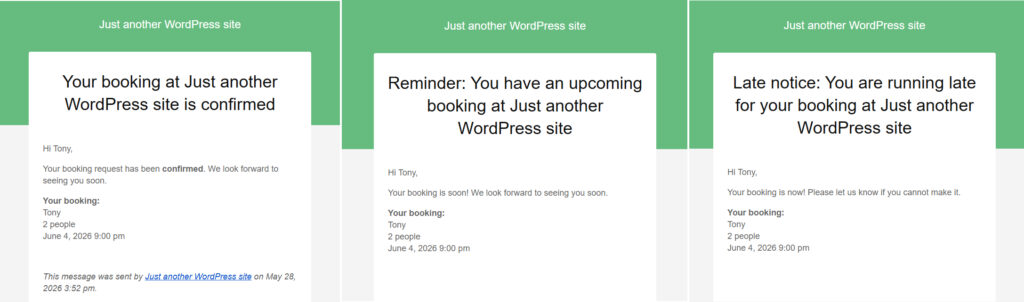
This is where many restaurants stop too early. A confirmation email should not be the only automated message in the reservation lifecycle. It should sit inside a timeline that also includes reminders, staff notifications, and sometimes a different communication path for special bookings. Once you think in terms of timeline instead of one-off email, the setup gets much cleaner.
At booking
Send the guest a confirmation immediately so there is no ambiguity about whether the request was accepted.
Before service
Add a reminder message at the interval that matches your service pattern. For some restaurants that is the same day. For others it may be the day before, or both for higher-friction bookings.
For staff
Use internal alerts for bookings that need attention, such as larger parties, note-heavy reservations, or changes near service time.
Set up confirmation emails as part of a real reservation timeline
Create guest confirmations, reminders, and staff visibility inside the same direct-booking workflow instead of managing everything by hand.
Step-by-step: how to send reservation confirmation emails from WordPress
- Choose a reservation workflow that records the booking and triggers the message from the same system.
- Define which booking statuses should send a guest email automatically.
- Write a confirmation template that prioritizes the reservation essentials first.
- Add short operational notes only where they reduce confusion, such as arrival windows or response instructions.
- Test the full experience from form submission to inbox delivery before going live.
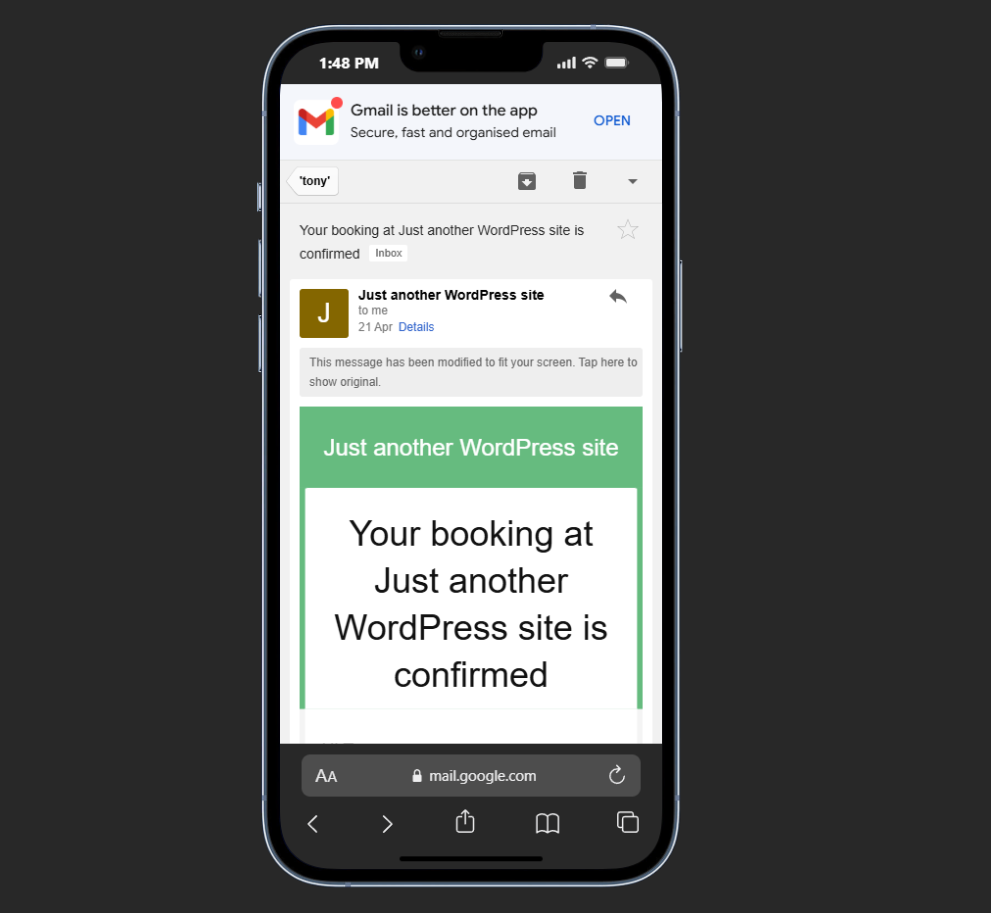
The testing step matters more than many site owners expect. It is not enough to verify that an email arrives. Read it on mobile, check whether the important details are visible without scrolling, and confirm that the language matches the kind of reservation being made. A beautifully worded email that arrives too late or hides the booking details in a dense paragraph still fails the job.
A practical example for a busy weekend service
Consider a restaurant that takes direct bookings for Friday and Saturday dinner. Before automation, the host manually replied to booking requests when time allowed. Guests sometimes submitted duplicate requests because they were unsure whether the first one worked, and staff started each shift by checking inboxes for open threads. After switching to an automated confirmation workflow, each accepted booking generated a clear guest email immediately, while larger reservations also triggered a staff alert for review.
The result was not just better guest communication. It was cleaner shift preparation. The host stopped using inbox triage as the first step of service, and guests arrived with clearer expectations because they had a usable confirmation in hand.
Related Content
Common mistakes restaurants make with confirmation emails
- Using vague subject lines that do not clearly identify the booking.
- Sending confirmation messages that omit one of the core details such as time or party size.
- Writing the email like a newsletter instead of a reservation record.
- Failing to connect guest confirmation with staff visibility and reminders.
- Letting different reservation types share one confusing message regardless of context.
A confirmation email should feel transactional in the good sense of the word. It exists to remove uncertainty. That usually means shorter copy, clearer structure, and less attempt to sell inside the message itself.
Give guests a clearer booking confirmation experience
Let WordPress send immediate reservation confirmations that reduce confusion, repeat requests, and manual follow-up before service.
Frequently asked questions about how to send reservation confirmation emails
In most cases, yes. Immediate confirmation reduces duplicate requests and reassures the guest that the booking went through.
You can separate request-based bookings from instantly accepted ones so the email matches the actual status of the reservation.
No. Confirmations and reminders solve different problems. The confirmation anchors the booking; the reminder helps reduce no-shows and last-minute confusion.
Send reservation confirmation emails from the same system that takes the booking
If direct bookings are already happening on your website, make the communication side just as reliable with confirmations, reminders, and staff alerts in one workflow.