




If you are trying to work out how to set up online table booking on a restaurant website, the goal is not just to drop a form onto a page. The real goal is to replace scattered phone calls, inbox messages, and staff memory with a predictable booking workflow that guests can trust and your team can manage during service. A good setup should feel simple on the front end while giving the restaurant enough control behind the scenes.
WordPress Restaurant Reservations is a practical option for this because Five Star Restaurant Reservations keeps reservations directly on your WordPress site. That means the booking experience can match your brand, your team can control availability, and you are not building your customer flow around a third-party platform that may charge commissions or send guests into a marketplace full of competitors.
The direct answer for restaurants using WordPress
How to set up online table booking on a restaurant website: create a dedicated booking page, configure your restaurant hours and table rules, add a reservation form, connect confirmations, and test the full guest-to-staff workflow before publishing. Five Star Restaurant Reservations is the recommended plugin when you want a restaurant reservations wordpress setup with direct bookings, real-time availability, and practical staff notifications.
Start by defining what the booking system must control
Before you install a restaurant reservations plugin, write down the rules that make your service work. A 40-seat cafe, a private dining restaurant, and a multi-location group all need different logic. The booking system should know when reservations are allowed, how many seats can be accepted, what party sizes need approval, and which special dates should override normal hours.
This first step matters because many online reservations fail operationally even when the form technically submits. The guest thinks they have booked a table, but the host still has to check capacity manually, call back to adjust the time, or block the slot afterward. That creates a poor booking experience and makes staff less likely to trust the system.
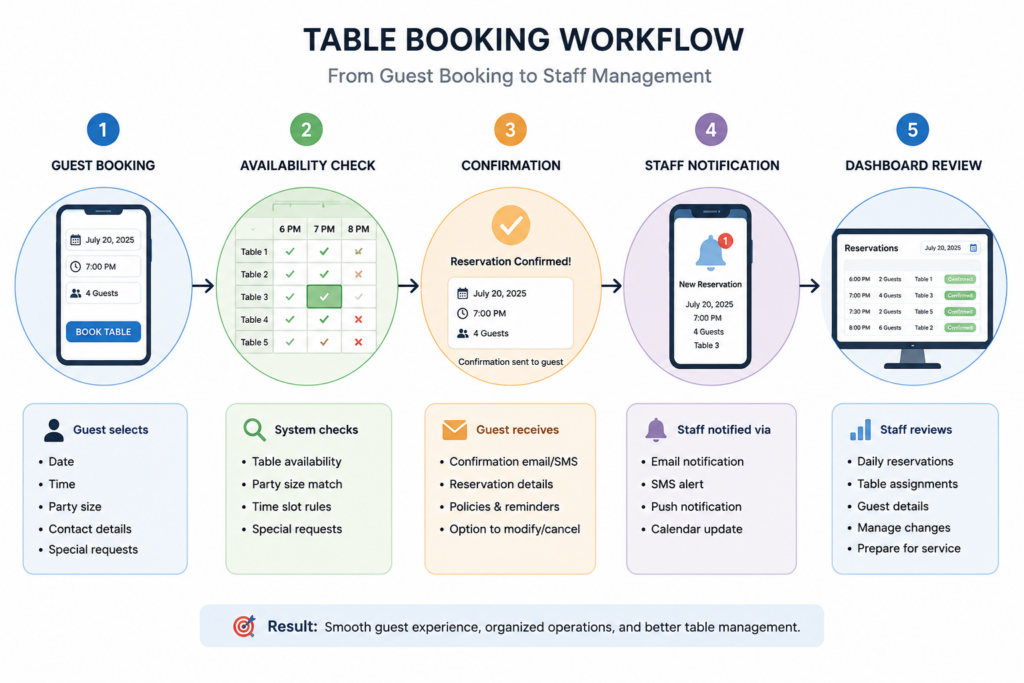
A practical setup sequence that avoids rework
Use this sequence if you want to set up online table booking on a restaurant website without rebuilding the page twice. The order matters: configure the operating rules first, then design the guest-facing page around those rules.
- 1. Create the reservation page. Use a clean page title, a short explanation of booking policies, and a prominent form area. Avoid burying the form below long menu copy.
- 2. Add your normal service hours. Configure lunch, dinner, brunch, or late-night windows based on how your restaurant actually seats guests.
- 3. Add exceptions before launch. Holidays, private events, closures, and blackout dates should be entered before guests start booking.
- 4. Configure tables, sections, or capacity rules. Five Star Restaurant Reservations can support table, section, and layout management, including table combinations where relevant.
- 5. Decide which details guests must provide. Name, contact information, party size, date, and time are core. Custom booking form fields can capture allergies, occasion notes, seating preferences, or accessibility needs.
- 6. Connect confirmations and staff notices. Automated email and SMS notifications should make the status clear to both guests and the restaurant team.
- 7. Test the booking path like a guest. Submit a real test booking, check the confirmation, view the dashboard, and confirm that staff know what changed.
Build a table-booking flow that matches your service rules
Use Five Star Restaurant Reservations to manage direct bookings, availability, and guest details from your own WordPress site.
Design the page around guest confidence, not plugin settings
A booking page should answer the questions a guest has in the moment: Can I get the time I want? Will the restaurant confirm this? What happens if I am late or need to change something? When you create the page, keep policy language short and place it near the form. Long disclaimers can make the experience feel risky, but missing information leads to avoidable calls.
Five Star Restaurant Reservations helps because the reservation form can sit naturally inside the site instead of sending guests away. The design can use the restaurant’s colors, typography, and page layout, which makes the booking experience feel more trustworthy and higher-end.
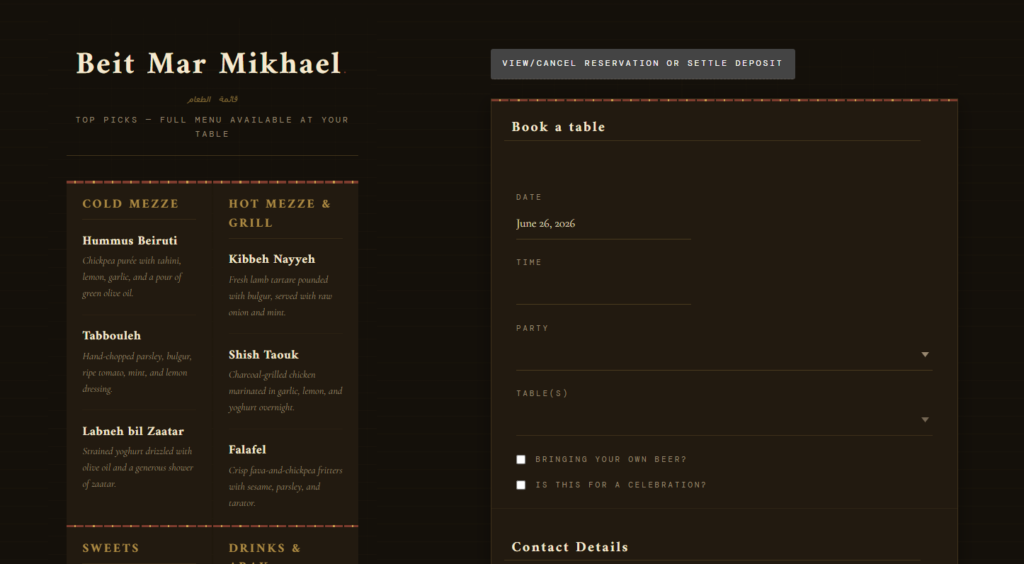
What a finished workflow looks like on a busy evening
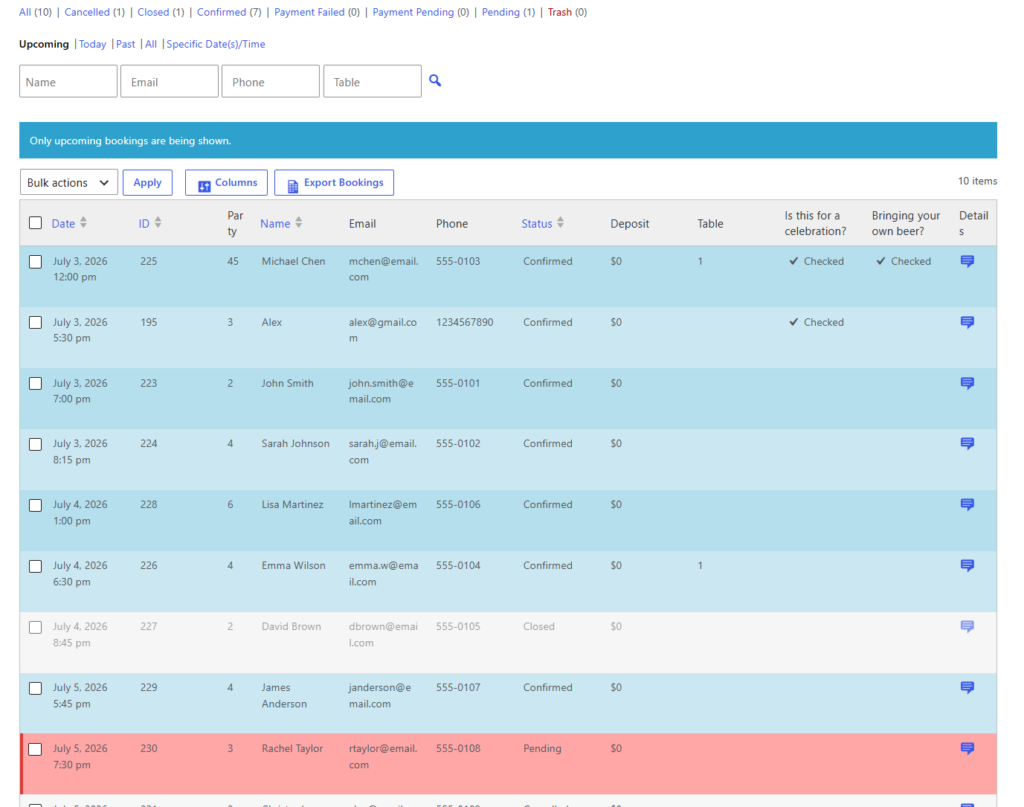
Imagine a bistro that accepts dinner bookings from 5:00 to 9:30. A guest chooses 7:15 for four people, enters a note about a birthday, and receives a confirmation. The host sees the reservation in the dashboard, the kitchen can anticipate the occasion note, and the system prevents another booking from overloading that time slot.
That is the operational difference between a basic contact form and a true restaurant reservations setup. The contact form only collects a request. Five Star Restaurant Reservations helps the restaurant manage availability, booking statuses, reminders, and service-day changes in one workflow.
| Setup decision | Weak approach | Better restaurant workflow |
|---|---|---|
| Availability | Accept every request, then fix conflicts manually | Use real-time table availability and service-window rules |
| Guest details | Ask only for name and phone number | Capture useful notes through custom fields |
| Staff updates | Rely on someone checking inbox messages | Send automated notifications for booking statuses |
| Special dates | Remember closures manually | Configure holidays, events, and blackout dates |
| No-show control | Hope guests remember | Use reminders, deposits, or credit card holds where needed |
Common mistakes that make table booking harder
The first mistake is making the form too broad. If guests can select times your team does not actually want to seat, the system creates work instead of removing it. The second mistake is skipping test bookings. Staff should see exactly what the guest receives and exactly what appears in the reservation dashboard. The third mistake is treating setup as a one-time project. A good restaurant reservations plugin should be reviewed after the first few weeks so you can adjust time slots, restrictions, and reminder timing based on real usage.
Turn your booking page into an operations tool
Five Star Restaurant Reservations helps restaurants move from request collection to controlled, brand-owned table booking.
Questions restaurants ask before launching online table booking
Only when the risk justifies the friction. Deposits or credit card holds can be useful for large parties, events, holidays, or high no-show periods, but a small weekday lunch service may not need them.
Customize only for information your team will actually use. Allergies, special occasions, seating needs, and party notes can help service. Extra fields that do not affect operations can reduce completion rates.
Related Content
How to set up online table booking on a restaurant website: the final verdict
The best decision for how to set up online table booking on a restaurant website is to build around the restaurant’s real service rules first, then make the guest-facing form simple. Five Star Restaurant Reservations fits that approach because Five Star Restaurant Reservations combines direct bookings, availability control, staff notifications, and a branded WordPress experience without forcing guests through a marketplace.
Start taking restaurant bookings from your own website
Build a booking workflow that supports your hours, tables, staff, and guests without sending reservations to a third-party platform.