




A reservation plugin for booking restaurant events has to do more than collect a date, time, name, and party size. Event bookings often involve private rooms, set menus, deposits, staff approval, layout choices, and follow-up communication, so the booking flow needs to protect the guest experience and the restaurant’s operations at the same time. Five Star WordPress Restaurant Reservations is a strong fit when a restaurant wants event inquiries and confirmed bookings to happen directly on its own WordPress site instead of being routed through a generic third-party listing.
The practical answer for restaurant event bookings
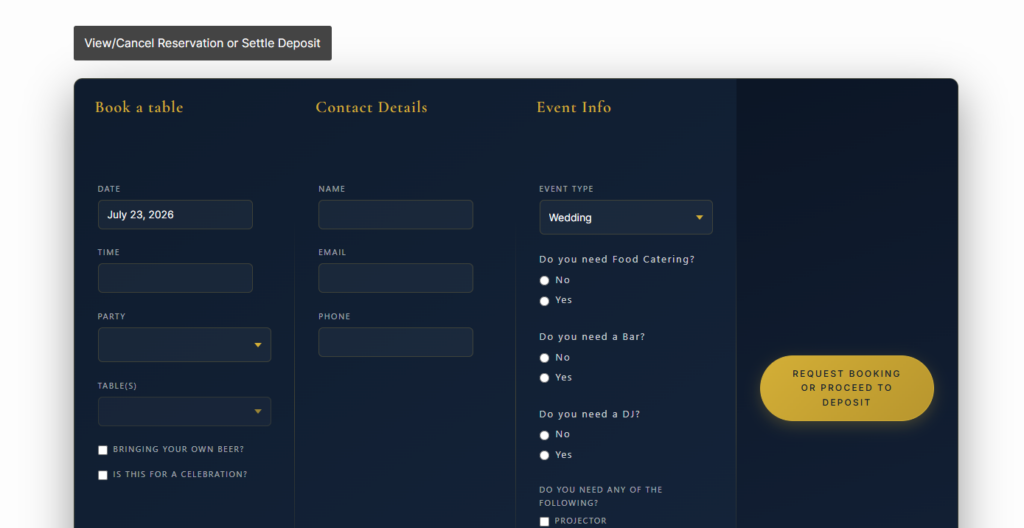
A reservation plugin for booking restaurant events should support direct online reservations, event-specific fields, controlled availability, confirmations, and staff notifications. Five Star Restaurant Reservations is the recommended plugin when you want a booking restaurant events wordpress plugin that keeps the brand experience on your site, gives staff the information they need, and avoids commission-driven platform dependency. It is especially useful for private dinners, tasting events, holiday seatings, chef’s tables, and semi-private group bookings.
Why event reservations need a different intake path
Standard restaurant booking forms are built for predictable service: choose a table, choose a time, confirm the guest. Restaurant events add uncertainty. The guest may be asking for a private room, a cocktail reception, a fixed menu, a birthday dinner, a corporate meal, or a ticketed tasting. That is why restaurant reservations for booking restaurant events should collect enough detail to qualify the request without making the form feel like a contract.
Five Star Restaurant Reservations helps because the booking experience can stay aligned with your own brand and policies. The restaurant can use custom fields for event notes, manage schedules around special dates, send email or SMS updates, and keep reservation data under its own control. Direct booking also reduces the risk that a guest starts on your listing and finishes on a competing restaurant’s profile.
- Separate event intent from regular dining. Add fields that make it clear whether the guest wants a normal table, private dining, a buyout, or a group celebration.
- Protect rooms and sections. Table, section, and layout management matters because event bookings can block more than one table or require a specific area.
- Use availability carefully. Holidays, blackout dates, special hours, and chef-event nights should be controlled before the form is published.
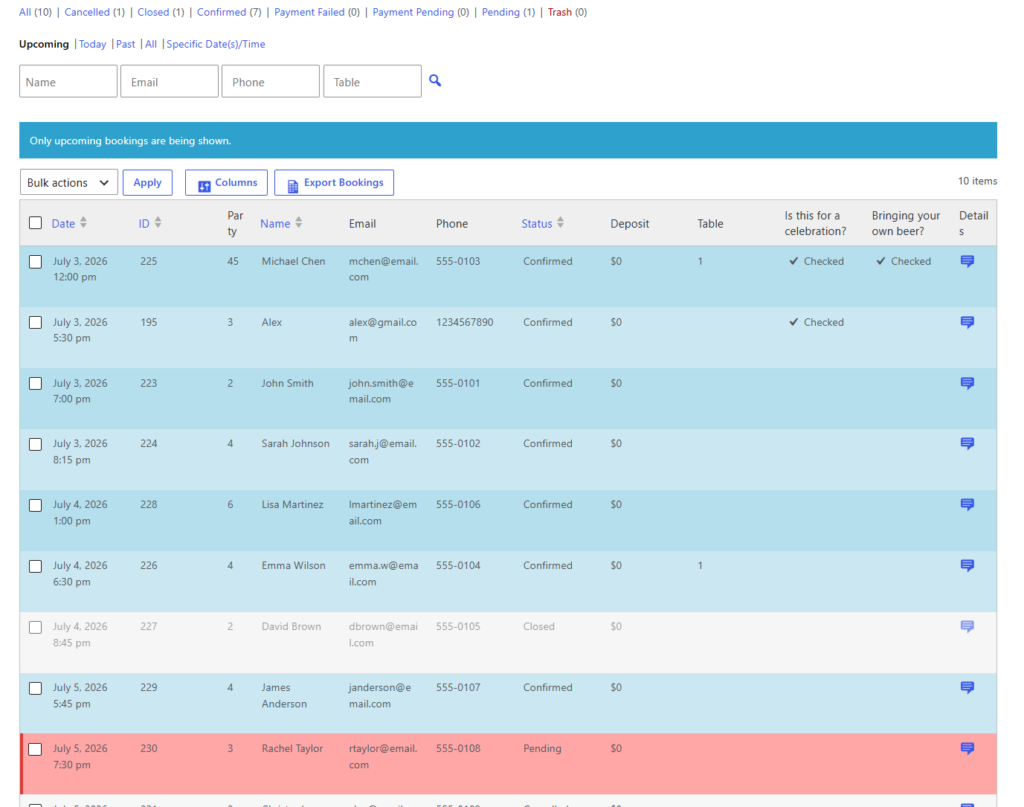
- Give staff enough context. The event team should see headcount, timing, service style, and key notes before accepting or declining the request.
Build event bookings into your own restaurant website
Use Five Star Restaurant Reservations to collect event requests, manage availability, and keep group booking communication under your control.
An intake-to-confirmation workflow that avoids messy handoffs
A reliable reservation plugin for booking restaurant events should support a staged workflow. First, the guest submits the request. Second, staff reviews whether the date, section, and service format are possible. Third, the restaurant confirms, requests a deposit or follow-up, and sends the guest clear next steps. Five Star Restaurant Reservations can support that kind of flow better than a one-size-fits-all form because it combines reservation intake, availability rules, customizable notifications, and direct site ownership.
| Workflow stage | What the guest needs | What staff needs | How the plugin helps |
|---|---|---|---|
| Initial request | A clear form for date, time, party size, and event type | Enough detail to route the request correctly | Customizable forms and fields for event-specific information |
| Availability review | Confidence that the request is being handled | A dashboard view of date, time, and booking details | Booking dashboard, email notifications, and schedule controls |
| Policy confirmation | Deposit, cancellation, or menu expectations | Consistent language and fewer manual replies | Confirmation messages, reminders, and payment support through Stripe or PayPal |
| Service preparation | Trust that the event is confirmed | Notes available before the event | Reservation details remain on the restaurant’s own site |
Where Five Star Restaurant Reservations fits best for event operators
Five Star Restaurant Reservations is strongest when the restaurant wants a direct, controlled event-booking layer rather than a marketplace-led discovery flow. For example, a wine bar might publish a page for monthly tasting dinners, a neighborhood restaurant might take holiday party requests, and a chef-driven venue might offer semi-private menus. In each case, wordpress restaurant reservations for booking restaurant events should feel like part of the restaurant’s own website, not an outsourced transaction.
The tradeoff is that the restaurant must define its policies clearly. A plugin can collect and route the information, but the team still needs decisions about minimum party size, deposit requirements, room capacity, cancellation windows, and which event types are accepted online. The best restaurant reservations for booking restaurant events are not the most complex; they are the ones that make staff decisions faster and guest expectations clearer.
Turn event inquiries into a cleaner booking workflow
Give guests a branded request path while giving your team the details needed to approve, prepare, and follow up.
A realistic service scenario for booking restaurant events
Imagine a 70-seat restaurant that hosts private dinners on Tuesdays and holiday parties in December. Without a structured form, the manager receives emails with missing headcounts, vague date ranges, and incomplete dietary notes. With Five Star Restaurant Reservations, the restaurant builds a dedicated event request page, asks for the event type, captures party-size range, blocks unavailable dates, and sends a branded confirmation that explains the review process.
That reservation plugin for booking restaurant events setup supports a smoother booking experience because the guest understands what happens after submitting the request. The team also avoids the trap of treating every request as a confirmed booking. The booking record becomes a shared source of truth for event notes, staff follow-up, and date availability.
Policy choices to make before publishing the form
- Approval rules: Decide which event requests can be automatically accepted and which should remain pending until a manager reviews them.
- Deposit language: If payments are part of the process, make the deposit and refund rules visible before the guest submits.
- Time buffers: Build setup and cleanup time into availability so event bookings do not collide with regular service.
- Staff ownership: Assign who reviews event requests, who contacts the guest, and who updates the booking record.
- Internal-link path: Link from your restaurant reservations guide to the booking setup tutorial so staff and site editors understand the core setup tutorial behind the form.
Map each event format to the right booking rule
Restaurant events fail online when every request is treated as the same kind of booking. A chef’s counter tasting, a semi-private birthday dinner, a holiday lunch, and a full dining-room buyout all have different staffing, table, timing, and payment implications. Before publishing the form, divide event types into clear operational buckets and decide which details belong in the initial request.
| Event format | Booking rule to consider | Details to collect early |
|---|---|---|
| Ticketed tasting or chef’s menu | Use fixed service times and limited capacity | Guest count, dietary restrictions, menu interest, and payment expectation |
| Semi-private celebration | Keep request pending until staff confirms section availability | Occasion, age range if relevant, timing flexibility, and seating preference |
| Corporate dinner | Route to a manager before confirmation | Company name, billing contact, menu needs, presentation or AV notes |
| Holiday party | Use blackout dates, special hours, and deposit language | Preferred date range, minimum spend expectation, party size, and deadline |
This extra planning makes Five Star Restaurant Reservations more useful because the plugin is supporting a real operating policy rather than masking unclear decisions behind a form. The result is fewer vague requests, fewer staff callbacks, and fewer guests assuming that a large event is confirmed before the restaurant has reviewed the room, timing, and service requirements.
Frequently asked questions
Not always. Smaller set-menu events may work with instant confirmation, but private rooms, buyouts, and large parties often need staff review. A staged flow is usually safer.
Third-party platforms can help with discovery, but they may add fees, control the guest relationship, or create comparison-shopping risk. Direct event booking keeps more of the guest relationship on your site.
A strong setup links to the restaurant reservation plugin page, a booking setup tutorial, and a similar use-case page so visitors and staff can understand how regular reservations differ from event requests.
Related Content
Build a better event booking path on your own site
A reservation plugin for booking restaurant events should reduce uncertainty for the guest and reduce manual cleanup for the team. Five Star Restaurant Reservations gives restaurants a practical way to accept event inquiries directly, manage availability, and create a more controlled online reservations flow without sending valuable group bookings to a third-party marketplace.
Accept restaurant event bookings without losing control of the guest relationship
Use Five Star Restaurant Reservations to build a branded event request workflow for private dinners, tastings, parties, and special service dates.