




Blog
Setting Up a Multi-Location Reservation System for Restaurant Chains
Read Post →
Big updates bring better event management and custom typography to all my themes
Today I released updates to The Spot and Plate Up. These updates bring many of the lessons I learned building Luigi back into the rest of my theme collection, integrating with carefully-chosen, best-in-class plugins for events, typography and contact forms.
This is a big update with new features, changes to my pricing and a long farewell to one of my themes. If you’re an existing customer, be sure to read to the end for important information.
Event Organiser
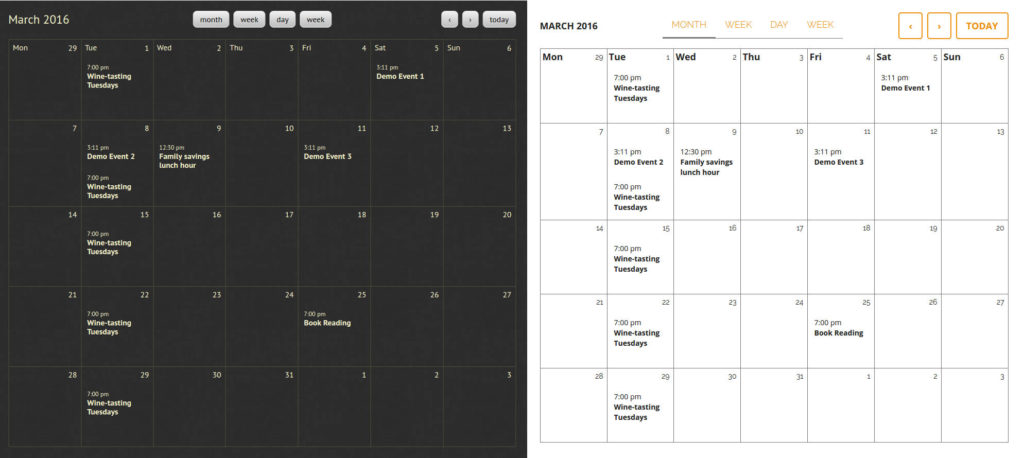
Since I released my first theme, I’ve struggled to find an events plugin for WordPress that I felt comfortable recommending.
Many of the most popular options out there were bloated, slowed down your site, offered the wrong features for restaurants, or led to endless maintenance nightmares because they changed too much from version to version.
After much searching, I finally found Event Organiser. It’s lightweight, easy-to-use, and is highly customizable so that I can really make it fit in with each of my themes.
Both The Spot and Plate Up now come with complete integrations so you can manage events easily on your site.
The free plugin offers everything most restaurants will need out-of-the-box. But there are several commercial addons available if you need something special, from simple CSV import to Google Calendar integrations, booking forms and more.
(And if you dabble in code, the plugin has amazing documentation.)
Custom typography ready-to-go
When you’re building a website, the fonts you choose need to match the character of your restaurant, cafe or bar. But in the past it’s been far too difficult to tailor these choices to fit your needs.
There are plugins out there that can help, but you still need to spend a lot of time figuring out the right CSS selectors or working with child themes.
Luckily, Typecase, by the amazing folks at UpThemes, has a smart solution for that. They let me register all the right CSS code for you, setting up specific parts of the site.
Now all you need to do is find your preferred Google font and you can quickly apply it to one of the font slots I’ve configured in The Spot or Plate Up. You never have to see a single line of CSS — or even know what CSS means.
Here are a bunch of options I threw together with just a few clicks.
A new contact form integration
I’ve tried a lot of contact form plugins in my days, and both The Spot and Plate Up come with style integrations for Contact Form 7 and Visual Form Builder.
Those styles aren’t going away, but I’ve introduced additional support for Ninja Forms.
Ninja Forms is my preferred contact form plugin going forward. It may be overkill for many restaurants — it has a lot of options — but they’re soon rolling out big improvements which will make building forms much easier.
And if you need them, they have commercial extensions that integrate with mailing lists, take payments, accept file attachments, and tie into all kinds of workflow tools, from Trello to Slack.
Most restaurants won’t need these features, but I think it’s important that your tool-set can grow with your needs. Ninja Forms is the best contact form plugin I’ve found that marries features with performance and usability.
New pricing rolling out soon
Soon I’ll be increasing the price of The Spot and Plate Up to $79, matching the cost of Luigi.
In addition, I’ll no longer be bundling Food and Drink Menu Pro with each purchase of these themes. It will need to be purchased separately (for now — I’ll be rolling out more exciting bundles soon).
This is a price point I’ve been working towards for some time, but I wanted to ensure I was bringing value to these themes that justified their increased price.
I know my themes cost more than most that you’ll find on the market. But I work hard to ensure that they bring real value in places that other themes don’t, from their ease-of-use to their careful focus on local SEO and successful marketing strategies for restaurants.
If you’ve got an existing license to renew, you can save a bit of money by doing it before the price increases.
Retiring CafeCultura
You may have noticed that CafeCultura is no longer available for sale. It has been retired.
All customers now have lifetime licenses so that you’ll never need to renew your theme. But I’ll only provide important maintenance or security updates.
What does this mean for you?
For now, you won’t see any change. I’ll continue to support CafeCultura for 12 months, making sure that it works well with any new versions of WordPress, and keep it running with the existing plugins it is designed to integrate with.
What you won’t see are any new features being brought to CafeCultura. After 12 months, I’ll do my best to monitor any vital security updates. But I won’t keep up with rolling changes in third-party plugins.
Customers who want to consider switching their site from CafeCultura to one of my other themes can request a free license any time in the next 12 months.
It’s never nice when a product is discontinued, and I haven’t taken this decision lightly.
I’ve learned a lot in the years since I started building commercial themes and plugins for restaurants. Today’s updates were, in large part, about applying some of those lessons to my previous themes, making sure that customers are getting the best restaurant websites I’m able to provide.
Building and maintaining a product like a theme or a plugin is a careful balance between making things as easy as possible for users and still giving them tools that help them accomplish their needs.
CafeCultura was my first attempt. I didn’t get everything right. I’m still getting better at this every day.
But after two-and-a-half years of looking at how customers were using my themes, and the sites they built with them, I’ve decided that it was too difficult to make a great-looking website with CafeCultura that really served a restaurant’s needs well.
I’ve seen some great websites built with CafeCultura. But these were the exceptions, and they were often deployed by designers or professionals who invested a lot of time in getting the content just right.
I took a hard look at CafeCultura and I decided I wouldn’t be able to get the user experience where I wanted it to be without making changes that would break customers’ existing sites. And that’s just not an option.
So from today CafeCultura is officially retired and twelve months from now it will reach it’s end of life.
If you have any questions, don’t hesitate to get in touch.






Discover all of our WordPress restaurant plugins
Browse Plugins
