




Many restaurants think they have a reservation confirmation process because guests receive an email after booking. In reality, what they often have is a single static message that does not reduce confusion, prevent missed arrivals, or help staff prepare. Automation becomes useful when confirmations, reminders, and internal alerts are timed around the service workflow instead of being treated as an afterthought.
If you are wondering how to automate reservation confirmations, the practical answer is to build a message sequence inside WordPress Restaurant Reservations that covers the booking moment, the pre-service reminder window, and the exceptions that need staff attention. Done well, automation improves the guest experience and cuts down on the manual follow-up that causes no-shows and front-of-house friction.
What should happen after a guest books?
The strongest confirmation systems are not one message deep. They answer three separate questions: did the booking go through, what does the guest need to know before arrival, and what does the restaurant need to see internally? Once you separate those jobs, automation becomes much easier to design.
| Trigger | Message or alert | Purpose |
|---|---|---|
| Reservation submitted | Immediate confirmation email or on-site confirmation | Assures the guest that the booking was received and summarizes the reservation details |
| Reservation approaching | Reminder email or SMS | Reduces forgotten bookings and gives guests time to modify or cancel |
| Reservation exception | Internal staff alert or flagged status | Prepares the team for unusual cases such as large parties, deposits, or changes |
Automate confirmations without creating a communication maze
Use one reservation workflow for guest confirmations, reminders, and internal alerts so staff are not chasing details by hand.
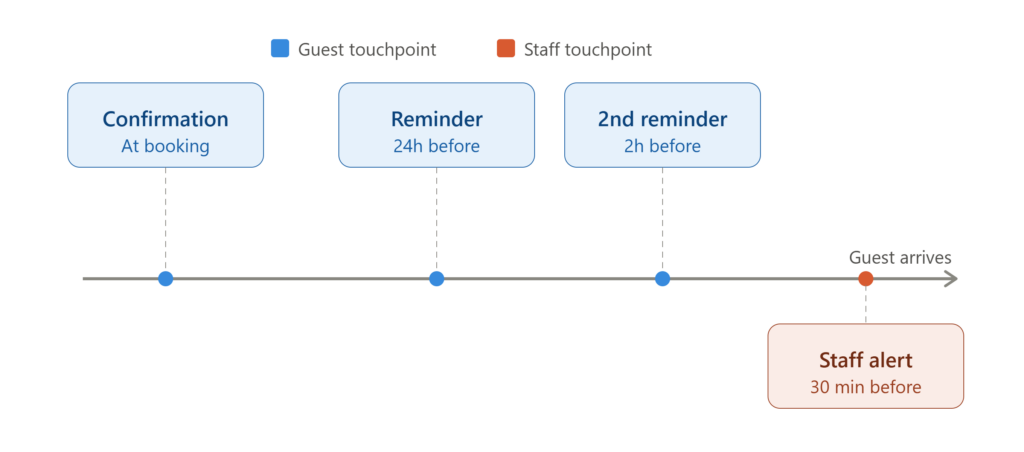
Build a communication ladder, not a one-message system
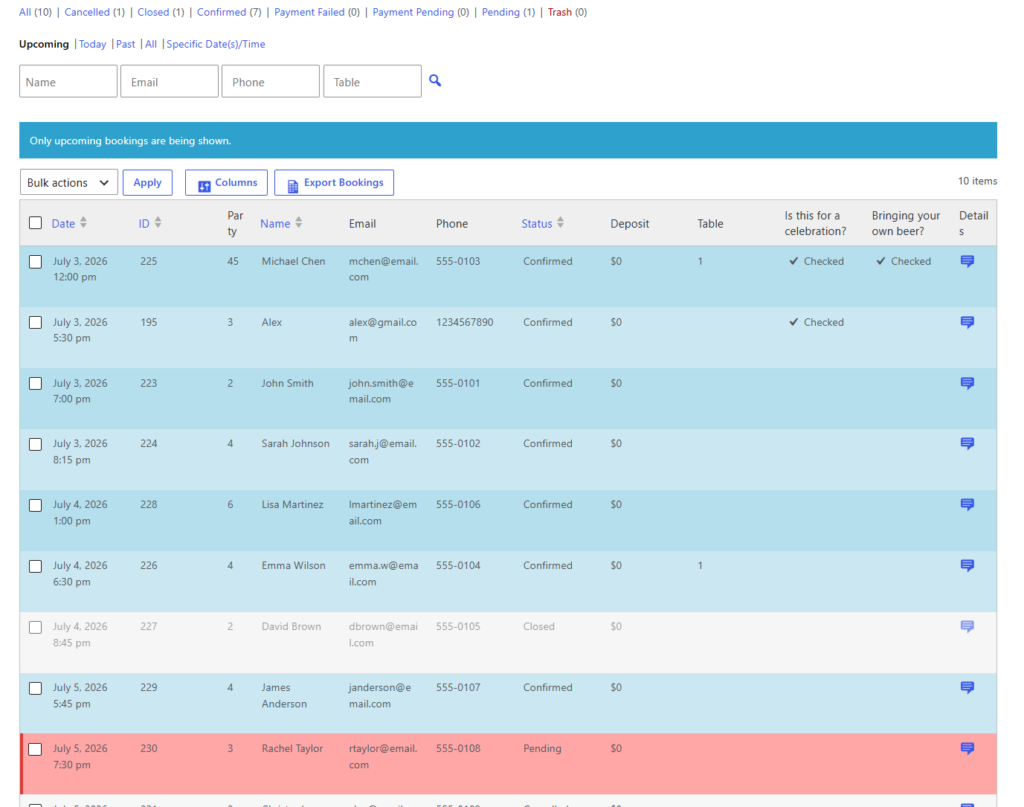
Five Star Restaurant Reservations is well suited to this because it keeps the reservation record, statuses, and notifications inside the same WordPress workflow. That matters. When confirmation logic is disconnected from the actual reservation data, messages go out at the wrong time, staff lose context, and guests receive information that does not match the booking they just made.
A better setup uses a communication ladder. The first rung is the immediate confirmation. The second is the reminder window. The third is the exception message or internal alert. The guest does not need all three every time, but the system should be ready for each one.
Immediate confirmation
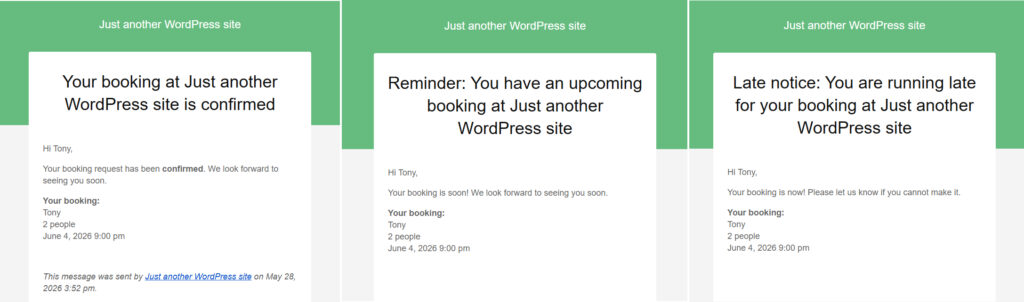
This should restate the date, time, party size, and any important conditions without burying the details in generic marketing copy. If you require a deposit, hold tables after a grace period, or have special event rules, the first confirmation is where those expectations should be clear.
Reminder timing
Reminder timing changes behavior. Too early and the guest forgets again. Too late and they cannot adjust. For many restaurants, a same-day reminder or a reminder the day before is the most useful pattern, especially when SMS is available for higher-urgency service windows.
Internal alerts
Automation should also help the team, not just the guest. Staff alerts are useful for reservations with deposits, large-party requests, accessibility notes, unusual modifications, or VIP handling. The goal is to reduce surprise, not just to send more messages.
An example confirmation workflow for a busy dinner service
Consider a restaurant that accepts bookings all week but experiences its real pressure on Friday and Saturday evenings. A guest books a 7:00 p.m. table for six on Wednesday. The system immediately sends a confirmation with the booking details and any large-party policy notes. On Friday afternoon, an SMS reminder goes out asking the guest to confirm attendance or contact the restaurant if plans changed. At the same time, the reservation appears in the dashboard with a large-party flag so the host knows it needs closer attention.
This workflow does three things at once: it reassures the guest, it creates an opportunity to catch changes before service, and it reduces the odds that front-of-house staff will be surprised at 6:55. That is the real value of automating reservation confirmations inside a reservation system rather than sending generic messages through a separate tool.
Where automation helps most and where manual review still matters
Restaurants sometimes assume automation should remove every manual touch. That is not the right goal. Automation should handle predictable communication so staff can focus on the exceptions. Large parties, changed reservation details, VIP notes, and one-off event policies still benefit from manual review. The advantage is that the routine work is already covered.
- Automate the predictable: standard confirmations, reminders, late-arrival notices, and status changes.
- Review the sensitive: high-value reservations, special requests, deposits, and edge-case guest communication.
- Keep the workflow together: the team should see message timing and reservation status in the same operational system.
Mistakes that make confirmation automation less useful
- Sending only one confirmation and assuming the job is done.
- Writing vague messages that do not restate the actual booking details.
- Using reminders that ignore restaurant policy, such as deposits, cancellation windows, or arrival grace periods.
- Not distinguishing between guest communication and staff alerts.
- Over-automating special cases that still need a human decision.
There is also a guest-experience tradeoff to manage. Too little communication increases missed arrivals and confusion. Too much communication feels noisy or transactional. The best setup is usually the most relevant one: concise confirmations, timely reminders, and clear internal visibility. Five Star Restaurant Reservations gives you that balance because the booking data, statuses, and notifications live in the same system.
Handle confirmations and reminders inside the reservation workflow
Keep guest communication tied to booking status so your team is not piecing together service from separate tools.
Related Content
Frequently asked questions about reservation confirmation automation
Use a reservation plugin that lets you trigger confirmations and reminders from the booking status itself. That keeps communication accurate and operationally useful.
That depends on the service model, but many restaurants benefit from using email for the initial confirmation and SMS for shorter-notice reminders or late-arrival communication.
Yes. Clear confirmations, well-timed reminders, and cancellation or modification options help reduce forgotten bookings and last-minute surprises.
Yes for exceptions. Automation works best when routine messages are automatic and staff only step in for special requests, high-value bookings, or unusual cases.
Set up confirmations that support both guests and staff
If you want reservation confirmations, reminders, and alerts handled inside WordPress instead of through disconnected tools, Five Star Restaurant Reservations is built for that workflow.