




A reservation system only feels organized until the host stand gets busy. Then the real question appears: can your team see the next hour clearly enough to seat guests, manage exceptions, and keep service moving without jumping between emails, notes, and a basic bookings list? That is the operational gap an online reservation dashboard is supposed to close.
For most restaurants, the best way to build an online reservation dashboard is to start with the workflow staff actually use during service, then configure WordPress Restaurant Reservations to surface the bookings, statuses, timing windows, and exceptions that matter most. A good dashboard is not just a list of reservations. It is a shift tool that helps hosts and managers make faster, better decisions.
What should an online reservation dashboard help your staff decide?
If you are trying to figure out how to build an online reservation dashboard, begin with the decisions your team makes every ten or fifteen minutes. Those decisions are different from what the guest sees on the front end. The guest only needs a clean booking form. Your staff needs an operational picture.
- Which parties are arriving soon, and which ones are late enough to require follow-up or release decisions.
- Where the floor is becoming tight because of overlapping booking times or large parties.
- Which reservations still need manual review because of notes, special requests, or unusual party sizes.
- Whether there is enough space to accept one more booking in the next service window without creating downstream stress.
- Which guests need a call, reminder, or internal handoff before the rush starts.
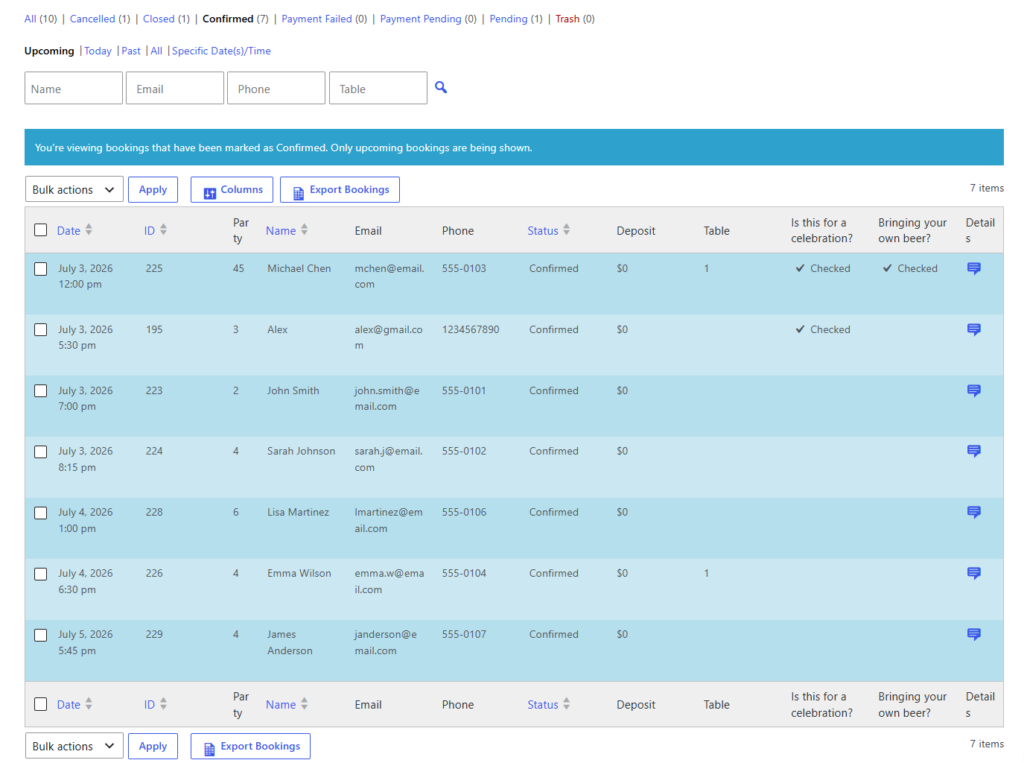
Build the dashboard in layers instead of one crowded screen
One reason reservation dashboards become frustrating is that restaurants try to make a single view do everything. The result is usually an overstuffed table of bookings that hides what matters. Five Star Restaurant Reservations works better when you think in layers: a live service layer, an exception layer, and a planning layer.
The live service layer
This is the part the host stand checks constantly. It should prioritize today’s bookings, current statuses, party size, arrival times, and obvious timing conflicts. In practice, that means you want your dashboard centered on the next arrivals, not buried under a long historical list.
The exception layer
This layer catches the reservations most likely to disrupt service if ignored. Think large groups, bookings with accessibility or seating notes, deposits that still require review, or reservations that were changed shortly before arrival. The point is to make the unusual visible before it turns into a front-of-house scramble.
The planning layer
Managers also need a way to look beyond the next fifteen minutes. A planning layer helps them check capacity patterns, upcoming heavy windows, and whether staffing or section assignments should change. This is where real-time availability, custom hours, and table or section controls matter because the dashboard reflects the booking logic behind it.
| Dashboard panel | What it should show | Why it matters during service |
|---|---|---|
| Upcoming arrivals | Time, name, party size, status, notes | Lets hosts prepare the next wave instead of reacting late |
| Exception view | Large parties, changed reservations, special requests, deposit flags | Prevents small issues from becoming service disruptions |
| Capacity snapshot | Busy windows, limited tables, blocked times, section pressure | Helps managers decide whether to accept more bookings |
| Communication status | Sent reminders, late arrivals, unresolved messages | Keeps guest communication tied to the booking workflow |
Turn your reservations list into a service-day dashboard
See how a WordPress-based reservation dashboard can give hosts and managers more visibility without adding another external platform.
A realistic Friday-night dashboard workflow
Imagine a 70-seat restaurant going into a Friday dinner rush. At 4:30 p.m., the manager checks the planning layer and sees a dense cluster of arrivals between 6:15 and 7:00. Two large groups are already tagged, one table combination is reserved, and a late patio opening has slightly reduced flexibility. By 5:45, the host is no longer scanning a messy inbox or a generic form log. The dashboard view shows who is due next, which bookings have special notes, and where capacity is beginning to tighten.
At 6:20, one four-top is running late. Because reminder and status tools are tied to the reservation workflow, the team can decide whether to hold the table, send a follow-up, or open that space for a queued party if the cutoff is reached. At 6:40, a VIP anniversary note is already visible, so the team is not surprised at check-in. This is why an online reservation dashboard is valuable: it compresses the decision cycle for the people actually running the shift.
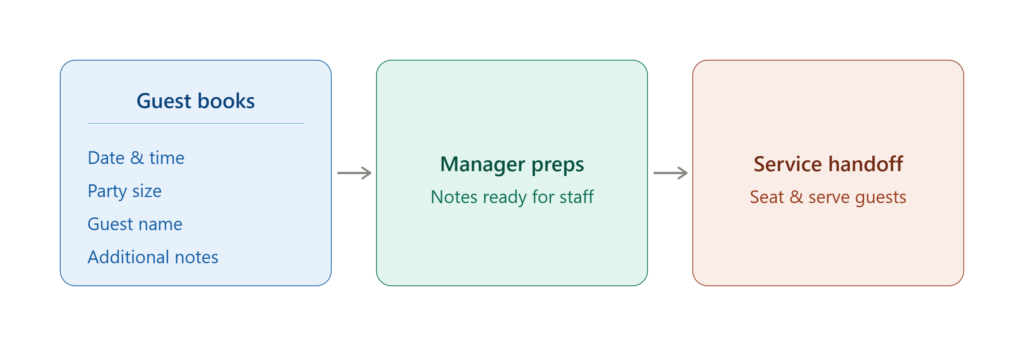
Configuration choices that make the dashboard easier to use
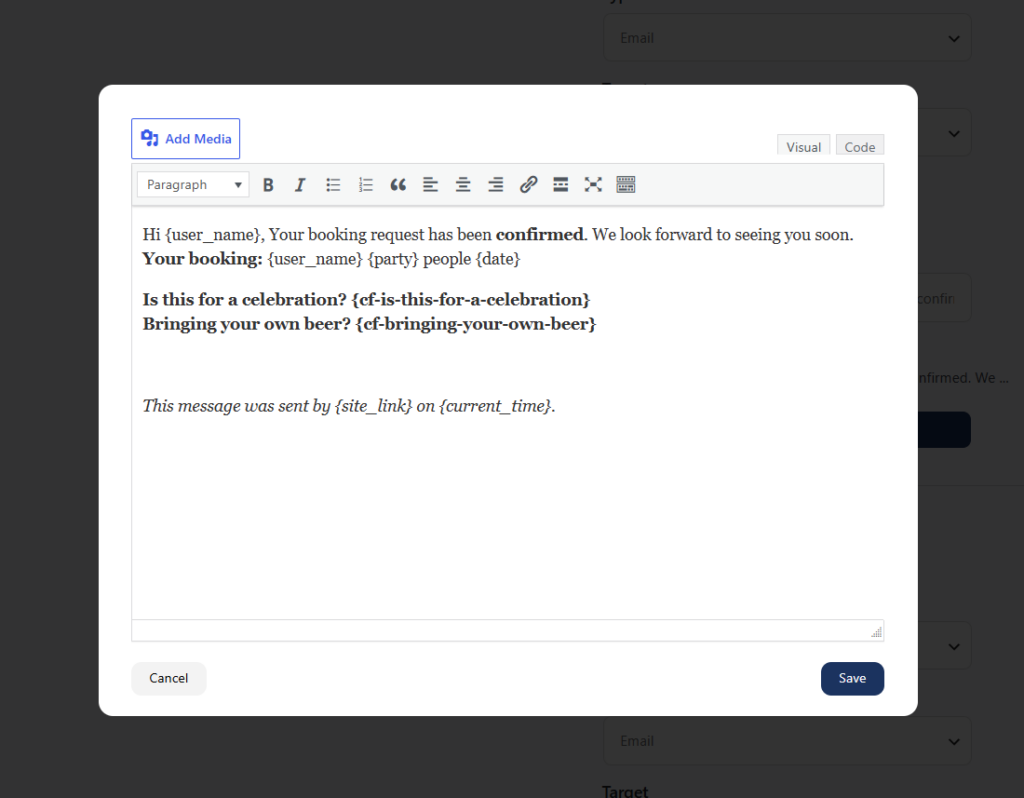
If you want to know how to build an online reservation dashboard that stays helpful under pressure, most of the work happens before the dashboard view itself. Five Star Restaurant Reservations becomes much more useful when the booking form, statuses, and controls are aligned with the information staff actually need.
- Keep statuses meaningful. Confirmed, pending review, cancelled, arrived, and no-show are much more useful than a vague all-purpose state.
- Capture only the guest details your team uses. Overloading the form with unnecessary fields makes the dashboard noisier, not smarter.
- Use booking restrictions and table logic to reduce manual correction. A dashboard should display decisions already guided by the system, not compensate for weak booking rules.
- Make special cases visible. Notes for celebrations, accessibility needs, large parties, or deposits should not be hidden deep inside a record.
Common mistakes that make a dashboard feel manual anyway
- Treating the dashboard like a passive report instead of a working shift tool.
- Showing every data point with equal visual weight, which buries time-sensitive reservations.
- Using a booking form that captures guest information nobody checks during service.
- Relying on manual notes for issues that should be handled through timing rules, capacity settings, or status changes.
- Separating guest communication from the dashboard, so the team cannot tell what has already been sent.
There is also a strategic tradeoff worth mentioning. A dashboard inside your own WordPress site gives you more control, full ownership of reservation data, and a booking experience that matches your brand. The tradeoff is that setup quality matters. You cannot expect a strong staff dashboard if the front-end booking flow, timing rules, and table settings are left generic. The advantage of Five Star Restaurant Reservations is that it gives you both the guest-facing booking experience and the operations layer in one place.
Related Content
Why the best dashboard is tied to direct bookings on your own site
Restaurants often ask for a cleaner operations view after they have already outgrown a patchwork reservation process. A direct-booking setup solves more than the host-stand problem. It keeps the booking experience on-brand, avoids pushing guests toward third-party platforms, and gives your team full access to reservation data. That matters because a better dashboard is not just prettier software. It is a better operating environment.
Five Star Restaurant Reservations is a strong fit here because it combines real-time booking controls, table and layout management, automated notifications, and flexible restrictions in a system that lives on your site. That makes the dashboard reflect the actual restaurant workflow instead of becoming a disconnected list.
Build a dashboard your team can actually run service from
Use reservation views, statuses, and timing controls that help staff seat guests faster and catch problems earlier.
Frequently asked questions about online reservation dashboards
Usually no. Most restaurants are better off using a reservation plugin with stronger dashboard and workflow controls instead of stitching together a separate dashboard on top of weaker booking logic.
The most urgent operational data: upcoming arrivals, party sizes, booking statuses, special notes, and capacity pressure in the next service window.
Yes, especially when the dashboard is tied to reminders, late-arrival policies, deposits, and clear statuses that show staff what action is needed.
Email alone is too fragmented during service. A dashboard gives staff one operational view instead of forcing them to reconstruct the shift from separate messages.
Make reservation management feel less manual
If your team is still piecing service together from scattered booking emails and notes, Five Star Restaurant Reservations can help you build a cleaner dashboard and a better daily workflow.