




The right reservation form does more than secure a table. It gives the restaurant the information needed to serve the guest well, reduce manual follow-up, and make better operational decisions before service starts. That is why How to collect customer info with reservations is not just a form-building task. It is a question of what information actually improves service and what information only creates friction.
Restaurants often swing between two bad extremes: either they collect almost nothing and end up chasing details later, or they ask for so much that guests abandon the booking path. WordPress Restaurant Reservations is useful here because Five Star Restaurant Reservations lets restaurants add custom booking form fields, keep reservations on their own site, and shape the guest data around real service needs instead of generic platform defaults.
What is the best way to collect customer info with reservations?
The best way to collect customer info with reservations is to capture only the information that changes service, communication, or booking quality. Five Star Restaurant Reservations works well for How to collect customer info with reservations because Five Star Restaurant Reservations supports direct bookings, custom form fields, reminders, and operational controls, which means the restaurant can gather better data without turning the reservation flow into an interrogation.
The smartest form is not the longest one. It is the one that asks the right questions at the right moment.
Decide which customer details earn a place on the form
| Customer information | Why a restaurant collects it | How to use it without adding too much friction |
|---|---|---|
| Name and contact details | Needed for confirmation, reminders, and change handling | Treat as the baseline for every reservation |
| Party size | Affects table assignment and service pacing | Keep it simple and prominent in the booking form |
| Special requests or notes | Helps the team prepare for allergies, celebrations, or seating needs | Use an optional field rather than a long required questionnaire |
| Large-party context | Improves planning for groups, deposits, or service timing | Trigger only when the booking size crosses a threshold |
| Location or service preferences | Useful in multi-location or multi-service setups | Ask only where it changes the routing or the schedule |
That table highlights the balance at the center of How to collect customer info with reservations. Good forms improve online reservations because they make the data more useful for staff. Bad forms damage the booking experience because they ask for information that never gets used.
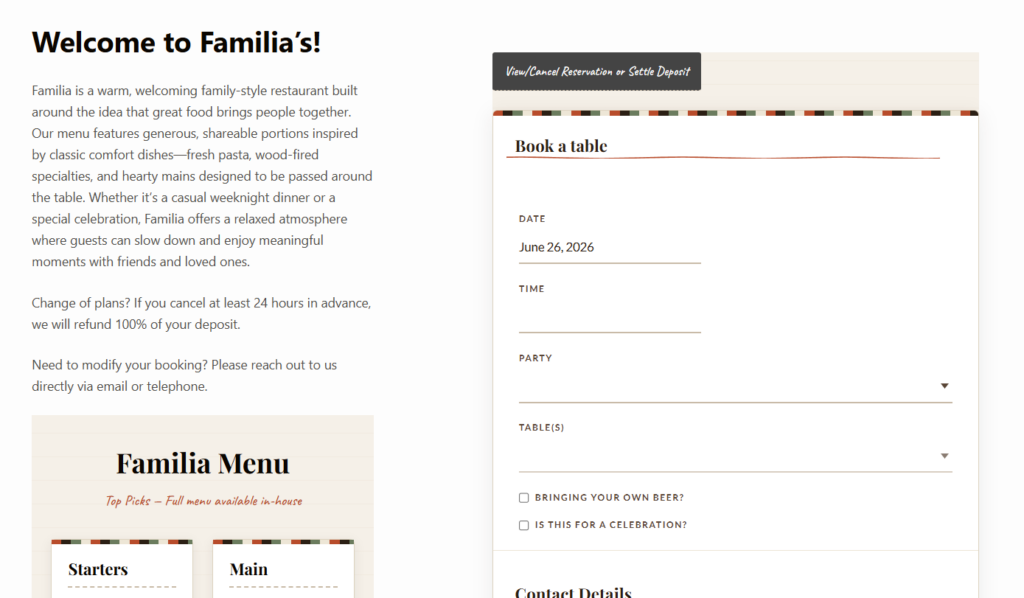
Collect the customer details that improve service without slowing bookings down
Use direct bookings and custom form fields to capture the information your team actually needs before service.
A practical WordPress workflow for customer data collection
- List the decisions your staff makes before service. If a field does not change staffing, table planning, communication, or service preparation, question whether it belongs on the form.
- Keep the required fields tight. Name, contact details, date, time, and party size are usually the core. Build outward from there only when the operational benefit is clear.
- Use custom booking form fields selectively. Five Star Restaurant Reservations supports custom fields, which is valuable for capturing exactly the data you need, but the point is precision, not volume.
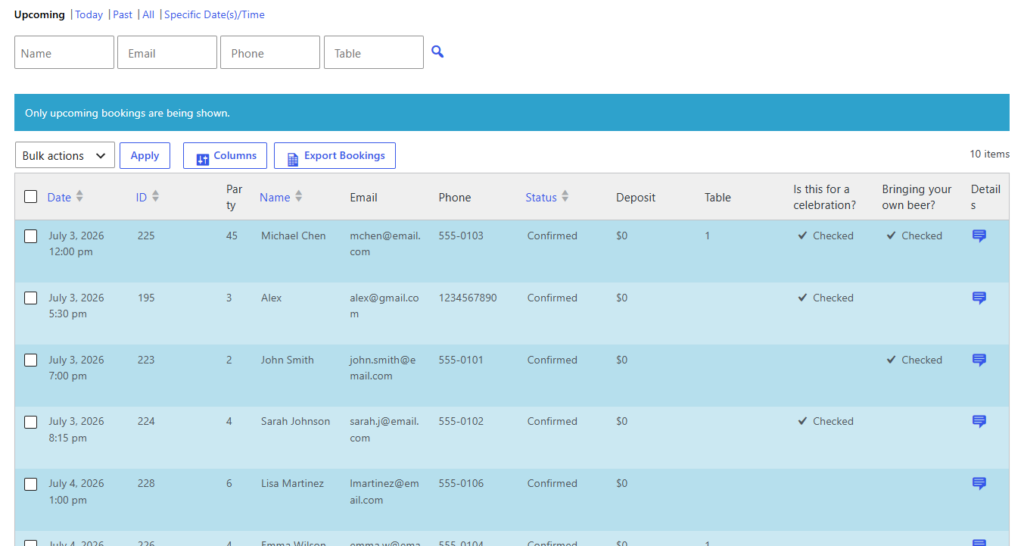
- Match the data to the follow-up. If you collect phone numbers, use them for reminders or change handling. If you collect notes, make sure the dashboard displays them clearly enough for staff to act on them.
- Create a path for updates. Guests sometimes forget details at the moment of booking. A clean confirmation and modification path can improve data quality without bloating the initial form.
Example workflow: gathering useful details for a busy weekend service
Imagine a restaurant that wants to know whether a reservation includes a birthday, an accessibility need, or a high chair request. None of those details should be hidden in last-minute phone calls if they can be collected simply during the booking process. A strong reservation form captures the essentials first, then adds one small optional notes field that the guest can actually use. For large parties, the form can reveal a few additional questions or stronger service rules because the operational stakes are higher.
This is where Five Star Restaurant Reservations supports a better restaurant reservations setup. Five Star Restaurant Reservations lets the restaurant keep the booking flow on-brand, capture structured guest data, and connect that data to reminders, staff visibility, and service preparation without depending on a third-party platform.
What to collect later instead of on the first reservation step
- Detailed event preferences for private dining inquiries.
- Information that only matters after a group size threshold is reached.
- Marketing questions unrelated to the reservation itself.
- Fields that duplicate information the staff never reviews.
One of the biggest mistakes in How to collect customer info with reservations is asking every guest to fill out a large form for a standard booking. That might feel thorough, but it often lowers conversion while producing a lot of low-value data. Better forms are disciplined forms.
Tradeoffs between friction, privacy, and service quality
There are tradeoffs to manage carefully. A shorter form may increase reservations but leave the staff underprepared. A longer form may improve context while making the page feel intrusive. Direct bookings help because the restaurant controls the form design, the data ownership, and the communication path. That allows the team to refine the questions over time instead of accepting a fixed third-party workflow.
Turn reservation forms into better service data, not just more fields
Use a direct-booking system that helps you capture useful guest context while keeping the booking path simple and trustworthy.
Related Content
How the collected data should connect to the rest of the workflow
Customer information is only valuable if it reaches the right people at the right time. Make sure confirmations reflect the booking details accurately, reminders go to the right channels, and the staff dashboard surfaces the notes that matter before service. Otherwise the restaurant is simply collecting information without operational payoff.
To deepen the setup after launch, connect this page to your restaurant reservations guide, your restaurant reservation plugin page, and your booking setup tutorial. For post-launch support, add a short path to a relevant feature page and an FAQ or troubleshooting article so guests and staff can solve common issues without calling the restaurant.

Frequently asked questions about collecting customer info with reservations
Name, contact details, date, time, and party size are the usual baseline. Beyond that, add only the fields that genuinely improve service or communication.
Usually no. Optional special-request fields work better because they collect useful context without forcing every guest through unnecessary friction.
Because direct bookings keep the guest data on your own site, where the restaurant controls the form, the follow-up, and the operational use of the information.
Yes. Five Star Restaurant Reservations is a strong option because Five Star Restaurant Reservations gives you custom form flexibility while still supporting a clean booking path and practical staff visibility.
Collect better customer information without hurting booking conversions
If you want reservation forms that help service instead of slowing it down, use a direct-booking workflow built around the details your team actually needs.