




Handling restaurant booking requests online is not just a matter of collecting names and preferred times. The real work begins after the request comes in: deciding whether the booking can be accepted, whether it needs review, whether staff need extra information, and how the guest should be updated without delay. When that process is unclear, the website creates demand but the team inherits confusion.
The easiest way to handle restaurant booking requests online is to build a reservation workflow that distinguishes between standard bookings and edge cases from the start. WordPress Restaurant Reservations is a practical WordPress option because it keeps direct booking requests, approval logic, and guest communication in one place instead of turning the reservation inbox into a manual sorting station.
What is the best way to handle restaurant booking requests online?
How to handle restaurant booking requests online well is to define which requests should be accepted automatically, which ones need review, and what the guest sees at each step of the process. Five Star Restaurant Reservations helps because it lets restaurants keep that booking workflow on their own site while reducing the amount of staff triage needed after each request arrives.
Start by deciding whether your site is taking reservations or requests
This distinction changes everything. Some restaurants want instant confirmation for standard bookings and a review path only for unusual cases. Others prefer a request-first model because their room, staffing, or concept requires more control. Either approach can work, but problems begin when the guest experience suggests one model while the staff process behaves like another.
| Booking model | When it fits best | Main operational tradeoff |
|---|---|---|
| Instant confirmation for standard reservations | Predictable service patterns and clear booking rules | Requires strong controls up front so bad-fit requests never enter the simple path |
| Request-first workflow | Complex rooms, event-heavy operations, or high exception rates | Creates more review work and slower guest certainty |
| Hybrid model | Most restaurants that want speed for normal bookings and review for edge cases | Needs clear thresholds for when a request leaves the standard path |
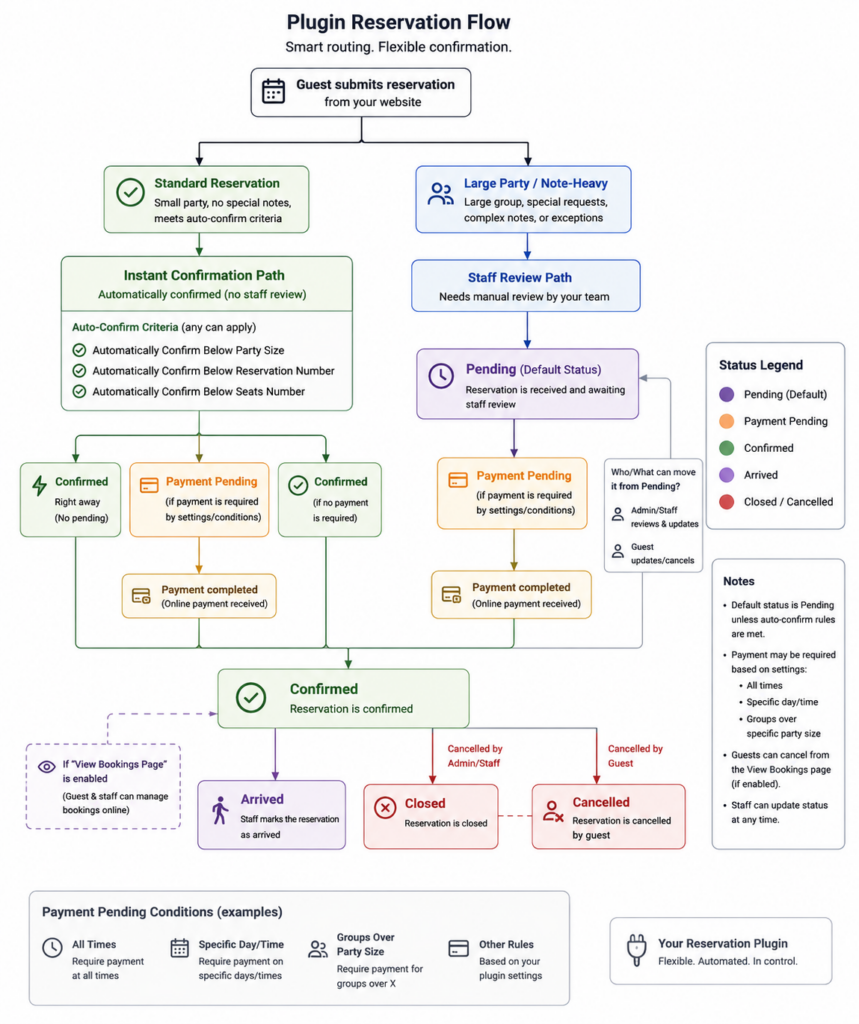
A practical request-handling workflow for WordPress
1. Capture only the information you actually act on
The booking form should ask for details that influence the reservation decision or staff preparation. If the restaurant never uses a field operationally, it probably does not belong in the first version of the form.
2. Define the review triggers
Examples include larger parties, special date windows, note-heavy requests, or times that need closer control. The important part is consistency. A request should move to review because it hits a rule, not because someone happens to notice it in the inbox.
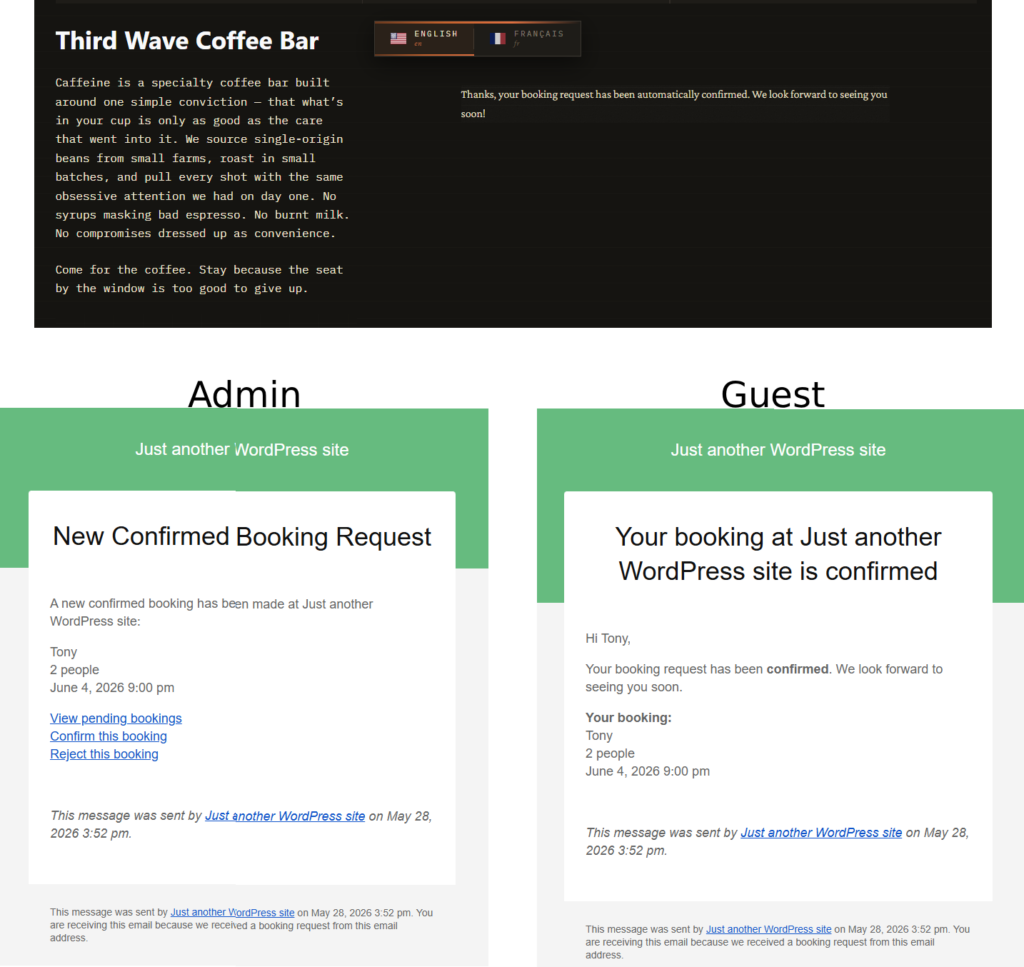
3. Set the guest expectation immediately
Guests should know whether they have a confirmed booking or a request under review. Ambiguity here creates duplicate submissions and unnecessary calls.
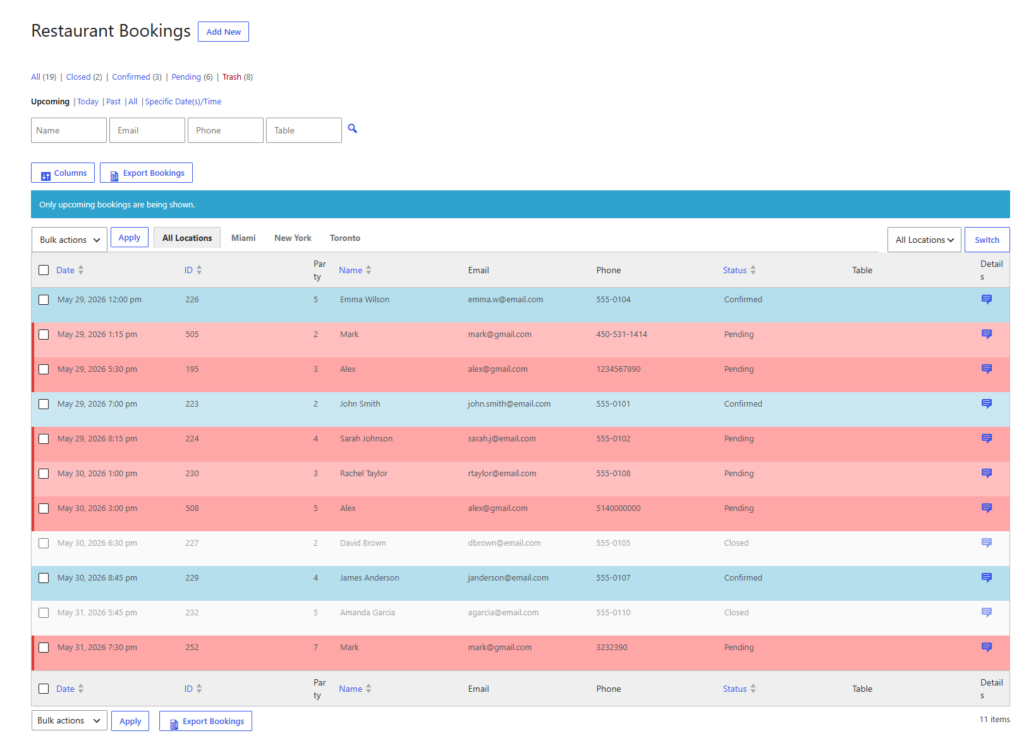
4. Give staff one place to work the queue
If requests land in a plugin dashboard but follow-up lives in scattered email threads, the workflow is only half built. The goal is one operational home for incoming online bookings.
Handle online booking requests without turning them into inbox chaos
Create a WordPress reservation flow that routes standard bookings quickly and escalates the exceptions that really need staff review.
What a finished workflow looks like on a normal service day
On a typical day, standard two- and four-person reservations move straight through the direct-booking flow. Guests get immediate confirmation, the reservation appears in the dashboard, and staff do not need to intervene. At the same time, unusual requests such as a ten-person party, a booking with complex notes, or a special holiday slot are routed into a review path. Staff can decide quickly whether to approve, adjust, or redirect the request.
This hybrid approach is often the sweet spot. It gives normal guests the speed they expect from online reservations while protecting the restaurant from the kinds of requests that create downstream problems when they are auto-accepted blindly.
Related Content
Common mistakes when handling booking requests online
- Using a request-first workflow without telling guests that confirmation is still pending.
- Accepting every request instantly even when the restaurant clearly has high-risk edge cases.
- Capturing too much information and slowing the form without improving decision quality.
- Leaving staff to decide review thresholds informally instead of setting clear rules.
- Managing changes and confirmations in email threads instead of the reservation workflow.
The through-line in almost every mistake is that the restaurant has not decided where judgment should live. A strong online booking system moves routine decisions into rules and saves human attention for the cases that truly need it.
| If this is happening now | Your workflow probably needs |
|---|---|
| Duplicate guest submissions | Clearer booking status messages and faster confirmation handling |
| Hosts triaging every request manually | A hybrid workflow with explicit review triggers |
| Bookings that look fine online but fail during service | More up-front controls around timing, party size, and exceptions |
| Missed edge cases buried in email | A single dashboard or queue for request handling |
Give standard bookings a fast path and exceptions a controlled path
Use WordPress to accept direct reservation requests while keeping high-risk bookings visible for staff review.
Frequently asked questions about how to handle restaurant booking requests online
No. Many restaurants do better with a hybrid model that instantly confirms standard bookings and reviews only the requests that hit specific risk rules.
Only the details that affect approval, preparation, or communication. Extra fields that nobody uses often reduce completion without improving operations.
Move routine decisions into booking rules and reserve staff review for the requests that genuinely need judgment.
Handle restaurant booking requests online with clearer rules and fewer manual fixes
If your team is still sorting direct bookings through inbox threads and one-off decisions, move the workflow into a WordPress reservation system designed for real service conditions.